Meta Muse Glimmer 30B: 7 Things You Need to Know About This Local AI Model in 2026
Updated September 2026
What if an AI agent could run directly on your own computer, work with local files and images, call tools, write code, and complete multi-step tasks without sending every request to a cloud AI service?
That is the idea behind Meta Muse Glimmer 30B.
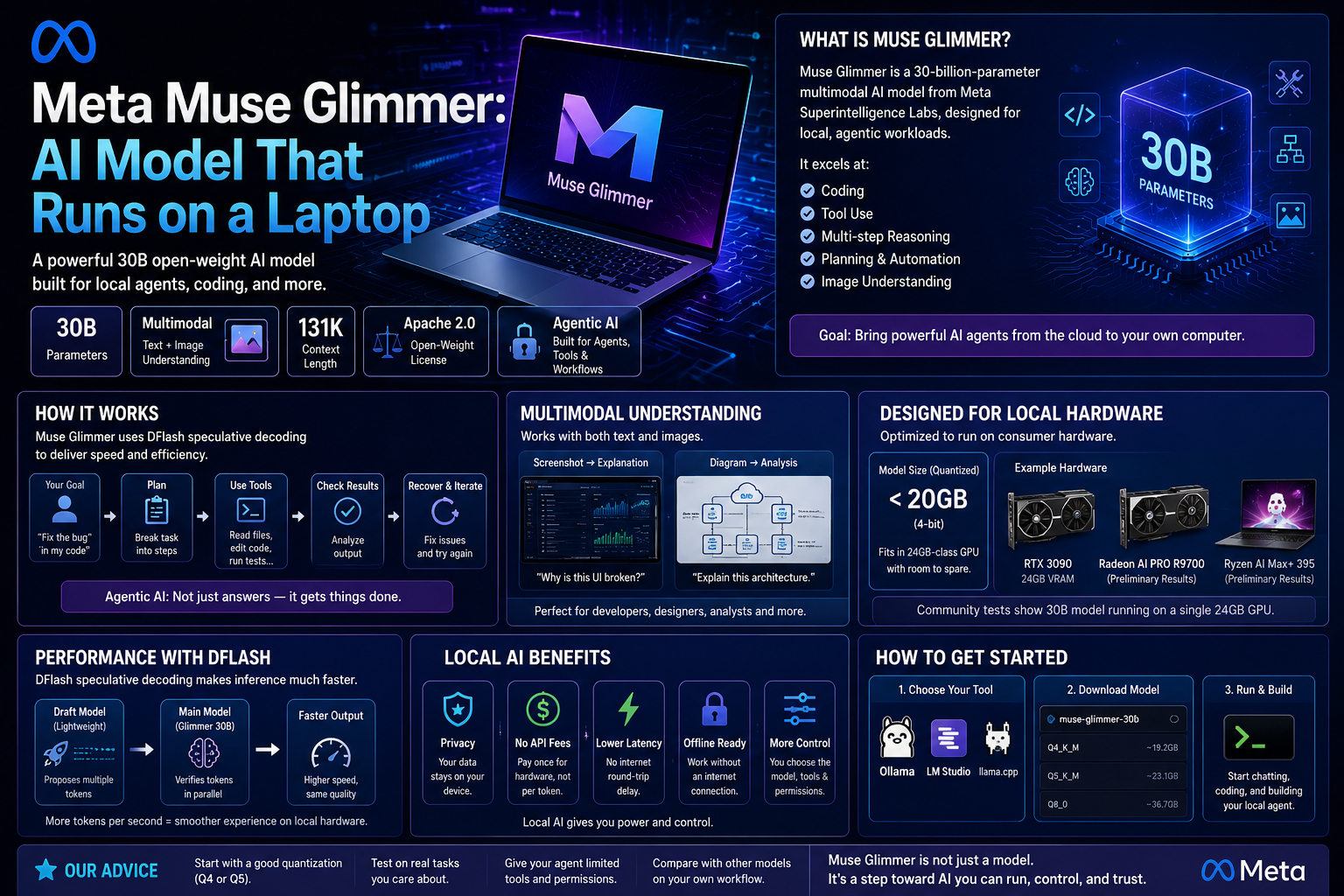
Meta introduced Muse Glimmer on August 10, 2026, as a roughly 30-billion-parameter model designed specifically for local agentic workflows. Meta released the model weights under the Apache 2.0 license and positioned it for use on consumer hardware, including systems with a single capable GPU.
But there is an important distinction behind the headline.
Muse Glimmer is not a lightweight model designed for every ordinary laptop.
It is a relatively large local model with multimodal input, tool-use capabilities, long context, coding support, and agentic functionality. Meta’s official model documentation describes approximately 29.6 billion parameters, including a dedicated vision encoder, and a context length of 131,072+ tokens.
The more interesting question is therefore not:
Can a laptop run AI?
It already can.
The better question is:
How much useful agentic AI can we now run locally on consumer hardware?
That is what makes Muse Glimmer one of the more interesting local AI releases of 2026.
At a Glance
| Feature | Muse Glimmer 30B |
|---|---|
| Developer | Meta Superintelligence Labs |
| Release | August 10, 2026 |
| Parameters | ~29.6B including vision encoder |
| Architecture | Dense causal transformer + perception encoder |
| Input | Text + images |
| Output | Text |
| Context | 131,072+ tokens |
| License | Apache 2.0 |
| Primary focus | Local agentic AI |
| Quantized options | ~17GB and ~20GB model builds |
| Target hardware | 24GB and 32GB consumer-memory configurations |
| Speculative decoding | DFlash |
| Main local runtime | llama.cpp, with other supported deployment options |
The exact memory requirement depends on the model build, context size, vision support, runtime, and whether DFlash is enabled.
What Is Meta Muse Glimmer 30B?
Muse Glimmer 30B is a multimodal causal language model developed by Meta Superintelligence Labs for local agentic workloads.
The official model card describes a dense transformer with approximately 29.6 billion parameters, including a roughly 1.8-billion-parameter ViT-G/14 perception encoder. It supports text and image input and produces text output.
The model was distilled from Meta’s larger Muse Spark model and designed around capabilities such as:
- Multi-step reasoning
- Tool use
- Coding
- Multimodal understanding
- Failure recovery
- Agentic task completion
- Long-context processing
Meta’s goal is not simply to create another local chatbot.
The model is designed to participate in workflows where the AI can receive a goal, use tools, inspect information, and continue working through multiple steps.
Chatbot vs. agent
A conventional chatbot often works like this:
You ask → AI answers
An agentic system is intended to work more like:
You give it a goal → AI reasons → uses tools → observes results → continues
For example, a coding agent could potentially:
- Inspect a project.
- Identify relevant files.
- Analyze an error.
- Modify code.
- Run tests.
- Inspect the results.
- Make additional changes.
- Return the completed result.
That workflow is much closer to an AI worker than a traditional chatbot.
Why Is Muse Glimmer Important?
The significance of Muse Glimmer is not simply its parameter count.
It is the combination of:
30B-class model + multimodal input + agentic capabilities + local deployment + open weights
Meta specifically designed the model for local operation and says it can run on consumer hardware without requiring cloud infrastructure or network access.
That creates several practical advantages.
1. More Deployment Control
With local inference, you control more of the environment in which the model operates.
You can decide:
- Where the model runs
- Which files it can access
- Which tools it can call
- Which network permissions it receives
- How the application is configured
You are also less dependent on a provider’s API availability and pricing.
2. More Privacy Options
If an application is genuinely configured for local processing, sensitive information can potentially remain on your own infrastructure.
This can be useful for:
- Private documents
- Source code
- Internal company files
- Research notes
- Local databases
- Sensitive development workflows
However, local AI is not automatically private or secure.
An agent can still leak information if it has access to the wrong files, tools, applications, or network connections.
3. No Per-Token Cloud API Bill
When inference happens locally, there is no cloud API charge for every generated token.
Instead, your costs move toward:
- Hardware
- Electricity
- Storage
- Maintenance
- Setup
- Engineering time
That can become attractive for sufficiently heavy workloads.
4. Offline Operation
A local model can continue working without an active internet connection once the model and required software are installed.
This can be useful for:
- Offline environments
- Private networks
- Travel
- Local development
- Restricted infrastructure
5. Open-Weight Development
Meta released Muse Glimmer under the Apache 2.0 license, giving developers a relatively permissive basis for experimentation and application development, subject to the applicable terms.
The 7 Most Important Things to Know About Muse Glimmer
1. It Is a 30B-Class Local Agent Model
Muse Glimmer has approximately 29.6 billion parameters, including its vision encoder.
That makes it considerably larger than the small local models commonly used on entry-level hardware.
But the interesting part is not simply the number of parameters.
Meta specifically optimized Muse Glimmer for local agentic workloads and uses quantization to reduce the model’s memory footprint.
The official documentation provides a roughly 17GB K-Quant model targeting a 24GB memory envelope and a dynamic version targeting 32GB hardware.
The practical lesson is:
Muse Glimmer is large enough to target complex local workloads while still being designed around consumer hardware.
That does not mean every computer can run it comfortably.
2. It Is Built for Agents, Not Just Chat
This is arguably the most important distinction.
Meta describes Muse Glimmer as a model purpose-built for autonomous agentic tasks.
Its capabilities include:
- Multi-step reasoning
- Tool use
- Coding
- Failure recovery
- Multimodal understanding
- End-to-end task completion
Meta evaluates the model on agent-oriented workloads including software engineering and tool-use scenarios.
This makes it particularly interesting for:
- Coding agents
- Local research assistants
- Tool-using assistants
- Automation systems
- Local AI applications
- AI evaluation workflows
The key difference is that the model is designed to work toward a task rather than simply answer one isolated question.
3. It Can Understand Images
Muse Glimmer is a multimodal model.
It accepts:
- Text
- Images
And produces:
- Text
The model includes a dedicated approximately 1.8B-parameter ViT-G/14 perception encoder for visual input.
That enables workflows such as:
Screenshot analysis
“Why is this interface displaying incorrectly?”
Visual coding assistance
“Help me reproduce this interface.”
Diagram analysis
“Explain this system architecture.”
Document-image analysis
“Summarize the information shown in this image.”
This makes Muse Glimmer more versatile than a text-only local model.
What about video?
Do not describe Muse Glimmer as a dedicated video-understanding model.
The official model specification lists text and image input, not video as a native input modality.
If video is processed in an application, that can involve extracting frames and sending images to the model rather than using a dedicated video architecture.
4. It Supports 131K+ Tokens of Context
Muse Glimmer supports a context length of 131,072+ tokens.
That can be useful for:
- Large codebases
- Long documents
- Research material
- Multiple files
- Extended agent workflows
- Large technical specifications
However, context length should not be confused with reasoning quality.
A model having a 131K-token context window does not guarantee that it will perfectly understand every piece of information inside a huge context.
The practical value also depends on your hardware.
Larger contexts require additional memory for the KV cache and can increase latency.
So treat 131K+ as a capability, not a promise that every 131K-token workflow will perform equally well.
5. Official 4-Bit Builds Make Consumer Deployment More Practical
This is one of the most interesting aspects of Muse Glimmer.
Meta’s model documentation explains that quantization reduces the language model to under 20GB, leaving room for the KV cache, perception encoder, and speculative decoding components within 24GB or 32GB hardware configurations.
The official GGUF repository currently lists:
- K-Quant 17GB: approximately 16.8GB, targeting 24GB VRAM
- K-Quant Dynamic: approximately 19.7GB, targeting 32GB VRAM
- Vision encoder: approximately 1.4GB
- DFlash drafter: approximately 1.6GB
The vision encoder is required for image input, while DFlash is optional and is used for speculative decoding.
This distinction is important.
The model file size is not the same as total system memory usage.
You also need room for:
- Context
- KV cache
- Vision processing
- Runtime overhead
- DFlash if enabled
- Your operating system
- Other applications
6. DFlash Can Significantly Accelerate Generation
Muse Glimmer includes support for DFlash speculative decoding.
The idea is relatively simple.
Instead of requiring the main model to generate every token one at a time, a smaller drafting model proposes a block of tokens.
The main model then verifies those proposals.
Conceptually:
DFlash drafter → proposes a block
↓
Main model → verifies the proposal
↓
Correct tokens → accepted
↓
Incorrect predictions → corrected
The official model documentation says the DFlash drafter predicts blocks of 16 tokens in a forward pass, after which the main model verifies them.
This is an inference optimization.
It does not make the underlying model more intelligent.
Meta’s published speed results
Meta reports benchmarked generation speeds for its K-Quant-17GB configuration with DFlash on specific hardware.
Its model documentation reports:
| Hardware | Baseline | With DFlash | Reported speedup |
|---|---|---|---|
| NVIDIA RTX 5090 | 74.9 tok/s | 233.4 tok/s | 3.1× |
| Apple M4 Max | 23.7 tok/s | 37.8 tok/s | 1.5× |
| Apple M5 Max | 26.6 tok/s | 50.2 tok/s | 1.8× |
These are Meta’s own measurements under specific test conditions, including batch size 1 and greedy decoding. They should not be interpreted as universal performance guarantees.
Your results can vary significantly depending on hardware, software, context length, prompts, and configuration.
7. It Is Released Under Apache 2.0
Meta released Muse Glimmer and its associated model artifacts under the Apache 2.0 license.
The official ecosystem includes:
- Full-precision weights
- Quantized model versions
- DFlash components
- Vision components
- On-device deployment artifacts
The exact artifact and runtime you use still matter, so developers should review the official repository and license information before commercial deployment.
Apache 2.0 is generally considered a permissive open-source license, but you should not assume that the license alone answers every legal or operational question surrounding an AI application.
Can Muse Glimmer Really Run on a Laptop?
Yes, but not every laptop.
Muse Glimmer is specifically designed to run on capable consumer hardware, but its approximately 30B parameter size means it is not comparable to a small 3B or 7B model.
Meta’s own quantized configurations target 24GB and 32GB memory envelopes.
That means a high-memory laptop or desktop can potentially run the model locally.
But there is an important distinction:
Being able to load a model is not the same as being able to use it comfortably.
A machine can technically load a model while producing slow generation or struggling with longer contexts.
The better question is:
Can my system run Muse Glimmer at a useful speed with the context and features I actually need?
What Hardware Do You Need?
There is no single hardware specification that guarantees a particular experience.
A useful starting point is the hardware target documented by Meta:
| Configuration | Practical target |
|---|---|
| 17GB K-Quant | 24GB memory envelope |
| Dynamic K-Quant | 32GB memory envelope |
| Full precision | Much higher-memory systems |
| Image input | Additional memory for the perception encoder |
| DFlash | Additional memory for the drafter |
Meta’s official model card reports approximately 0.2% average degradation for its dynamic K-Quant configuration and 1.0% for the 17GB configuration across 15 benchmarks, relative to the full-precision reference used in its evaluation.
These figures are useful for understanding Meta’s own evaluation, but they should not be treated as a guarantee for every workload.
Why 24GB matters
A 16.8GB model file does not mean that a computer with exactly 16.8GB of available memory will be enough.
You need additional memory for:
- KV cache
- Vision
- Runtime
- DFlash
- Operating-system processes
- Other applications
That is why Meta targets the 17GB build at a 24GB envelope.
What If You Have Only 12GB of VRAM?
This is where expectations should become realistic.
Some configurations may involve CPU or system-memory offloading, but the experience can become significantly slower and more complicated.
Potential issues include:
- Slow generation
- Memory pressure
- CPU offloading
- Reduced practical context
- Higher latency
- More complicated configuration
If your system has only 12GB of VRAM, a smaller local model may offer a much better balance between capability and speed.
Muse Glimmer becomes considerably more attractive when your hardware is closer to Meta’s 24GB or 32GB target range.
What Can Muse Glimmer Actually Do?
1. Coding and Software Development
Coding is one of Muse Glimmer’s most important use cases.
The model is designed for agentic software-engineering workflows involving capabilities such as:
- Code generation
- Debugging
- Repository analysis
- Refactoring
- Tool use
- Multi-step coding tasks
Meta reports evaluation results on software-engineering and agentic benchmarks such as SWE-Bench-related tasks.
But this does not mean Muse Glimmer is automatically the best coding model for every developer.
Performance depends on:
- Programming language
- Repository size
- Task complexity
- Agent framework
- Prompting
- Inference settings
- Competing models
Better way to evaluate coding performance
Instead of asking:
“Is Muse Glimmer the best coding model?”
ask:
“Does Muse Glimmer solve my coding tasks accurately enough and with fewer retries than my alternatives?”
That is a much more useful test.
2. Local Files and Documents
Local AI becomes especially interesting when the information already exists on your computer.
You could build workflows around:
- Document summarization
- Local search
- File classification
- Report generation
- Research notes
- Internal documentation
- Code repositories
- Knowledge bases
A local workflow could look like:
Local files → Local AI model → Local results
The main advantage is not that cloud models cannot perform these tasks.
They can.
The difference is where the processing takes place.
A properly designed local workflow can reduce the need to upload sensitive files to an external AI service.
3. Screenshots and Visual Analysis
Because Muse Glimmer accepts image input, it can support workflows involving:
- Screenshots
- Charts
- Diagrams
- Interfaces
- Documents
- Visual debugging
For example:
“Look at this screenshot and explain why the layout is broken.”
Or:
“Analyze this architecture diagram.”
Or:
“Compare these two interface screenshots.”
The vision encoder is a significant part of the model’s local multimodal design.
4. Long Documents and Large Projects
With 131K+ tokens of context, Muse Glimmer can potentially work with substantially larger inputs than many smaller local models.
This can be useful for:
- Large documents
- Research projects
- Technical specifications
- Multiple related files
- Large software repositories
However, the machine still needs enough memory to process both the model and the context.
And a larger context window does not guarantee perfect reasoning across a large amount of information.
5. Local AI Agents
This may ultimately be the most interesting use case.
Imagine a local assistant that can work with:
- Your files
- Your code
- Your screenshots
- Approved local tools
- Your development environment
You could ask:
“Analyze this project and identify the five biggest problems.”
Or:
“Review these documents and organize them by topic.”
Or:
“Inspect this codebase and suggest the most important fixes.”
At that point, the model becomes more than a chatbot.
It becomes a local AI worker.
But this also introduces a major security concern.
The more permissions you give an AI agent, the more serious its mistakes can become.
How Do You Run Muse Glimmer Locally?
The official ecosystem supports several deployment approaches.
llama.cpp
For local users who want detailed control over inference, llama.cpp is one of the most relevant options.
The official Muse Glimmer GGUF repository states that you need llama.cpp build b10353 or newer for Muse Glimmer support. Older builds do not recognize the architecture.
llama.cpp is useful for:
- GPU acceleration
- Quantized inference
- Local servers
- Performance tuning
- Speculative decoding
Transformers
Developers can also use the model through the Transformers ecosystem.
This is useful when integrating Muse Glimmer into Python-based applications or research workflows.
vLLM
vLLM can be relevant for developers who want to expose a model through an inference server or integrate it into a production application.
However, hardware requirements depend heavily on the exact quantization and deployment configuration.
ExecuTorch
Meta also provides ExecuTorch artifacts for on-device inference, including Apple Silicon configurations. The official collection includes dedicated Muse Glimmer ExecuTorch builds.
Important compatibility warning
Local AI software changes quickly.
Do not assume that every interface supports every Muse Glimmer capability.
Check whether your chosen runtime supports:
- Text input
- Image input
- DFlash
- Your specific GPU
- Your quantization
- Your context length
before choosing a deployment method.
Should You Use 4-Bit or Higher Precision?
Quantization reduces the numerical precision used to represent model weights.
In simplified terms:
Lower precision → smaller memory footprint → easier deployment
But lower precision can involve quality trade-offs.
For Muse Glimmer, Meta provides official quantized configurations specifically intended for consumer hardware.
For many local users, those official 4-bit builds are a logical starting point.
The goal should not be:
“Use the highest precision possible.”
Instead:
“Use the lowest precision that provides the quality I actually need.”
If your goal is coding, document analysis, or agentic automation, test the quantized model on those tasks.
Muse Glimmer vs. Other Local AI Models
It is tempting to ask:
“Is Muse Glimmer better than Qwen or Gemma?”
There is no universal answer.
Meta reports strong benchmark results compared with other models in the same general size category.
But benchmark results measure particular tasks under particular evaluation conditions.
They do not automatically tell you which model will perform best on:
- Your codebase
- Your documents
- Your language
- Your agent framework
- Your hardware
- Your preferred context length
A better comparison method
If you are choosing between Muse Glimmer and another local model, create a small evaluation set.
For example:
| Test | Suggested number |
|---|---|
| Coding | 10 |
| Document analysis | 5 |
| Reasoning | 5 |
| Tool use | 5 |
| Image understanding | 5 |
Then measure:
- Accuracy
- Speed
- Memory usage
- Tool reliability
- Number of retries
- Failure rate
This gives you much more useful evidence than a generic leaderboard.
The Biggest Advantages of Muse Glimmer
1. Designed for Local Agents
The model was specifically developed around local agentic workflows rather than simply being a general-purpose model that happens to run locally.
2. Apache 2.0 License
The model and released artifacts use a permissive Apache 2.0 license.
3. Multimodal Input
Muse Glimmer can process both text and images.
4. Long Context
Its 131K+ context window makes it suitable for large documents and extended workflows.
5. Consumer Hardware Focus
Meta explicitly optimized the model around capable consumer systems.
6. DFlash Acceleration
Speculative decoding can significantly increase generation speed on supported configurations.
7. Tool-Oriented Design
Tool use and multi-step task completion are central to the model’s design.
What Are Muse Glimmer’s Biggest Weaknesses?
1. It Is Still a Large Model
A roughly 30B model is not comparable to lightweight 3B or 7B local models.
2. Hardware Matters
A 24GB system and a 12GB system can provide dramatically different experiences.
3. Local Deployment Requires Technical Work
With cloud AI, the provider manages much of the infrastructure.
With local AI, you may be responsible for:
- Installation
- Updates
- Runtime configuration
- Hardware
- Monitoring
- Security
4. It Is Not Automatically the Best Model
Another model may outperform Muse Glimmer on your specific workload.
5. Large Context Does Not Guarantee Better Reasoning
A 131K context window is a capability, not a guarantee that every long-context task will be solved correctly.
6. Agentic AI Creates Additional Risks
Once an AI can manipulate files or call tools, model errors can have real consequences.
What Can Go Wrong With a Local AI Agent?
This is one of the most important considerations.
Imagine giving an agent access to:
- Your computer
- Your terminal
- Your browser
- Your personal files
- Your databases
- External applications
The AI is no longer simply generating text.
It is taking actions.
If it misunderstands an instruction, selects the wrong file, executes an unsafe command, or enters an unexpected loop, the consequences can be more serious than an incorrect chatbot response.
A safer progression is:
Read-only access
↓
Limited tools
↓
Restricted directories
↓
Human approval for important actions
↓
Greater autonomy only when justified
This approach reduces the potential damage from model mistakes.
Local deployment can improve control over data and infrastructure.
It does not eliminate:
- Prompt injection
- Malicious files
- Tool misuse
- Permission problems
- Unsafe commands
- Hallucinations
- Application vulnerabilities
The correct mindset is:
Local AI can improve control and privacy, but security still depends on the entire system around the model.
Who Should Use Muse Glimmer?
Developers
Yes.
Especially if you want to experiment with:
- Local coding agents
- Tool calling
- Multimodal workflows
- Private development environments
- Agent infrastructure
Local-AI Enthusiasts
Yes, if you have suitable hardware.
Muse Glimmer is particularly interesting for users who want to explore what a relatively large agentic model can do locally.
Privacy-Conscious Users
Potentially.
Local processing can be useful when keeping information on your own hardware is an important requirement.
But privacy depends on the complete application stack.
Small Businesses
Possibly.
Local inference can make sense when a business has:
- Suitable hardware
- Predictable workloads
- High-volume AI requirements
- Technical expertise
- Strong privacy requirements
Average Laptop Users
Probably not the best starting point.
If you simply want an easy AI assistant, a cloud service or smaller local model will usually be easier to use.
Local vs. Cloud vs. Hybrid AI
The future is unlikely to be a simple battle between local and cloud AI.
A more practical approach may be hybrid AI.
Local AI
Best suited for:
- Private documents
- Offline workflows
- Personal assistants
- Local automation
- Repetitive tasks
- Sensitive development work
Cloud AI
Best suited for:
- Frontier-scale models
- Extremely demanding reasoning
- Managed infrastructure
- Large-scale workloads
- Users who do not want to maintain hardware
Hybrid AI
A hybrid system could work like this:
Local model handles ordinary tasks
↓
Cloud model handles difficult tasks
↓
Application chooses the appropriate model
This can potentially balance:
Privacy + cost + convenience + capability
Models such as Muse Glimmer make the local side of this architecture increasingly practical.
What Should You Do Before Installing Muse Glimmer?
Do not start by downloading the largest file available.
Use a structured process instead.
Step 1: Check Your Hardware
Identify:
- GPU VRAM
- System RAM
- Unified memory
- CPU
- Storage
Step 2: Choose the Appropriate Quantization
For consumer hardware, start with an official quantized configuration appropriate for your available memory.
Meta’s 17GB K-Quant is designed around a 24GB envelope, while the dynamic version targets 32GB.
Step 3: Choose Your Runtime
Depending on your needs, consider:
- llama.cpp
- Transformers
- vLLM
- ExecuTorch
Check current compatibility before installation.
Step 4: Test Real Tasks
Do not judge the model using random prompts.
Test:
- Your code
- Your documents
- Your screenshots
- Your research workflows
- Your actual agent tasks
Step 5: Measure Performance
Track:
- Tokens per second
- Memory usage
- Accuracy
- Tool reliability
- Failure rate
- Number of retries
Step 6: Compare With Your Current Model
If you already use Qwen, Gemma, Mistral, or another local model, run the same tasks through both.
The goal is not to own the newest model.
The goal is to find the model that performs your work best.
Our Take on Meta Muse Glimmer
Muse Glimmer is interesting for a reason that goes beyond its parameter count.
The important development is not simply:
“Meta released an AI model that runs on a laptop.”
The bigger development is:
“Meta released a roughly 30B multimodal model specifically designed around local agentic workflows and optimized for capable consumer hardware.”
That changes the conversation around AI infrastructure.
Instead of asking only:
“Which AI subscription should I buy?”
developers can increasingly ask:
“Which AI model should I run on my own machine?”
That is a meaningful shift.
Muse Glimmer does not mean cloud AI is disappearing.
It means the boundary between personal computing and AI infrastructure is becoming increasingly blurred.
Final Verdict
Muse Glimmer 30B is one of the more interesting local AI releases of 2026, particularly for users interested in agentic workflows rather than simple chat.
Its strongest combination is:
Local deployment + multimodal input + tool use + long context + open weights
But those capabilities come with a hardware and setup cost.
Muse Glimmer is worth considering if:
- You have roughly 24GB+ of suitable memory
- You want to experiment with local agents
- You need image understanding
- You work with large documents or codebases
- You value local processing
- You are comfortable configuring AI software
It may not be the right choice if:
- You have limited GPU/system memory
- You want a simple plug-and-play chatbot
- You do not need agentic capabilities
- A smaller model already solves your tasks
The most important lesson is:
Don’t choose the model with the biggest hype. Choose the model that performs your real work best on your actual hardware.
Frequently Asked Questions
Can Muse Glimmer run on any laptop?
No.
Muse Glimmer is a roughly 30B model designed for capable consumer hardware. Meta’s official quantized configurations target 24GB and 32GB memory envelopes. Actual performance depends on hardware, runtime, context size, and configuration.
Is Muse Glimmer free?
The model weights and released artifacts are available under the Apache 2.0 license.
However, running the model locally still requires suitable hardware, electricity, storage, and setup.
Is Muse Glimmer open-source?
The most useful description is open-weight.
Meta has released the model and supporting artifacts under Apache 2.0.
What is Muse Glimmer best for?
Its primary focus is local agentic AI, including:
- Coding agents
- Tool use
- Multi-step workflows
- Local automation
- Document analysis
- Multimodal reasoning
- Agent evaluation
Does Muse Glimmer understand images?
Yes.
The model accepts image input and includes a dedicated perception encoder for visual understanding.
How much memory does Muse Glimmer need?
There is no single number that applies to every configuration.
Meta’s official documentation provides a 17GB K-Quant configuration targeting a 24GB envelope and a dynamic configuration targeting 32GB. Image input and DFlash add additional memory requirements.
Is Muse Glimmer better than Qwen or Gemma?
Not universally.
Meta reports strong results on several benchmarks, but those results do not guarantee that Muse Glimmer will outperform another model on your particular workload.
Testing your own tasks is the better approach.
Can Muse Glimmer replace ChatGPT?
For some local, private, and offline workflows, it can potentially replace a cloud AI model.
However, hosted AI services still have major advantages in convenience, managed infrastructure, scaling, and access to other frontier models.
Should beginners install Muse Glimmer?
Only if they have suitable hardware and are genuinely interested in local AI.
For a simple AI assistant, a hosted service or smaller local model may be easier.
Does Muse Glimmer support video?
Its official model specification lists text and image input rather than native video input. If a video workflow uses Muse Glimmer, it may involve processing individual frames rather than using a dedicated video model.
What license does Muse Glimmer use?
Meta released Muse Glimmer under the Apache 2.0 license. Developers should still review the official model documentation and applicable terms before commercial deployment.
What version of llama.cpp do I need?
The official Muse Glimmer GGUF documentation states that llama.cpp build b10353 or newer is required for Muse Glimmer support.
Related Articles
- Best AI Agents in 2026
- Gemini 3.7 Flash: Features, Pricing, Benchmarks & How to Use It
- AI Cybersecurity in 2026: How AI Agents Are Changing Cybersecurity
- Best Open-Source AI Models in 2026: Top 5 Open-Weight Models
- What Are AI Agents? 7 Powerful Things You Need to Know in 2026
Editor’s Note
Last updated: August 2026
Muse Glimmer is a rapidly evolving local AI model. Hardware compatibility, inference-framework support, quantization options, benchmarks, and third-party integrations can change quickly. Always verify the latest model documentation and test performance on your own hardware before making deployment decisions.