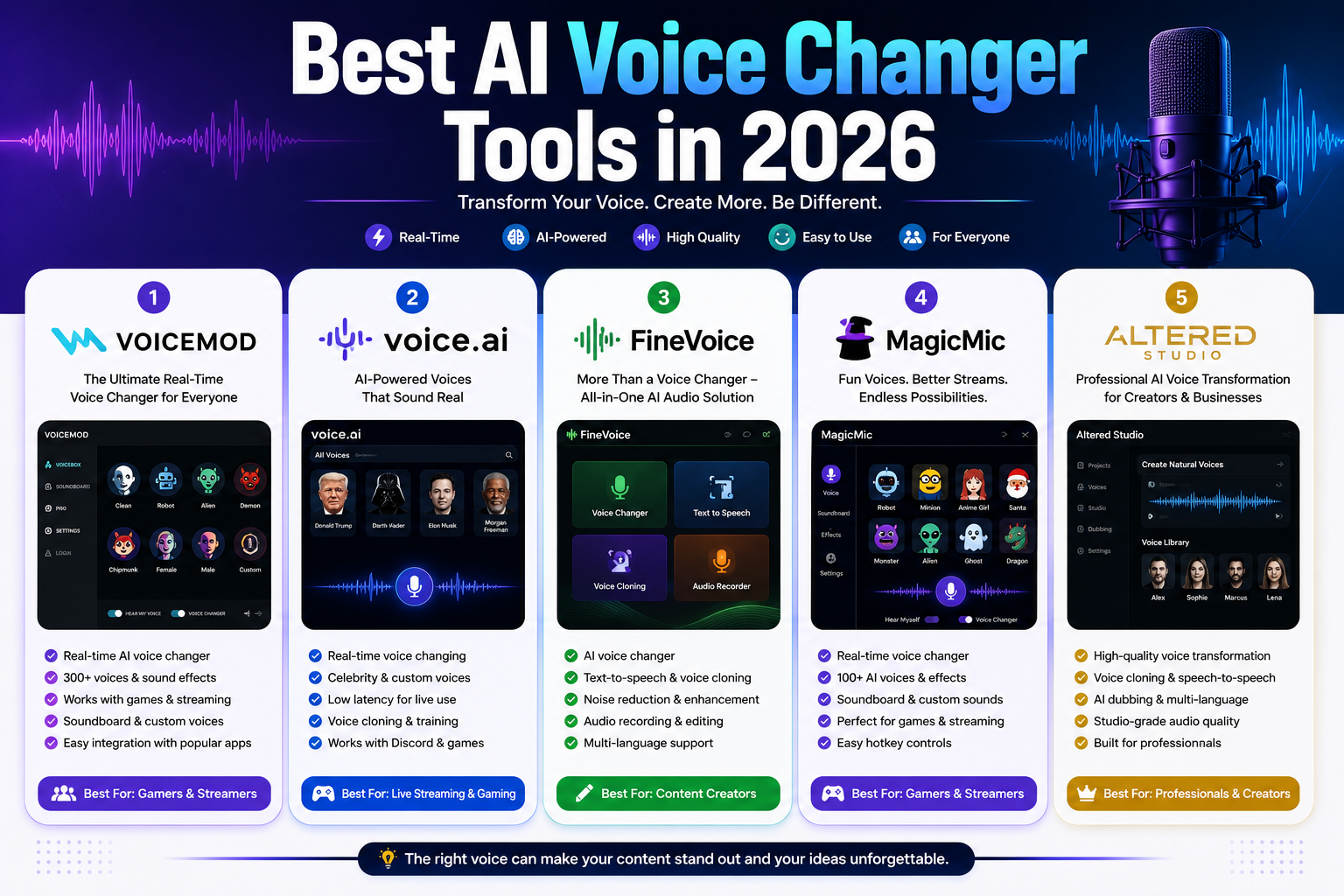
Best AI Voice Changer Tools in 2026: 5 Tools Worth Trying
— Updated September 2026
Changing your voice used to mean applying simple pitch effects or spending time inside complicated audio-editing software. Modern AI voice technology has changed that workflow.
Today’s AI voice changers can transform speech while preserving much more of the original delivery than traditional pitch-shifting effects. Depending on the software, you can change vocal characteristics, create character voices, clean recordings, generate speech, or transform a recording into another voice.
But there is an important difference between an AI voice changer, an AI voice generator, and a voice cloning platform.
A gamer looking for a real-time voice effect does not necessarily need the same tool as a YouTuber creating narrated videos. A podcast producer may care more about audio cleanup and editing, while a professional production team may need commercial licensing and high-quality speech-to-speech transformation.
That’s why this guide focuses on the actual workflow each tool is best suited for, rather than simply counting the number of voices or effects available.
Our Top Picks
| Tool | Best for | Main strength | Free option |
|---|---|---|---|
| Voicemod | Gaming and live streaming | Real-time voice effects | Yes |
| Voice.ai | AI voice transformation | Voice conversion and audio tools | Yes |
| FineVoice | Creators and voice projects | Voice changing + TTS + cloning | Yes |
| MagicMic | Live entertainment | Large collection of effects | Yes |
| Altered Studio | Professional production | Advanced voice morphing | Yes |
Quick recommendations
- Best overall for gaming and streaming: Voicemod
- Best for a broad AI audio toolkit: Voice.ai
- Best all-in-one creator option: FineVoice
- Best for live voice effects: MagicMic
- Best for professional voice production: Altered Studio
There isn’t one tool that is objectively best for everyone. The right choice depends on whether you need real-time transformation, post-production, voice generation, voice cloning, or professional production features.
What Is an AI Voice Changer?
An AI voice changer uses machine-learning technology to transform spoken audio into a different vocal output.
Traditional voice changers often rely on effects such as pitch shifting, distortion, echo, or modulation. AI-based systems can analyze speech characteristics and use trained models to produce a more sophisticated transformation.
Depending on the software, this can include:
- Real-time voice conversion
- Speech-to-speech transformation
- Voice effects
- Voice cloning
- Text-to-speech
- Voice enhancement
- Noise removal
- Audio editing
- Character voices
- Accent or speaking-style transformation
However, these capabilities are not interchangeable.
For example, voice cloning attempts to reproduce characteristics of a particular voice, while a traditional AI voice changer may simply transform your recording into another voice style.
AI Voice Changer vs. Voice Generator vs. Voice Cloning
These terms are often used interchangeably, but they describe different workflows.
AI Voice Changer
You provide spoken audio and the software transforms the voice.
Best for: gaming, streaming, live calls, character voices, and creative recordings.
AI Voice Generator
You provide text and the system generates spoken audio.
Best for: narration, videos, educational content, and voiceovers.
AI Voice Cloning
The system creates a model that can reproduce characteristics of a particular speaker.
Best for: authorized personal voices, characters, narration workflows, and production projects where you have the necessary rights and permissions.
This distinction matters because buying an AI voice changer does not automatically mean you have access to every AI audio feature.
Why Use an AI Voice Changer?
Create Character Voices
Creators can use different voices for characters in videos, games, animations, podcasts, and storytelling projects.
Make Live Content More Interactive
Real-time voice effects can add variety to streams, gaming sessions, and other live content.
Speed Up Audio Production
Instead of recording every variation manually, AI tools can transform or generate additional versions of a recording.
Improve Existing Audio
Some platforms combine voice changing with noise reduction, voice enhancement, transcription, and other audio tools.
Protect Voice Privacy
A transformed voice can provide an additional layer of privacy in situations where you don’t want your normal speaking voice broadcast.
However, voice-changing technology should not be used to impersonate another person, mislead people, or bypass identity or security systems.
The 5 Best AI Voice Changer Tools in 2026
1. Voicemod — Best for Gaming and Live Streaming
Voicemod is one of the better-known options for real-time voice transformation.
Its main advantage is not simply the number of available effects. It’s the combination of real-time processing, a large voice/effect library, soundboard functionality, and integrations aimed at gaming and streaming.
Voicemod’s official documentation distinguishes between its free and PRO experiences. Free users receive a rotating selection of voices, while PRO unlocks the full voice library and additional VoiceLab functionality.
Why choose Voicemod?
If your main goal is:
“I want to change my voice while I’m gaming or streaming.”
Voicemod is one of the easiest places to start.
Key features
- Real-time voice changing
- Voice effects
- Soundboard
- Custom voice creation through VoiceLab
- Streaming workflows
- Gaming integrations
- Voice presets
- Free version
Pros
- Designed around real-time use
- Beginner-friendly
- Large collection of voices and effects
- Strong fit for gaming and streaming
Cons
- Free users have a limited voice selection
- Full customization requires PRO
- It is more focused on real-time entertainment than professional post-production
Best for
Gamers, streamers, YouTubers, VTubers, and people who want live voice effects.
Our take
Choose Voicemod when real-time performance and simplicity matter more than advanced professional audio production.
2. Voice.ai — Best for a Broader AI Audio Workflow
Voice.ai has expanded beyond the simple idea of a real-time voice changer.
Its current platform includes an online voice changer, text-to-speech, voice agents, audio enhancement, vocal removal, echo removal, stem splitting, and other audio tools. Its pricing is now credit-based rather than the simple fixed pricing shown in the original article.
The free plan currently includes 5,000 credits per month, while the Starter plan is listed at $5/month and includes additional capabilities such as instant voice clones and commercial licensing. Higher plans are designed for creators and larger-scale users.
Why choose Voice.ai?
It makes more sense for creators who want multiple AI audio capabilities in one platform, rather than only a live voice changer.
Key features
- Online AI voice changer
- Text-to-speech
- Instant voice cloning on eligible plans
- Audio enhancement
- Vocal removal
- Echo removal
- Stem splitting
- Voice-agent tools
- Credit-based usage
Pros
- Broad collection of AI audio features
- Free plan available
- Real-time and non-real-time workflows
- Scales to larger creator and business use cases
Cons
- Credit systems can make usage harder to estimate
- Some advanced features require paid plans
- The platform is broader than a simple voice changer, which may be unnecessary for casual users
Best for
Creators, streamers, audio enthusiasts, and users who want several AI audio tools in one service.
Our take
Voice.ai is particularly interesting if you’re looking beyond simple voice effects and want a broader AI audio toolkit.
3. FineVoice — Best All-in-One Option for Creators
FineVoice combines several AI audio functions in one platform.
Its current plans include AI voice changing, text-to-speech, voice cloning, voice enhancement, speech-to-text, and AI sound effects. The free plan includes limited daily usage, while paid plans increase voice-changing and generation limits.
This makes FineVoice different from a tool focused almost entirely on real-time gaming.
Why choose FineVoice?
If you’re creating YouTube videos, narration, podcasts, or other content and need more than one AI voice feature, having multiple tools under one account can be convenient.
Key features
- AI voice changer
- Text-to-speech
- Voice cloning
- Voice enhancement
- Noise removal
- Speech-to-text
- AI sound effects
- Voice design
- Audio conversion
Pros
- Broad set of creator-focused features
- Free option available
- Voice changing and TTS in the same platform
- Useful for content production
Cons
- The number of available features can make the platform feel less focused
- Usage limits depend on the plan
- Advanced voice cloning requires careful attention to permissions and licensing
Best for
YouTubers, educators, podcasters, marketers, and content creators.
Our take
FineVoice is a better fit when your workflow includes voice generation and audio editing alongside voice transformation.
4. MagicMic — Best for Live Voice Effects
MagicMic is designed around real-time voice changing and entertainment.
Its appeal is straightforward: users can select different voice effects and use them in live applications such as gaming, streaming, and voice chat.
Why choose MagicMic?
The platform is aimed more at users who want to experiment with fun, live voice effects than at users building a professional post-production workflow.
Key features
- Real-time voice changing
- AI voice effects
- Sound effects
- Voice customization
- Soundboard functionality
- Gaming compatibility
- Voice recording
- Live-use workflows
Pros
- Large collection of effects
- Easy to experiment with
- Suitable for live entertainment
- Useful for gaming and streaming
Cons
- Some effects are more entertainment-focused than natural
- Premium content requires a paid plan
- Professional audio producers may need more advanced editing tools
Best for
Gamers, streamers, casual creators, and users looking for entertaining live voice effects.
Our take
MagicMic makes the most sense if fun and variety are your priorities.
5. Altered Studio — Best for Professional Voice Transformation
Altered Studio takes a substantially different approach from gaming-oriented voice changers.
Altered Studio is built around voice content production, with speech-to-speech transformation, voice morphing, voice cloning, text-to-speech, transcription, translation, audio editing, and other production features.
Its current Studio pricing includes a free plan, Creator at $30/month when billed annually, Professional at $90/month when billed annually, and Enterprise pricing by contact. The licensing terms differ between these plans, so commercial users should check the current license before publishing generated material.
Why choose Altered Studio?
The platform is designed for users who care more about production quality and control than having hundreds of fun voice effects.
Altered also distinguishes its media-production voice morphing from its separate RealTime Pro product, which is designed for low-latency voice transformation in calls, games, and streams.
Key features
- Speech-to-speech voice morphing
- Voice cloning
- Voice transformation
- Text-to-speech
- AI voice cleaning
- AI denoising
- Transcription
- Translation
- Audio editing
- Batch processing
- Commercial licensing options
Pros
- Strong professional-production focus
- Advanced voice morphing
- Multiple audio-production tools
- Commercial licensing options
- Local processing is available for selected workflows
Cons
- More expensive than consumer-oriented options
- Higher learning curve
- Some advanced workflows require stronger computer hardware
- Not the obvious choice for someone who only wants fun gaming effects
Best for
Voice actors, filmmakers, game developers, podcast producers, agencies, and professional content teams.
Our take
Altered Studio is the strongest option in this list when production quality and professional control matter more than casual live effects.
Which AI Voice Changer Should You Choose?
Instead of choosing based on the number of voices advertised, start with your actual workflow.
For Gaming
Start with Voicemod or MagicMic.
They are designed around real-time voice effects and entertainment.
For Live Streaming
Voicemod is a strong starting point because its workflow is built around live voice changing and soundboard use.
For YouTube Content
Consider FineVoice or Voice.ai if you need voice changing alongside text-to-speech and other audio tools.
For Professional Voice Production
Altered Studio is the better fit when you need advanced speech-to-speech transformation and production-oriented controls.
For Multiple AI Audio Tasks
Voice.ai and FineVoice are worth considering because they combine voice changing with additional AI audio features.
What Actually Matters When Choosing an AI Voice Changer?
1. Real-Time or Post-Production?
This is probably the most important decision.
If you’re streaming, latency matters.
If you’re editing a YouTube video, you may care more about output quality and editing flexibility.
Don’t pay for professional post-production features if you only need a simple live effect.
2. Voice Quality
A large voice library doesn’t automatically mean better quality.
When comparing tools, listen for:
- Natural speech
- Clear pronunciation
- Consistent tone
- Stable output
- Minimal robotic artifacts
- Good handling of different speaking speeds
The best test is to use the same short recording with multiple tools and compare the results.
3. Latency
For live conversations and gaming, delay can make a voice changer difficult to use.
A transformation that sounds excellent but introduces noticeable delay may be less useful for live communication than a slightly less sophisticated model that responds quickly.
4. Hardware Requirements
Some AI voice systems perform processing locally, while others rely on cloud infrastructure.
For example, Altered states that its desktop media-production workflow has minimum GPU requirements, while its real-time product offers different processing options.
Before subscribing, check whether your computer meets the software’s requirements.
5. Commercial Rights
This is easy to overlook.
If you’re creating videos for a business, monetized YouTube content, advertising, or client projects, don’t assume that a free voice automatically includes commercial rights.
For example, Altered’s current plans use different licensing arrangements, while Voice.ai’s paid Starter plan explicitly lists a commercial license.
Always check the current terms before using generated audio commercially.
A Simple Way to Test These Tools
If you’re serious about choosing the right platform, don’t judge it from the marketing page.
Use the same test recording.
Step 1: Record 20–30 seconds
Use normal speech with several sentences.
Step 2: Use the same recording with each tool
Avoid changing the microphone or recording conditions.
Step 3: Compare five things
Rate each output from 1–5 for:
| Category | What to check |
|---|---|
| Naturalness | Does it sound believable? |
| Clarity | Are words easy to understand? |
| Stability | Does the voice remain consistent? |
| Latency | How quickly does the transformation respond? |
| Control | Can you adjust the result easily? |
This gives you a more useful comparison than simply counting the number of advertised voices.
Tips for Better AI Voice Results
Use a Clean Recording
AI models generally perform better when the original recording is clear.
Use a quiet room and avoid excessive background noise.
Keep Your Microphone Consistent
You don’t necessarily need an expensive microphone.
A consistent, clean recording is more useful than constantly changing equipment.
Avoid Excessive Effects
Heavy effects can make speech difficult to understand.
For professional content, subtle transformations often sound more convincing.
Test Before Going Live
Always test your microphone, voice model, output volume, and application routing before starting a live session.
Listen With Headphones
Headphones make it easier to notice:
- Distortion
- Echo
- Background noise
- Volume differences
- Unnatural artifacts
Common AI Voice Changer Mistakes
Using the Most Extreme Voice
The most dramatic effect isn’t necessarily the best one.
Choose the voice that matches the content.
Ignoring Latency
A voice that sounds great in a recording may still be frustrating in a live conversation if the processing delay is noticeable.
Forgetting Licensing
Check whether the plan allows commercial use before publishing monetized or client work.
Using AI to Impersonate Someone
Don’t use voice cloning or transformation to deceive people into believing you’re another real person.
If you are cloning a voice, make sure you have the appropriate permission and rights.
Assuming Every Tool Does the Same Thing
A gaming voice changer, a professional voice-morphing platform, and a text-to-speech service solve different problems.
AI Voice Changers: Advantages and Disadvantages
Advantages
- Real-time voice transformation
- Faster content production
- Character creation
- Audio experimentation
- Voice effects for live content
- Voice enhancement
- Some platforms provide cloning and TTS
- Useful for creators and streamers
Disadvantages
- Quality varies significantly between platforms
- Some tools require powerful hardware
- Credit systems can complicate pricing
- Advanced features often require subscriptions
- Commercial licensing differs between providers
- AI-generated voices can still contain artifacts
Frequently Asked Questions
What is the best AI voice changer in 2026?
For gaming and live streaming, Voicemod is our strongest general recommendation.
For broader AI audio features, Voice.ai and FineVoice are more versatile.
For professional voice production, Altered Studio is the stronger choice.
Is there a free AI voice changer?
Yes.
Voicemod has a free version with a rotating selection of voices, Voice.ai currently offers a free plan with monthly credits, FineVoice provides free daily usage, and Altered Studio has a free plan with limited usage.
Free limits change, so check the official pricing page before subscribing or planning a production workflow.
Can AI voice changers work in real time?
Yes.
Real-time processing is one of the main use cases for products such as Voicemod, Voice.ai, and MagicMic. Altered also offers a separate RealTime Pro product designed for low-latency voice transformation in calls, games, and streams.
Which AI voice changer is best for professional work?
Altered Studio is one of the strongest choices in this comparison for professional voice transformation because it combines speech-to-speech morphing with voice production, editing, transcription, translation, and commercial licensing options.
Can I use AI-generated voices commercially?
Sometimes.
Commercial rights depend on the provider, feature, and subscription plan.
For example, Altered has different licenses across its plans, while Voice.ai’s Starter plan lists a commercial license. Always check the current terms before using an AI-generated or transformed voice in commercial content.
Does a better microphone improve AI voice changing?
Usually, starting with a cleaner recording helps.
A good microphone can reduce unwanted noise and make the original speech easier to process, although the exact effect depends on the software and model.
Can AI voice changers clone another person’s voice?
Some platforms offer voice cloning, but having the technical ability to clone a voice does not mean you have permission to reproduce someone else’s identity.
For ethical and legal use, only clone voices when you have the appropriate authorization.
Final Verdict
AI voice technology has moved well beyond simple pitch-changing effects.
The best tools now combine voice transformation with other capabilities such as text-to-speech, voice cloning, audio enhancement, transcription, and professional editing.
But the “best” tool depends heavily on the job.
Our recommendations
Voicemod — Best for gaming and live streaming
Voice.ai — Best for a broad AI audio toolkit
FineVoice — Best for creators who need multiple AI voice features
MagicMic — Best for live entertainment and voice effects
Altered Studio — Best for professional voice transformation
If you’re a beginner, don’t start by buying the most expensive plan.
Take the same short recording, test it across two or three platforms, compare naturalness and latency, and then check the licensing terms for your intended use.
That practical test will tell you much more than a long list of advertised features.
Editorial Methodology
This comparison focuses on five factors:
- Voice transformation quality — How the platform approaches voice conversion or morphing.
- Real-time capability — Whether the tool is appropriate for live use.
- Creator workflow — Whether it supports recording, editing, TTS, enhancement, or related tasks.
- Professional capability — Whether it offers advanced production features, automation, or commercial licensing.
- Pricing and limits — Whether the free and paid plans provide enough usage for the intended audience.
Pricing and feature availability can change. Before purchasing, readers should verify the current official pricing and licensing information.
Where possible, this article uses official product documentation for feature and pricing information. The rankings are editorial recommendations based on intended use cases, not claims that one tool is universally superior.
Sources
- Google Search Central — Write high-quality reviews: explains that strong reviews should demonstrate expertise, provide evidence, compare products, and include original research.
- Google Search Central — Reviews System: explains that Google’s reviews system is intended to reward insightful analysis and original research rather than thin summaries.
- Voicemod official documentation: current information about Free vs. PRO features.
- Voice.ai official pricing: current plans, credits, voice cloning, and commercial licensing information.
- FineVoice official pricing: current voice-changing, TTS, cloning, enhancement, and usage limits.
- Altered official pricing and product documentation: current plans, licensing, voice morphing, and professional features.
Related Articles
Continue exploring the best AI audio and content creation tools: