Best AI Subtitle Generator Tools in 2026: 5 Tools for Accurate, Engaging Captions
Updated September 2026
Adding subtitles to a video used to mean transcribing the audio, synchronizing every line, fixing timing problems, and then formatting the captions for different platforms.
AI has changed that workflow.
Modern subtitle tools can automatically transcribe speech, synchronize captions with the audio, translate subtitles, style captions for short-form videos, and export ready-to-publish videos or subtitle files. Some go much further by combining caption generation with video editing, clipping, dubbing, and content repurposing.
But not every AI subtitle generator is designed for the same job.
A creator making TikTok videos may want animated captions and fast vertical exports. A YouTube educator may care more about transcription accuracy and downloadable SRT files. A marketing team may prioritize collaboration and brand consistency.
That’s why choosing a subtitle tool based only on a feature list can lead to the wrong decision.
In this guide, we’ll compare five AI subtitle generator tools worth considering in 2026, explain what each one is best at, discuss important limitations, and show you what to look for before paying for a subscription.
Editor’s note: Features, limits, and pricing can change. Always verify the current plan before purchasing.
Quick Comparison
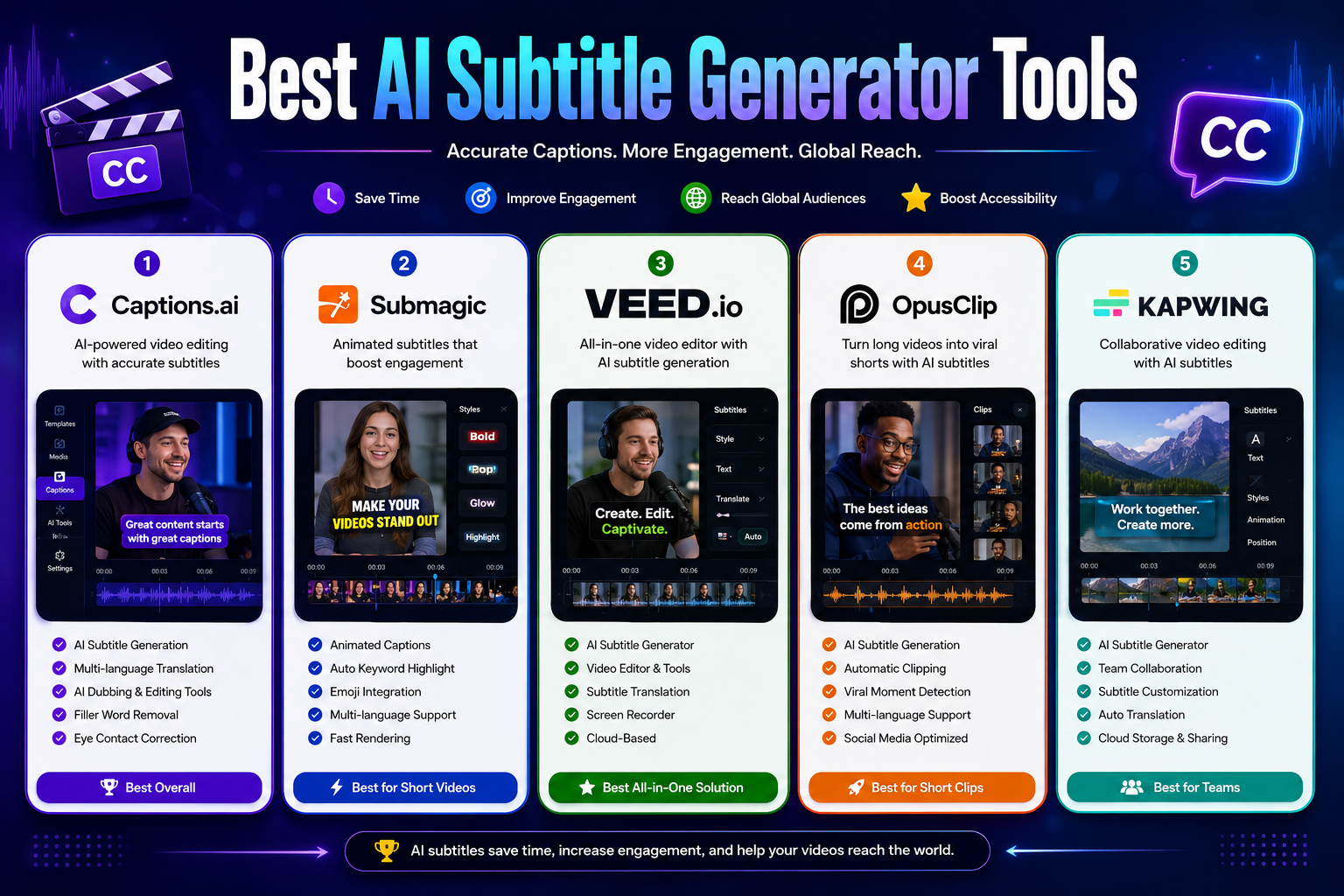
| Tool | Best For | Free Option | Starting Paid Price* | Standout Feature |
|---|---|---|---|---|
| Captions | AI-powered creator workflows | Yes | $24.99/mo | AI editing and caption workflow |
| Submagic | Short-form social videos | Limited/free options | $19/mo | Animated captions |
| VEED | All-in-one online editing | Yes | Paid plans available | Subtitles + full browser editor |
| OpusClip | Repurposing long videos | Yes | $15/mo | AI clipping + animated captions |
| Kapwing | Teams and collaboration | Yes | $16/member/mo annually | Collaboration + AI subtitles |
*Starting prices shown are based on currently published official pricing and may vary by billing cycle, platform, region, or promotional offer.
What Is an AI Subtitle Generator?
An AI subtitle generator is software that uses speech-recognition technology to convert spoken dialogue into text and synchronize that text with a video.
Depending on the platform, you may also get:
- Automatic transcription
- Speaker detection
- Subtitle translation
- Animated captions
- Caption templates
- SRT and VTT exports
- Burned-in subtitles
- AI dubbing
- Video editing
- Filler-word removal
- Automatic clip creation
- Brand customization
The important distinction is that subtitle generation is only one part of the workflow.
Some platforms primarily focus on transcription. Others are full video editors with subtitle tools built in. Others are specifically designed to turn long videos into short-form social content.
That difference matters when choosing a tool.
Why Use an AI Subtitle Generator?
1. Reduce Manual Transcription
Manually typing a transcript and synchronizing it with a video can take considerably longer than generating a first draft automatically.
AI gives you a starting point that you can review and correct.
The biggest benefit isn’t necessarily eliminating editing altogether. It’s reducing the amount of repetitive work required before editing begins.
2. Make Videos Easier to Follow
Captions can help viewers understand dialogue when the audio is difficult to hear or when they’re watching in environments where sound isn’t practical.
They can also make spoken content easier to follow for viewers who aren’t native speakers of the video’s language.
3. Create Multilingual Content
Many modern subtitle platforms can translate captions into additional languages.
This can be useful when repurposing educational, marketing, or social-media content for international audiences.
However, automatic translation should still be reviewed for names, technical terminology, cultural context, and expressions that may not translate literally.
4. Create Social-First Captions
Short-form platforms have made visual caption styles increasingly popular.
Instead of plain subtitles at the bottom of the screen, creators can use:
- Word highlighting
- Animated text
- Dynamic positioning
- Brand fonts
- Caption templates
- Emoji effects
- Emphasis on important words
Tools such as Submagic and OpusClip are particularly focused on this style of workflow.
5. Export Captions for Different Workflows
A good subtitle tool shouldn’t force you to use only one type of output.
Depending on your workflow, you may want:
- SRT files
- VTT files
- TXT transcripts
- Burned-in captions
- Captioned MP4 videos
- Vertical social exports
If you edit videos in another application, downloadable subtitle files can be particularly useful.
The 5 Best AI Subtitle Generator Tools in 2026
1. Captions — Best for AI-Powered Creator Workflows
Captions
Captions is more than a traditional subtitle generator.
Its platform combines captions with AI-powered video creation and editing features, making it particularly interesting for creators who want to do several parts of the production process in one place.
The current Max plan includes AI editing styles, AI-generated footage, digital twins or AI actors, a chat-based editing workflow, automatic short-form content creation, and 500 monthly credits. Captions also offers a free version with a more limited feature set.
Why Choose Captions?
The biggest advantage is workflow consolidation.
Instead of generating captions in one application and performing other AI video tasks somewhere else, creators can keep more of the process inside the same ecosystem.
Key Features
- AI-generated captions
- AI video editing
- AI Shorts
- AI voiceover
- Voice cloning
- AI denoise
- AI sound effects
- AI video creation
- Automatic clip creation
- AI editing styles
- Digital twins and AI actors on supported plans
Pros
- Broad AI video feature set
- Strong fit for social-media creators
- Captions are part of a larger editing workflow
- Free version available
- Useful for creators who want automation beyond transcription
Cons
- The platform can be more than you need if you only want basic subtitles.
- Advanced AI features require paid credits/plans.
- Pricing and feature availability can differ by platform.
Best For
Best for creators who want subtitles plus a broader AI video-production workflow.
2. Submagic — Best for Animated Social Media Captions
Submagic
If your main goal is creating attention-grabbing captions for TikTok, Instagram Reels, and YouTube Shorts, Submagic is one of the most specialized options on this list.
The platform focuses heavily on short-form video workflows, including AI captions, animated caption styles, caption translation, AI cleanup, hooks, templates, and social publishing features.
Its current Starter plan is listed at $19 per month, while Pro is $39 per month and Business is $69 per member per month on monthly billing. Annual plans can reduce the effective price.
Why Choose Submagic?
Submagic makes sense when captions are an important part of the visual identity of your short-form content rather than simply a transcript placed at the bottom of the screen.
Key Features
- AI auto captions
- Animated caption styles
- AI caption translation
- Custom words dictionary
- Brand assets
- Caption templates
- AI hook titles
- AI removal of bad takes and silences
- AI audio cleanup
- Social publishing
- Short-form video editing
Submagic also supports caption translation into a large number of languages, according to its current product information.
Pros
- Strong focus on short-form videos
- Large selection of caption styles
- Useful brand customization
- Translation features
- Designed around social-media workflows
Cons
- More expensive than a basic transcription-only solution.
- The platform is primarily optimized around short-form content.
- Credit/video limits vary by subscription.
Best For
TikTok creators, Instagram Reels creators, YouTubers, agencies, and social-media marketers.
3. VEED — Best All-in-One Browser Video Editor
VEED
VEED is a strong option for users who don’t want a dedicated subtitle application.
Its browser-based editor combines video editing with automatic subtitles, translation, transcription, screen recording, audio tools, and other AI-powered features.
VEED says its automatic subtitle generator can produce captions and export subtitle files including SRT, VTT, and TXT. The tool is free to start, while longer videos and some downloads require a paid plan.
Why Choose VEED?
VEED is particularly useful if your workflow looks like this:
Upload video → generate subtitles → edit video → style captions → export.
You don’t necessarily need separate software for each stage.
Key Features
- Automatic subtitles
- Speech transcription
- Subtitle translation
- SRT export
- VTT export
- TXT export
- Animated subtitles
- Online video editor
- Screen recorder
- AI avatars
- Audio tools
- Brand features
- Collaboration features
Pros
- Everything works in the browser
- Subtitle generation and editing are integrated
- Multiple subtitle export formats
- Useful for businesses and creators
- No desktop installation required
Cons
- Some advanced features require a paid subscription.
- Users looking only for transcription may find the platform broader than necessary.
- Larger projects can require more processing time.
Best For
Businesses, educators, YouTubers, agencies, marketers, and creators who want a complete browser-based video editor.
4. OpusClip — Best for Turning Long Videos Into Short Clips
OpusClip
OpusClip approaches subtitles from a different direction.
Rather than being primarily a captioning application, it is designed to help creators turn longer videos into shorter social-media clips.
Its workflow can identify potentially useful moments, create short clips, reframe the video, and add animated captions.
The current Starter plan is listed at $15 per month and includes AI clipping, animated captions in 20+ languages, automatic social publishing, an editor, and other features.
Why Choose OpusClip?
If you already create podcasts, interviews, webinars, educational videos, or long YouTube videos, you may not need a subtitle-only tool.
OpusClip can combine repurposing + captions in one workflow.
Key Features
- AI video clipping
- Automatic caption generation
- Animated captions
- AI reframing
- Virality Score
- Filler and silence removal
- Social publishing
- Brand templates
- Long-to-short video workflow
OpusClip currently states that its caption system supports numerous languages and reports caption accuracy above 97%.
Pros
- Excellent for content repurposing
- Combines clipping and captions
- Strong fit for podcasts and interviews
- Social-media publishing features
- Free option available
Cons
- Overkill if you only need an SRT file.
- Its biggest value comes from the complete repurposing workflow.
- Processing limits depend on the selected plan.
Best For
Podcasters, YouTubers, coaches, educators, marketers, and businesses repurposing long-form video.
5. Kapwing — Best for Teams and Collaborative Video Work
Kapwing
Kapwing combines online video editing, AI tools, automatic subtitles, translation, and collaboration.
This makes it particularly useful for teams where several people need to work on the same content rather than simply generating captions for an individual video.
Kapwing’s current Free plan includes auto-subtitling for up to 50 minutes, while its Pro plan includes up to 1,000 minutes of auto-subtitling per month. Pro starts at $16 per member per month when billed annually, or $24 monthly.
Why Choose Kapwing?
Kapwing is particularly attractive when subtitles are only one part of a larger collaborative content-production process.
Key Features
- AI auto-subtitling
- Subtitle translation
- Online video editor
- Shared workspaces
- Brand Kit
- Custom fonts
- 4K exports on supported plans
- Cloud storage
- AI video tools
- Team collaboration
Kapwing’s current credit system also makes it possible to understand usage more clearly: subtitle transcription uses one credit per minute, while subtitle translation uses two credits per minute.
Pros
- Strong collaboration features
- Useful for marketing teams
- Browser-based workflow
- Subtitle translation
- Brand controls
- Generous subtitle limits on higher plans
Cons
- Pro pricing is per member.
- A dedicated subtitle tool may be simpler for individuals.
- Heavy AI usage can consume credits quickly.
Best For
Marketing teams, agencies, businesses, educators, and collaborative content creators.
Which AI Subtitle Generator Should You Choose?
There isn’t one universal winner.
The right choice depends on what happens before and after subtitle generation.
| Your Main Goal | Recommended Tool |
|---|---|
| AI-powered video creation and editing | Captions |
| Animated captions for Shorts/Reels | Submagic |
| Full browser-based video editing | VEED |
| Turning long videos into Shorts | OpusClip |
| Team collaboration | Kapwing |
| Simple subtitle files | VEED |
| Social-first caption design | Submagic |
| Podcast repurposing | OpusClip |
What to Look For in an AI Subtitle Generator
1. Transcription Accuracy
Accuracy should be your first consideration.
A visually impressive caption is still a bad caption if it changes what the speaker actually said.
Test difficult examples such as:
- Names
- Numbers
- Acronyms
- Technical terms
- Different accents
- Background noise
- Multiple speakers
Don’t judge a tool only from its marketing claims.
2. Editing Controls
AI-generated captions are a starting point, not something you should blindly publish.
Look for an editor that lets you quickly change:
- Words
- Timing
- Line breaks
- Speaker labels
- Punctuation
- Font
- Size
- Position
- Animation
The faster you can fix mistakes, the more useful the AI becomes.
3. Subtitle Export Formats
If you want flexibility, check whether the platform supports standard subtitle files.
Common formats include:
- SRT
- VTT
- TXT
For example, VEED explicitly supports SRT, VTT, and TXT subtitle downloads.
4. Translation Quality
Automatic translation is useful, but don’t assume every language pair will produce equally good results.
Before publishing translated subtitles, check:
- Names
- Slang
- Technical vocabulary
- Cultural expressions
- Sentence meaning
- Punctuation
For professional or important content, human review is still valuable.
5. Caption Styling
For social videos, design matters.
Look for:
- Custom fonts
- Brand colors
- Word highlighting
- Animated captions
- Caption templates
- Position controls
- Safe-area controls
But don’t confuse visual complexity with quality.
A caption style should make the video easier to follow—not compete with the speaker.
6. Usage Limits
Pricing pages can be misleading if you only compare the monthly subscription.
Also check what you’re actually receiving.
A $15 plan with strict processing limits may be less useful than a $20 plan with substantially more usable minutes.
Compare:
Price → minutes → videos → export quality → AI credits → collaboration → translation limits.
This is especially important because several current platforms use credits or usage limits rather than simply offering unlimited caption generation.
How to Get More Accurate AI Subtitles
Record Cleaner Audio
AI transcription works better when speech is clear.
Whenever possible:
- Reduce background noise
- Avoid loud music under speech
- Use a good microphone
- Keep the speaker reasonably close to the microphone
- Avoid multiple people talking simultaneously
Better input generally produces a better starting transcript.
Review Names and Numbers
Names, locations, brands, abbreviations, and numbers deserve special attention.
These are common areas where an otherwise good transcript can contain mistakes.
Fix Caption Timing
A transcript can be technically correct and still feel bad if the timing is wrong.
Check whether:
- Captions appear too early
- Captions remain too long
- Lines change too quickly
- Sentences are split awkwardly
- Two speakers are difficult to distinguish
Keep Captions Short Enough to Read
Don’t put an entire sentence—or multiple sentences—on screen at once.
Break longer dialogue into natural chunks that viewers can comfortably read while watching the video.
Preview on a Phone
A caption style that looks good on a desktop monitor may be difficult to read on a smartphone.
Always check:
- Font size
- Position
- Contrast
- Line length
- Platform UI overlap
- Important text near the edges
This is particularly important for vertical videos.
Common AI Subtitle Mistakes
Publishing the AI Transcript Without Reviewing It
Automatic doesn’t mean perfect.
Always review the generated captions before publishing important content.
Using Too Many Visual Effects
Animated captions can be useful, especially for short-form videos.
But excessive movement, colors, emojis, and effects can make captions harder to read.
Choosing a Tool Based Only on Price
The cheapest option isn’t automatically the best value.
Consider how much time the tool saves and whether its workflow matches your content.
Ignoring Export Requirements
If you need an SRT file for another editor or platform, confirm that the tool supports it before subscribing.
Forgetting Different Platforms Have Different Needs
A caption style designed for TikTok may not be ideal for a webinar, online course, or corporate presentation.
Choose the workflow first and the tool second.
AI Subtitles vs. Manual Subtitles
Manual subtitle creation still has advantages.
A human can understand context, humor, sarcasm, technical language, and unusual names better than an automated system in many situations.
However, manual transcription becomes inefficient when you’re producing large amounts of content.
The strongest workflow for many creators is therefore:
AI generation → human review → final export
This approach lets AI handle repetitive transcription work while a person remains responsible for accuracy and presentation.
Are AI Subtitle Generators Good for Accessibility?
They can be very useful, but automatically generated captions shouldn’t automatically be treated as perfectly accessible.
Accessibility depends on more than generating text.
Good captions should be:
- Accurate
- Synchronized
- Readable
- Properly formatted
- Complete enough to convey important audio information
For professional, educational, or accessibility-sensitive content, review generated captions carefully before publication.
Are AI Subtitle Generators Worth It?
For anyone producing videos regularly, they can be.
The main value isn’t simply generating text. It’s reducing repetitive editing work and making it easier to create multiple versions of the same content.
For example, one long interview could become:
Original video → transcript → captioned YouTube video → short clips → translated subtitles → social-media versions
The right tool can simplify several of those steps.
However, if you only subtitle one short video occasionally, a free tool may be all you need.
Frequently Asked Questions
What is the best AI subtitle generator in 2026?
There isn’t one best tool for every creator.
Captions is a strong choice for AI-powered creator workflows, Submagic is particularly suited to animated short-form captions, VEED works well as an all-in-one browser editor, OpusClip is excellent for long-to-short repurposing, and Kapwing is attractive for collaborative teams.
What is the best AI subtitle generator for TikTok?
Submagic is one of the strongest choices if your priority is animated, social-first captions.
Its workflow is heavily focused on short-form video and includes customizable caption styles and translation features.
What is the best AI subtitle generator for YouTube?
It depends on your workflow.
For standard videos where you mainly need subtitles and editing, VEED can be a practical option. For creators who want to turn long YouTube videos into Shorts, OpusClip may be more useful.
Can AI subtitle generators translate videos?
Yes.
Several modern platforms provide AI subtitle translation. However, automatically translated captions should be reviewed before publication, particularly when the video contains technical language, names, slang, or industry-specific terminology.
Can I download SRT subtitles?
Yes, some platforms support downloadable subtitle files.
VEED, for example, explicitly supports SRT, VTT, and TXT exports from its subtitle workflow.
Are AI subtitles 100% accurate?
No AI transcription system should be treated as guaranteed perfect.
Accuracy can be affected by:
- Audio quality
- Background noise
- Accents
- Multiple speakers
- Vocabulary
- Recording conditions
- Language
Always review captions before publishing important content.
Is there a free AI subtitle generator?
Yes.
Several platforms offer free versions or free-to-start workflows, although limits can apply to video length, exports, watermarks, credits, or advanced features.
For example, Kapwing’s Free plan currently includes up to 50 minutes of auto-subtitling, while OpusClip also offers a free-forever option after its trial workflow.
Final Verdict
AI subtitle generators have evolved from simple transcription tools into broader video-production platforms.
The best option depends on what you need to accomplish.
Choose Captions if you want an AI-heavy creator workflow that goes beyond subtitles.
Choose Submagic if animated captions are central to your TikTok, Reels, or Shorts strategy.
Choose VEED if you want subtitles combined with a complete browser-based video editor.
Choose OpusClip if your main goal is turning long videos into short, captioned social content.
Choose Kapwing if you’re working with a team and need collaborative editing alongside AI subtitles.
Before paying for any subscription, upload a representative video and evaluate the things that actually matter: transcription accuracy, editing speed, caption readability, export options, language support, and usage limits.
The best AI subtitle generator isn’t necessarily the one with the longest feature list. It’s the one that fits your workflow and consistently produces captions you can publish with minimal correction.
Editorial Methodology
For this comparison, we evaluated the tools based on the factors that matter most to someone choosing subtitle software:
- Subtitle generation workflow
- Caption editing capabilities
- Social-media features
- Translation options
- Export flexibility
- Video editing capabilities
- Collaboration
- Usage limits
- Pricing structure
- Intended audience
We also compared the currently published information from the vendors’ official product and pricing pages.
Important: We do not claim first-hand testing or measured transcription accuracy unless those tests have actually been performed. If you test these tools yourself, adding screenshots, sample transcripts, before-and-after examples, and measured results would make this article substantially stronger as a first-hand review.
Sources
- Google Search Central — guidance on creating helpful, reliable, people-first content and high-quality reviews
- Captions — official pricing and product information
- Submagic — official pricing and AI caption information
- VEED — official subtitle and pricing information
- OpusClip — official pricing and caption information
- Kapwing — official pricing and credit documentation
Related Articles
Continue exploring the best AI video and content creation tools: