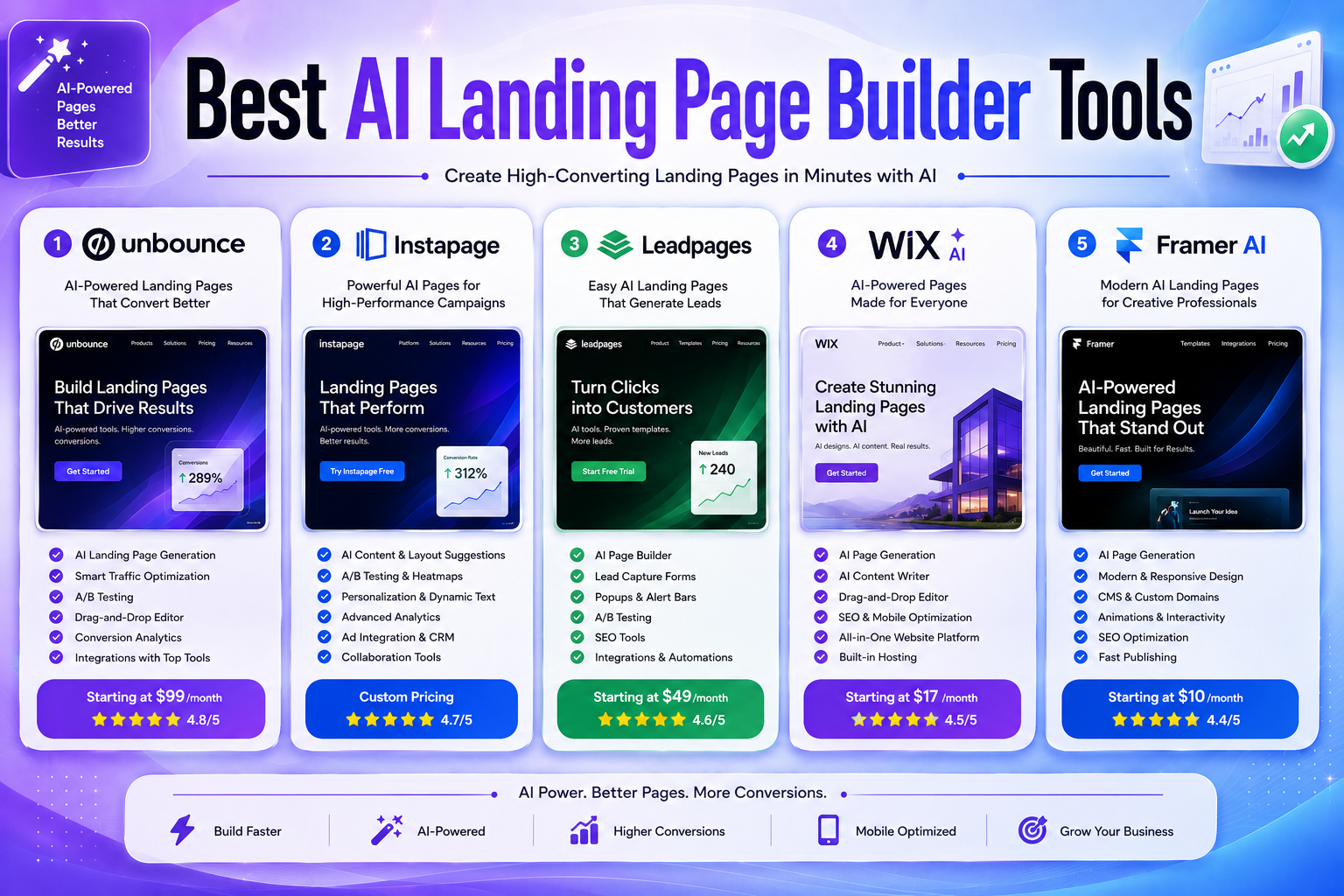
Best AI Landing Page Builder Tools in 2026: 5 Platforms for Better Campaign Pages
A landing page has one job: help a visitor take a specific action.
That action might be signing up for a free trial, requesting a quote, downloading a resource, registering for an event, or purchasing a product.
In the past, creating a dedicated landing page often required a designer, developer, or a complicated page builder. In 2026, AI has made the initial creation process much faster.
Modern AI landing page builders can generate page structures, write draft copy, suggest layouts, create visual elements, and help marketers turn a campaign idea into a publishable page.
But generating a page is only the beginning.
A landing page can look impressive and still perform poorly if the offer is unclear, the message doesn’t match the traffic source, the CTA is confusing, or the page provides insufficient evidence for visitors to trust the business.
That’s why this guide focuses on more than AI generation. We compare the platforms based on AI capabilities, design flexibility, conversion optimization, testing, analytics, integrations, pricing, and the type of marketer each tool is best suited for.
For 2026, our five picks are:
- Unbounce — Best for conversion-focused marketers
- Instapage — Best for advertising teams and enterprise campaigns
- Leadpages — Best for marketers who want AI plus CRO features
- Wix — Best for beginners and all-in-one campaigns
- Framer — Best for modern, design-focused landing pages
Editorial note: Pricing, AI credits, traffic limits, and features can change frequently. Always verify the current plan before purchasing.
Quick Comparison: Best AI Landing Page Builders in 2026
| Tool | Best For | Free Option | Starting Price* | Main Strength |
|---|---|---|---|---|
| Unbounce | Conversion-focused marketers | 14-day trial | $29/mo | CRO + AI optimization |
| Instapage | Enterprise advertising teams | Trial | Custom/varies | Personalization + campaign management |
| Leadpages | Small businesses and marketers | 7-day trial | $99/mo for Leadpages | AI + CRO |
| Wix | Beginners and small businesses | Yes | Free to start | AI + simplicity |
| Framer | Modern landing pages | Yes | $10/mo | Design + AI |
*Pricing depends on billing cycle, region, promotions, and the specific plan. Leadpages now has a separate publishing product with lower entry pricing, while its full Leadpages CRO platform starts at $99/month.
What Is an AI Landing Page Builder?
An AI landing page builder is a platform that uses artificial intelligence to help create and optimize standalone web pages for specific marketing campaigns.
Instead of manually starting with a blank canvas, you can provide information about your:
- Business
- Product
- Audience
- Campaign
- Offer
- Desired action
The AI can then create a starting version of the page.
Depending on the platform, AI may help generate:
- Headlines
- Subheadings
- Page sections
- Calls to action
- Images
- Layouts
- Forms
- Product descriptions
- SEO information
- Design variations
- Code components
- Personalized content
The important distinction is that AI generation does not automatically equal conversion optimization.
A page can be generated in seconds, but improving its performance still requires good marketing decisions and real visitor data.
Landing Page Builder vs Website Builder
A landing page is not necessarily the same thing as a normal website homepage.
A traditional website may contain:
- Home
- About
- Services
- Blog
- Contact
- Pricing
- Multiple navigation options
A landing page usually has a much narrower purpose.
For example:
Google Ad → Landing Page → Free Trial
or:
Email Campaign → Landing Page → Webinar Registration
The fewer distractions between the visitor and the intended action, the easier it is to keep the campaign focused.
That’s why dedicated landing page builders often include features such as A/B testing, conversion tracking, personalization, forms, and campaign analytics.
Why Use an AI Landing Page Builder?
1. Create Campaign Pages Faster
AI can produce the initial structure instead of forcing you to build every section manually.
This can be particularly useful when you’re running several campaigns and need different pages for different audiences.
2. Reduce Design Work
You don’t necessarily need to start by choosing fonts, spacing, sections, and layouts yourself.
AI can provide an initial design direction that you can then edit.
3. Speed Up Copywriting
AI can generate draft:
- Headlines
- Benefits
- Product descriptions
- CTAs
- FAQs
- Supporting copy
However, generated copy should always be reviewed for accuracy, specificity, and brand voice.
4. Create Campaign Variations
Marketing teams often need different pages for:
- Different audiences
- Different advertisements
- Different products
- Different offers
- Different geographic markets
AI can reduce the time needed to create these variations.
5. Combine Creation With Optimization
The more advanced platforms go beyond page generation.
They may provide:
- A/B testing
- Heatmaps
- Analytics
- Dynamic text replacement
- Personalization
- AI traffic routing
- Conversion reporting
These features are often more valuable to experienced marketers than AI copy generation alone.
Top 5 Best AI Landing Page Builders in 2026
1. Unbounce — Best for Conversion-Focused Marketers
Unbounce remains one of the strongest choices for marketers who care about conversion optimization rather than simply generating attractive pages.
Its platform combines a landing page builder with forms, popups, sticky bars, A/B testing, AI copywriting, integrations, and AI-powered traffic optimization on higher plans.
Why Choose Unbounce?
Unbounce is particularly attractive if your landing pages are connected to paid advertising and you want tools specifically designed around conversion optimization.
It is less about building an entire traditional website and more about creating and improving campaign experiences.
Key Features
- AI copywriting
- Landing page builder
- Drag-and-drop editing
- A/B testing
- AI traffic optimization
- Popups
- Sticky bars
- Multi-step forms
- Dynamic text replacement
- Conversion reporting
- Custom scripts and pixels
- 1,000+ integrations
- Custom domains
- Free hosting on qualifying plans
Unbounce’s higher-tier Optimize plan includes AI traffic optimization, while Experiment adds advanced A/B testing capabilities.
Pricing
Unbounce currently lists:
- Starter — $29/month
- Build — $99/month
- Experiment — $149/month
- Optimize — $249/month
Annual billing reduces the effective monthly price.
The Starter plan supports five landing pages and up to 500 monthly unique visitors, while Build increases the limit to unlimited pages and 20,000 monthly unique visitors.
Pros
- Strong conversion-focused feature set
- Advanced testing
- AI traffic optimization
- Excellent integrations
- Good for paid campaigns
- Powerful marketing controls
Cons
- More expensive than general-purpose website builders
- Traffic limits apply on several plans
- Can be more functionality than a beginner needs
Best For
Performance marketers, agencies, SaaS companies, advertisers, and businesses running paid campaigns.
Our Take
If your priority is conversion optimization rather than simply creating a pretty page, Unbounce is one of the strongest choices in this category.
2. Instapage — Best for Advertising Teams
Instapage is built around paid advertising and landing-page campaign workflows.
Its strongest appeal is to organizations that need more than a simple drag-and-drop page builder and want features for personalization, experimentation, collaboration, and advertising campaign management.
Why Choose Instapage?
Instapage is particularly relevant when landing pages are part of a larger paid-media operation.
For example, an advertising team might need different landing experiences for different:
- Campaigns
- Ad groups
- Audiences
- Products
- Offers
- Geographic markets
Key Features
Depending on the plan, Instapage can provide:
- AI-assisted content creation
- Landing page creation
- A/B testing
- Personalization
- Analytics
- Collaboration
- Forms
- Advertising integrations
- Dynamic content
- Heatmaps
- Conversion tracking
- Enterprise-oriented workflows
Pros
- Strong advertising focus
- Useful for larger marketing teams
- Advanced personalization capabilities
- Collaboration features
- Designed around campaign workflows
Cons
- More expensive than beginner-oriented builders
- Some features are unnecessary for simple campaigns
- Better suited to professional marketing teams
Best For
Advertising agencies, enterprise marketing teams, SaaS companies, and businesses running large paid-media campaigns.
Our Take
Instapage makes the most sense when landing pages are an important part of a serious advertising operation, rather than a one-off page for a small campaign.
3. Leadpages — Best for AI + Conversion Optimization
Leadpages has evolved beyond a simple landing page builder.
Its current platform combines AI page creation with conversion-rate optimization features such as A/B testing, dynamic text replacement, lead enrichment, personalization, and analytics.
Why Choose Leadpages?
Leadpages is particularly interesting for marketers who want AI-assisted page creation but also need traditional CRO functionality.
Its current AI landing page builder says it can turn a campaign description into a live page in roughly 60 seconds, after which the page can be edited and optimized.
Key Features
- AI landing page creation
- AI copy assistance
- Drag-and-drop editor
- A/B testing
- Dynamic text replacement
- Smart Traffic
- Heatmaps
- Lead enrichment
- Forms
- Analytics
- Custom domains
- Integrations
- Ecommerce functionality
- AI credits
Pricing
Leadpages now has two related offerings, so the pricing needs to be explained carefully.
The full Leadpages CRO platform currently starts at:
- Grow — $99/month
- Optimize — $199/month
- Scale — $399/month
Annual billing saves approximately 20%.
The company also offers HTML Pub, its publishing-focused product, starting at $10/month, with higher plans at $29 and $49/month.
The distinction matters: HTML Pub is focused on publishing, while Leadpages adds the deeper CRO layer such as A/B testing, Smart Traffic, heatmaps, and personalization.
Pros
- AI page creation
- Strong CRO features
- A/B testing
- Smart Traffic on higher plans
- Unlimited traffic on Leadpages plans
- Good integrations
- Useful for marketers
Cons
- Full CRO platform is relatively expensive
- Pricing structure can initially be confusing
- Advanced optimization features require higher plans
Best For
Small businesses, marketers, agencies, consultants, and teams that want AI creation plus conversion optimization.
Our Take
Leadpages is a strong middle ground between a simple AI page generator and an enterprise-focused CRO platform.
4. Wix — Best for Beginners
Wix is better known as a general website builder, but its current AI-powered landing page workflow makes it a strong option for users who want to create campaign pages without learning specialized CRO software.
Wix allows users to describe their campaign and generate a landing page with AI, then continue editing the result through its visual editor.
Why Choose Wix?
The biggest advantage is simplicity.
If you need:
- A business website
- Several landing pages
- Forms
- Basic marketing tools
- SEO
- Analytics
- Hosting
you may not need a separate landing-page platform.
Key Features
- AI landing page generation
- AI website creation
- Drag-and-drop editor
- AI-generated content
- Forms
- Analytics
- SEO tools
- Marketing integrations
- Mobile optimization
- Hosting
- Custom domains
- A/B testing capabilities
- Third-party analytics integrations
Wix’s landing-page tools can connect with services such as Google Analytics, Google Tag Manager, Meta Pixel, Crazy Egg, and Hotjar.
Pricing
Wix allows users to create and publish a landing page for free on a Wix subdomain.
A custom domain and additional premium capabilities require a paid plan.
Wix’s current plan structure includes Light, Core, Business, and Business Elite tiers, with U.S. pricing varying by billing method and taxes.
Pros
- Very beginner-friendly
- Free starting option
- AI-assisted page creation
- Full website builder
- Hosting included
- Strong visual editor
- Business tools available
Cons
- Less specialized than Unbounce
- Advanced CRO workflows may require other tools
- Some premium business features require upgrades
Best For
Beginners, small businesses, freelancers, creators, startups, and users who want their landing pages and main website on the same platform.
Our Take
Wix is the better choice if you want simplicity and an all-in-one website platform rather than a dedicated conversion-optimization system.
5. Framer — Best for Modern Landing Page Design
Framer is one of the strongest options for users who care about visual quality and modern web design.
Its AI agents can generate landing-page sections, layouts, copy, and visuals while keeping everything editable inside the visual canvas.
Why Choose Framer?
Framer is particularly strong for:
- SaaS landing pages
- Startup launches
- Product pages
- Waitlists
- Portfolios
- Marketing campaigns
- Design agencies
It provides a more flexible visual canvas than traditional template-driven builders.
Key Features
- AI page generation
- AI-assisted copywriting
- AI agents
- Responsive design
- Visual canvas
- CMS
- Forms
- SEO controls
- Analytics
- Animations
- Custom code components
- Custom domains
- Collaboration
- A/B testing through an add-on
Framer’s AI agents can also create custom code components based on natural-language descriptions, which can be useful for interactive landing-page elements.
Pricing
Framer currently offers:
- Free — $0
- Basic — $10/month
- Pro — $30/month
- Enterprise — Custom
The current free plan includes 500 AI credits to try the system. Paid plans include larger monthly AI-credit allowances.
Framer’s Basic plan includes built-in SEO and 50 GB bandwidth, while Pro increases the available CMS, bandwidth, and other capabilities.
Pros
- Excellent visual flexibility
- Modern designs
- AI-assisted creation
- Strong responsive workflow
- Fast publishing
- Good for SaaS and startups
- Custom code components
Cons
- Not the best choice for complex ecommerce
- Some advanced functionality uses add-ons
- AI features use credits
- Less focused on traditional CRO than Unbounce or Leadpages
Best For
SaaS companies, startups, designers, agencies, creators, and marketers who prioritize design.
Our Take
Choose Framer when your landing page needs to look modern, polished, and highly customized while still benefiting from AI-assisted creation.
Which AI Landing Page Builder Should You Choose?
The best choice depends on your campaign.
| If You Need… | Recommended Tool |
|---|---|
| Advanced conversion optimization | Unbounce |
| Enterprise advertising workflows | Instapage |
| AI + CRO features | Leadpages |
| Beginner-friendly creation | Wix |
| Modern visual design | Framer |
| Paid advertising campaigns | Unbounce / Instapage |
| Simple business landing page | Wix |
| SaaS or startup launch page | Framer |
How to Choose the Right AI Landing Page Builder
1. Start With the Campaign Goal
Don’t choose the software first.
Choose the goal first.
Your landing page might be designed to:
- Generate leads
- Sell a product
- Collect email addresses
- Book appointments
- Schedule demos
- Promote a webinar
- Launch an app
- Build a waitlist
- Promote an offer
The goal determines which features matter.
2. Match the Page to the Traffic Source
Your landing page should match the expectations created by the advertisement or message that brought visitors there.
For example:
Google Ad → Specific service page
is usually more relevant than:
Google Ad → Generic homepage
Similarly, a social-media advertisement should lead to a page whose headline and offer clearly connect with the original campaign.
This is often called message match.
3. Check AI Capabilities
Don’t judge an AI landing page builder simply by whether it has an AI button.
Look at what the AI actually does.
Useful capabilities include:
- Page generation
- Copy generation
- Section creation
- Layout suggestions
- Image generation
- Content rewriting
- Personalization
- AI testing
- AI traffic optimization
- AI analytics
A platform with fewer AI features can still be better if those features solve your actual problem.
4. Look for Testing Features
If conversions matter, testing can be more valuable than AI-generated copy.
Look for:
- A/B testing
- Multiple variants
- Traffic allocation
- Conversion tracking
- Heatmaps
- Analytics
- Personalization
- Dynamic content
For example, Unbounce includes A/B testing on its Experiment plan, while Leadpages includes A/B testing starting with its Grow plan.
5. Check Integrations
Your landing page rarely exists in isolation.
You may need to connect it to:
- CRM software
- Email marketing
- Google Analytics
- Meta Ads
- Google Ads
- Payment processors
- Webinar software
- Marketing automation
- Forms
- Zapier-style automation
Before subscribing, check whether the tools you already use are supported.
6. Understand Traffic Limits
This is especially important if you’re running paid advertising.
A plan that looks inexpensive can become less attractive if it has restrictive visitor or conversion limits.
Unbounce, for example, currently specifies monthly unique-visitor limits for each plan.
Leadpages takes a different approach: its current Leadpages plans advertise unlimited traffic.
Always compare limits against your expected traffic rather than comparing monthly prices alone.
How to Build a High-Converting Landing Page With AI
AI can accelerate the process, but it doesn’t replace marketing strategy.
1. Give AI a Detailed Brief
Instead of writing:
“Create a landing page for my business.”
provide information such as:
- Target audience
- Product
- Main problem
- Main benefit
- Price
- Offer
- Customer objections
- Brand voice
- Traffic source
- Desired action
Better input generally produces a more useful starting point.
2. Start With One Conversion Goal
A landing page should have a clear primary action.
Examples:
- Start a free trial
- Book a demo
- Request a quote
- Download a guide
- Buy a product
- Join a waitlist
If visitors have too many competing options, the page can lose focus.
3. Write a Specific Headline
A weak headline:
“The Future of Business Solutions”
A more useful headline explains the actual value:
“Create Professional Social Media Videos in Minutes”
The second example tells the visitor what the product does.
4. Match the Offer to the Advertisement
If the ad promises:
“Get a Free SEO Audit”
the landing page should immediately explain how the visitor can get that audit.
Don’t make users search through the page to find the offer they were promised.
5. Add Evidence
Trust can be improved with relevant evidence such as:
- Customer testimonials
- Reviews
- Case studies
- Product screenshots
- Demonstrations
- Certifications
- Client logos
- Specific results
Only use claims that are accurate and can be supported.
6. Make the CTA Obvious
Your main CTA should be easy to understand.
Examples:
- Start Free Trial
- Book a Demo
- Get My Quote
- Download the Guide
- Join the Waitlist
Avoid vague labels when a more specific action is possible.
7. Test Before Scaling Traffic
Don’t send a large advertising budget to an untested landing page simply because AI generated it.
Start with a reasonable test.
Measure:
- Visitors
- Conversion rate
- Cost per lead
- Cost per acquisition
- Bounce/engagement signals
- Revenue per visitor
Then use the results to improve the page.
Common Landing Page Mistakes
Using Too Many CTAs
Multiple unrelated actions can distract visitors.
Keep one primary objective.
Making the Page About the Company Instead of the Customer
Visitors usually care about solving their problem.
Explain:
- What they get
- Why it matters
- How it works
- What happens next
Publishing Generic AI Copy
AI can produce polished language that says very little.
Replace generic claims with specific information.
Ignoring Mobile Visitors
Check the page on small screens.
Pay attention to:
- Buttons
- Forms
- Font size
- Images
- Spacing
- Navigation
- Popups
Sending Traffic Without Tracking
Without conversion tracking, you can’t reliably determine whether your campaign is working.
Assuming AI Guarantees Higher Conversions
This is one of the biggest misconceptions.
AI can help create and optimize landing pages, but no AI builder can guarantee a particular conversion rate.
Performance depends on factors such as:
- Offer
- Audience
- Traffic quality
- Price
- Brand trust
- Message match
- Competition
- Page experience
AI Landing Page Builder vs Traditional Design
AI builders are not automatically better for every project.
AI builders are especially useful for:
- Marketing campaigns
- Lead generation
- Product launches
- MVPs
- Small businesses
- Paid advertising
- Rapid experimentation
Traditional development may be better for:
- Complex web applications
- Highly customized checkout flows
- Advanced customer portals
- Unique business logic
- Large-scale enterprise systems
The best approach may also be hybrid: use AI to create the first version and human developers or designers for the parts that require deeper customization.
Are AI Landing Pages Good for SEO?
They can be.
But AI generation itself does not make a page SEO-friendly.
A landing page intended to attract organic search traffic should still have:
- Useful content
- A clear search intent
- Descriptive titles
- Relevant headings
- Internal links where appropriate
- Descriptive image alt text
- Mobile-friendly design
- Good performance
- Accessible content
Google’s guidance emphasizes helpful, reliable, people-first content rather than producing pages primarily for search-engine manipulation.
For advertising landing pages that are not intended to rank organically, conversion and campaign relevance may matter more than traditional SEO.
Are AI Landing Page Builders Worth It?
For many marketers, yes.
The biggest benefit isn’t necessarily that AI can create a page in seconds.
It’s that AI can reduce the time required to go from:
Campaign idea → First draft → Editing → Testing → Optimization
The value becomes even greater when the platform combines AI with analytics and experimentation.
For a simple page, however, paying for an expensive CRO platform may not make sense.
A free or inexpensive builder can be enough if you only need a basic page and form.
Frequently Asked Questions
What Is the Best AI Landing Page Builder in 2026?
For conversion-focused marketers, Unbounce is one of the strongest overall choices because it combines AI capabilities with A/B testing, conversion optimization, integrations, and AI traffic optimization on higher plans.
For beginners, Wix is easier to approach. For modern design, Framer is particularly strong.
What Is the Cheapest AI Landing Page Builder?
There isn’t one simple answer because platforms use different pricing models.
Wix allows users to create a landing page for free, although custom domains and additional features require a paid plan.
Framer also has a free plan, with paid plans starting at $10/month.
Leadpages’ separate HTML Pub product starts at $10/month, while its full CRO platform starts at $99/month.
Which AI Landing Page Builder Is Best for Beginners?
Wix is one of the easiest options for beginners because users can generate a landing page with AI and then customize it through a visual editor.
Which Is Best for Paid Advertising?
Unbounce and Instapage are particularly suitable for paid advertising workflows.
Unbounce focuses heavily on conversion optimization and testing, while Instapage is designed around advertising and enterprise marketing workflows.
Which Is Best for SaaS Landing Pages?
Framer is an excellent option for SaaS and startup landing pages because of its visual flexibility, responsive design tools, AI-assisted creation, forms, CMS, and modern publishing workflow.
Can AI Create a Complete Landing Page?
Yes.
Modern platforms can generate much of the initial structure, including:
- Layout
- Headlines
- Copy
- Sections
- Visual direction
- Forms
- CTAs
But the generated page should still be reviewed and customized before publication.
Can AI Guarantee a High Conversion Rate?
No.
AI can help with page creation and optimization, but it cannot guarantee a specific conversion rate.
The result depends on the offer, audience, traffic, messaging, trust, pricing, competition, and many other variables.
Do AI Landing Pages Rank on Google?
They can, but AI generation doesn’t automatically give a page search visibility.
The page still needs useful content, technical accessibility, good UX, and a clear purpose.
For paid advertising campaigns, SEO may not even be the primary objective.
Final Verdict
AI landing page builders have made campaign-page creation significantly faster.
But the best tool isn’t necessarily the one with the most AI features.
The right platform depends on how you acquire traffic, how much testing you need, and how sophisticated your marketing operation is.
Our Top Picks
Best for conversion optimization: Unbounce
Best for enterprise advertising: Instapage
Best for AI + CRO: Leadpages
Best for beginners: Wix
Best for modern design: Framer
If you’re running serious paid campaigns and need testing and optimization, start with Unbounce or Instapage.
If you’re a small business or beginner who simply needs an effective campaign page, Wix may be the easier choice.
If you want AI generation combined with a strong CRO toolkit, Leadpages is worth considering.
And if design is your biggest priority, Framer offers an excellent balance between AI assistance and creative control.
Ultimately, AI should be treated as an accelerator—not a replacement for good marketing.
The strongest landing pages still start with a clear offer, understand their audience, communicate value quickly, provide evidence, and use real performance data to improve over time.
Editorial Methodology
We evaluated these platforms using criteria that matter to landing-page creators and marketers:
- AI page generation
- AI copywriting
- Design flexibility
- Conversion optimization
- A/B testing
- Analytics
- Personalization
- Marketing integrations
- Forms and lead capture
- Traffic limitations
- Pricing
- Ease of use
- Intended audience
We prioritized current official product and pricing information where available.
Because AI features, credits, pricing, and plan limits change frequently, readers should verify the current details before subscribing.
For review content, Google recommends evaluating products from the user’s perspective, explaining meaningful differences, discussing benefits and drawbacks, and adding original research or first-hand evidence where possible.
Important: Unless the author has personally tested a platform and documented the process, claims should be presented as an editorial assessment based on current product information rather than as first-hand testing.
How We Would Improve This Article Further
For an even stronger version on AIToolsForMarketers.com, add original evidence whenever possible.
For example, you could create the same landing-page brief in three or five builders and document:
| Test | What to Measure |
|---|---|
| Generation time | Seconds/minutes to first draft |
| Copy quality | Clarity and specificity |
| Design quality | Visual consistency |
| Mobile quality | Responsive behavior |
| Editing | Difficulty of changing sections |
| AI usage | Credits consumed |
| Publishing | Steps required |
| Testing | A/B testing availability |
| Integrations | Tools connected |
| Final cost | Actual cost for your use case |
That type of original comparison would make the article substantially more useful than simply repeating each company’s feature list.