Best AI Ad Creative Tools in 2026: 5 Tools for Faster, Better Advertising
Creating advertising creatives at scale is one of the most time-consuming parts of running paid campaigns. A single campaign may require multiple images, videos, headlines, formats, sizes, and variations for different audiences and platforms.
AI ad creative tools are changing that workflow. Instead of starting every creative from scratch, marketers can use AI to generate concepts, images, videos, ad copy, variations, and campaign assets much faster.
However, not every AI advertising tool does the same thing. Some are built specifically for performance advertising, while others focus on social media content, display ads, or general-purpose design.
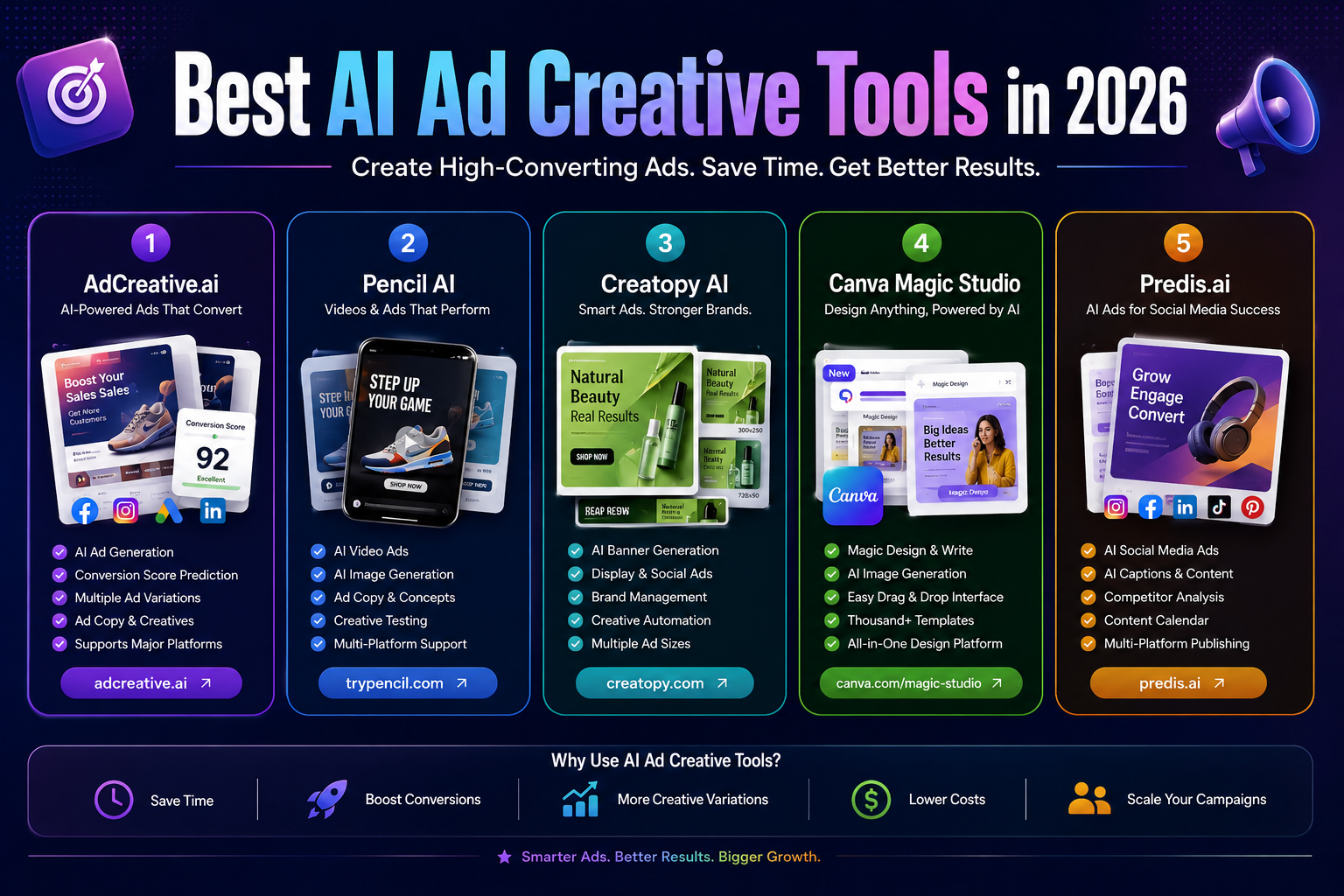
In this guide, we compare five of the strongest AI ad creative tools available in 2026 and explain what each one is actually good at, where it has limitations, and which type of advertiser should consider it.
Important: AI can speed up creative production, but no tool can guarantee higher conversions. Actual advertising performance depends on the offer, audience, landing page, targeting, budget, creative quality, and campaign execution.
Quick Comparison
| Tool | Best For | Free Option | Starting Price* | Main Strength |
|---|---|---|---|---|
| AdCreative.ai | Performance advertising | Trial | $39/month | Ad-focused creative generation and insights |
| Pencil | Social and video advertising | Limited free experience | $14/month | AI-generated ad concepts and multi-format creatives |
| Creatopy | Display and banner advertising | Trial/free access varies | Check current pricing | Creative automation and ad production at scale |
| Canva | General ad design | Yes | $15/month when billed annually for Pro | Easy design plus broad AI tools |
| Predis.ai | Social media advertising | Limited free access | $24/month when billed annually | Social creatives, scheduling, and content workflows |
*Prices and plan features can change. Pricing shown here reflects the providers’ current published pricing where available and should be checked before purchasing.
What Are AI Ad Creative Tools?
AI ad creative tools are software platforms that use artificial intelligence to help marketers produce advertising assets.
Depending on the platform, they can generate or assist with:
- Ad images
- Product visuals
- Headlines
- Primary ad copy
- Social media creatives
- Video advertisements
- Display banners
- Creative variations
- Different ad sizes and formats
- Brand-consistent designs
- Campaign concepts
The important distinction is that AI ad creative generation is not the same as campaign optimization.
A tool may help you create ten different advertisements, but that does not automatically mean one of them will outperform your existing campaign. Performance still needs to be measured using real campaign data.
This distinction is important when choosing software because some platforms concentrate on creative production, while others also provide performance insights, publishing, testing, or campaign-management features.
Why Use AI for Advertising Creatives?
The main advantage of AI is not that it replaces the advertising strategy. Its biggest benefit is that it can reduce the amount of repetitive creative work required before and during a campaign.
1. Produce More Creative Variations
Modern advertising often requires multiple creative variations.
For example, an eCommerce brand might need:
- 1:1 product ads
- 4:5 social ads
- 9:16 vertical videos
- Different headlines
- Different offers
- Different hooks
- Different product images
Creating every version manually can take considerable time.
AI can provide a starting point for many of these variations.
2. Speed Up Creative Production
Instead of moving between separate tools for copywriting, image creation, resizing, and editing, some AI advertising platforms combine several steps into one workflow.
This can be especially useful for agencies and businesses managing multiple products or clients.
3. Test More Ideas
Advertising performance can vary significantly between creative concepts.
Rather than relying on one design, marketers can generate several different concepts and test them against real audiences.
The goal is not simply to create more ads. The goal is to discover which creative angles, messages, visuals, and offers work best for a particular audience.
4. Maintain Brand Consistency
Many modern platforms allow users to provide brand colors, logos, fonts, images, or guidelines.
This can help teams create a larger volume of advertising material without completely losing their visual identity.
5. Reduce Repetitive Design Work
Tasks such as resizing creatives, adapting designs for different formats, producing variations, and creating first drafts are well suited to automation.
That gives marketers more time to focus on strategy, testing, and campaign analysis.
The 5 Best AI Ad Creative Tools in 2026
1. AdCreative.ai
Best for: Performance marketers, eCommerce brands, agencies, and paid advertising teams.
AdCreative.ai is one of the most specialized platforms in this list. Rather than being a general graphic-design application, it focuses specifically on advertising creatives.
Its platform can generate advertising assets, copy, product-related visuals, and creative variations. It also provides features such as Ad Creative Insight AI and creative scoring, alongside integrations with advertising platforms.
Why Choose AdCreative.ai?
AdCreative.ai makes the most sense when advertising performance is the primary objective and you want a platform designed specifically around paid advertising rather than general graphic design.
Its current Starter plan is listed at $39 per month with 10 monthly credits and one brand on monthly billing. Higher plans provide more credits, brands, users, and additional features.
The platform also offers a free trial, which makes it easier to evaluate the workflow before paying.
Key Features
- AI-generated advertising creatives
- AI-generated advertising copy
- Creative scoring and insights
- Product-related creative generation
- Ad platform integrations
- Creative variations
- Competitor insights
- Brand management
- Video advertising tools
- Batch creative production
Advantages
- Designed specifically for advertising
- Strong focus on performance-oriented creative workflows
- Supports multiple advertising formats
- Useful for teams producing large numbers of ads
- Includes creative insights beyond basic design generation
Limitations
- More expensive than general-purpose design tools
- Credit-based usage can make high-volume production more expensive
- May be more than a small advertiser needs for occasional campaigns
Best For
Choose AdCreative.ai if you regularly run paid advertising and want an advertising-focused platform rather than a general design editor.
2. Pencil
Best for: Brands and agencies producing large volumes of social and video advertising.
Pencil is an AI-powered creative platform designed around advertising production and performance workflows. It can generate text, image, and video ad assets and can automatically adapt creatives to different formats.
Its current Core plan starts at $14/month when billed monthly, or $11/month when billed annually, with 50 generations per month. Growth starts at $55/month monthly or $44/month annually, while enterprise pricing is customized.
Pencil also provides a guided experience that allows new users to create six ads for free before subscribing to the full platform.
Why Choose Pencil?
Pencil is particularly interesting for marketers who need a steady flow of fresh advertising concepts rather than designing individual ads manually.
The platform uses brand assets, branding guidelines, and performance data to help generate static and video advertising ideas. It supports advertising across platforms including Facebook, Instagram, TikTok, YouTube, Google Display, DV360, and LinkedIn.
Pencil also updated its generation system in August 2026, moving toward more granular pricing based on the models and work involved in each generation.
Key Features
- AI-generated ad concepts
- AI image generation
- AI video generation
- AI copy generation
- Creative performance insights
- Multiple aspect ratios
- Automatic resizing
- Brand assets and guidelines
- Advertising platform support
- Creative generation across multiple AI models
Advantages
- Strong focus on advertising rather than generic design
- Good fit for video and social advertising
- Supports multiple creative formats
- Useful for high-volume creative production
- Can work with different underlying AI models
Limitations
- Generation-based pricing requires monitoring usage
- Some advanced enterprise features are designed for larger teams
- Creative output still needs human review
Best For
Pencil is a strong option for agencies and brands that continuously need new social and video ad concepts.
3. Creatopy
Best for: Display advertising, banner production, agencies, and teams creating many ad variations.
Creatopy is focused heavily on digital advertising production and creative automation.
Its platform combines ad design, templates, AI-assisted generation, resizing, animation, collaboration, and automation. Creatopy also supports producing multiple variations from a single design, which can be useful for campaigns requiring different sizes or creative versions.
Why Choose Creatopy?
Creatopy is particularly useful when your advertising workflow involves many display formats and repetitive production tasks.
For example, instead of manually recreating an advertisement for every required size, a team can use creative automation and resizing features to generate multiple versions.
The platform also provides brand-management capabilities and collaboration features for teams.
Key Features
- AI banner generation
- AI image generation
- AI-assisted copy creation
- Display advertising
- Creative automation
- Ad resizing
- Animated advertisements
- Templates
- Brand kits
- Team collaboration
- Dynamic creative production
Advantages
- Strong display advertising capabilities
- Useful for producing multiple creative variations
- Good brand-management features
- Supports automation at scale
- Suitable for agencies and marketing teams
Limitations
- More specialized toward advertising design than general content creation
- Some advanced team and enterprise capabilities require higher-level plans
- Pricing and plan availability can vary, so current pricing should be checked before subscribing
Best For
Creatopy is a good choice when your main challenge is producing and managing large volumes of display and banner advertising.
4. Canva
Best for: Beginners, small businesses, freelancers, creators, and marketers who want flexible ad design.
Canva is not exclusively an advertising platform, but it remains one of the most practical choices for creating marketing creatives.
Its advertising tools support formats for platforms such as Instagram, YouTube, Google Ads, Facebook, and other channels. Canva also combines traditional design tools with AI features through Magic Studio and newer Canva AI capabilities.
The current Canva Free plan costs $0, while Canva Pro is listed at $180 per year for one person, equivalent to $15/month when billed annually.
Why Choose Canva?
Canva is particularly attractive if you do not want a specialized advertising platform and instead need one flexible tool for creating many types of marketing material.
You can create an advertisement, resize it, modify the design, remove a background, generate visuals, write initial copy, and adapt the same assets for other marketing channels.
Canva’s AI tools include features such as Magic Write, Magic Edit, Magic Eraser, Magic Grab, Dream Lab, and Magic Media. Availability varies by feature and plan.
Canva has also introduced Canva Grow, an AI advertising product designed to help create, launch, and learn from advertising campaigns.
Key Features
- AI-assisted ad creation
- Magic Write
- AI image generation
- AI video generation
- Background removal
- Design resizing
- Brand Kit
- Ad templates
- Video editing
- Collaboration
- Large stock media library
Advantages
- Very easy to learn
- Strong free tier
- Large template library
- Useful beyond advertising
- Excellent for small businesses
- Combines design and AI tools in one platform
Limitations
- Less specialized than dedicated advertising platforms
- Advanced AI capabilities may require paid access
- Creating a visually attractive ad does not guarantee better campaign performance
Best For
Canva is probably the best starting point for beginners who want to create professional-looking advertising creatives without learning complicated design software.
5. Predis.ai
Best for: Social media marketers, eCommerce businesses, creators, and agencies.
Predis.ai focuses on social media content and advertising rather than traditional graphic design alone.
Its platform can generate social ads, captions, product creatives, videos, posts, and other marketing content. It also includes scheduling, competitor insights, brand controls, approvals, and publishing features.
Why Choose Predis.ai?
Predis.ai makes sense when advertising is part of a broader social media workflow.
Instead of using one application for ads and another for social posts and scheduling, marketers can manage several parts of the process in one platform.
Its current pricing is credit-based. The Core plan is listed at $24/month when billed annually, with 1,300 credits per month. The Rise plan is $55/month when billed annually with 3,200 credits, while Enterprise+ is listed at $212/month when billed annually with 10,000 credits.
Predis states that an ad creative or social post uses 15 credits, while video generation consumes credits according to the type and duration of the video.
Key Features
- AI ad creation
- AI ad copy
- Social media posts
- Product creatives
- Video generation
- Automatic resizing
- A/B creative variations
- Content scheduling
- Competitor insights
- Brand guidelines
- Team approvals
- Multi-channel publishing
Advantages
- Strong social media workflow
- Combines creation and publishing
- Useful for eCommerce businesses
- Includes competitor insights
- Supports multiple brands on higher plans
Limitations
- Credit usage needs to be monitored
- More focused on social media than complex enterprise advertising operations
- Some advanced features require higher plans
Best For
Predis.ai is a strong choice if you want to create advertising creatives while also managing your broader social media content workflow.
AdCreative.ai vs Pencil vs Creatopy vs Canva vs Predis.ai
The five platforms overlap, but they are not identical.
| If you need… | Consider |
|---|---|
| Performance-focused advertising creatives | AdCreative.ai |
| High-volume social and video ads | Pencil |
| Display and banner advertising | Creatopy |
| Simple, flexible ad design | Canva |
| Social content + ads + scheduling | Predis.ai |
The right choice depends more on your workflow than on which platform has the longest feature list.
How to Choose the Right AI Ad Creative Tool
Before subscribing, consider the following factors.
1. Identify Your Main Advertising Format
Think about what you actually create.
If you mostly produce:
- Facebook and Instagram ads → consider AdCreative.ai, Pencil, Canva, or Predis.ai
- TikTok and short-form video ads → Pencil, Canva, or Predis.ai may be more suitable
- Display banners → Creatopy is particularly relevant
- General marketing graphics → Canva is usually the simpler option
- High-volume performance creatives → AdCreative.ai or Pencil may be worth evaluating
Do not choose a platform simply because it supports the largest number of channels. Choose one that fits the formats you use most frequently.
2. Look at the AI Generation Limits
“Unlimited AI” does not always mean unlimited practical production.
Some platforms use credits or generation limits.
For example, AdCreative.ai uses monthly credits, Pencil uses generations, and Predis.ai uses credits based on the type of content generated.
If you plan to generate hundreds of variations, understand the usage system before choosing a subscription.
3. Check Brand Controls
For professional advertising, consistency matters.
Look for features such as:
- Brand colors
- Logos
- Fonts
- Brand assets
- Reusable templates
- Brand guidelines
- Team permissions
These features become increasingly important when multiple people create ads for the same company.
4. Consider Your Workflow
Ask yourself what you want the tool to replace.
If you only need to generate a few graphics, Canva may be enough.
If you need creative concepts, performance insights, and advertising workflows, a specialized platform such as AdCreative.ai or Pencil may be more appropriate.
If you need social scheduling and content creation alongside advertising, Predis.ai may be more convenient.
5. Compare the Real Cost
Do not compare subscriptions based only on the headline monthly price.
Consider:
- Monthly or annual billing
- Number of generations
- Credit consumption
- Number of brands
- Number of users
- Video generation costs
- Premium assets
- Integrations
- Export limitations
A cheaper subscription can become more expensive if your campaign consumes a large number of generations.
How to Use AI Ad Creative Tools Effectively
Buying an AI tool is only one part of the process. The way you use it has a much bigger impact on the quality of the final advertising campaign.
Start With the Customer, Not the Image
Before generating an ad, define:
- Who is the target customer?
- What problem are they trying to solve?
- What makes your product different?
- What is the main offer?
- What action should the customer take?
An attractive image without a clear marketing message is unlikely to be enough.
Create Different Creative Angles
Instead of generating five almost identical designs, test different concepts.
For example:
- Problem-focused
- Benefit-focused
- Product demonstration
- Before-and-after concept
- Social proof
- Offer-focused
- Educational
- Lifestyle-focused
This produces more meaningful creative testing.
Adapt the Creative to the Platform
A design that works for a Facebook feed may not work equally well as a vertical TikTok or Instagram Story.
Consider:
- Aspect ratio
- Text placement
- Video duration
- Hook
- Call to action
- Mobile readability
The AI should assist with adaptation rather than replacing platform-specific creative strategy.
Review Every AI-Generated Asset
AI can produce incorrect text, awkward compositions, unrealistic product details, or claims that your business cannot support.
Before publishing, check:
- Product information
- Prices
- Promotions
- Spelling
- Brand assets
- Images
- Claims
- Legal or platform requirements
- Calls to action
Human review remains important, especially for advertisements involving regulated or sensitive claims.
Use Real Campaign Data
The strongest workflow is usually:
Generate → Launch → Measure → Learn → Create new variations
Do not assume an AI-generated creative is successful simply because it looks professional.
Measure actual campaign results.
Common Mistakes When Using AI for Advertising
Mistake 1: Assuming AI Automatically Creates High-Converting Ads
AI can accelerate production, but it cannot guarantee conversions.
Your audience, offer, landing page, targeting, pricing, and campaign structure all influence the final result.
Mistake 2: Creating Many Similar Variations
Generating 50 versions of the same idea is not necessarily better than generating five genuinely different concepts.
Focus on creative diversity rather than volume alone.
Mistake 3: Ignoring the Brand
A visually impressive advertisement can still be ineffective if customers cannot recognize the brand.
Use consistent visual elements and messaging.
Mistake 4: Trusting AI-Generated Claims
Never publish a marketing claim simply because an AI tool generated it.
Verify factual statements, product specifications, discounts, statistics, testimonials, and performance claims before using them in an advertisement.
Mistake 5: Ignoring Campaign Results
Creative generation should not become an end in itself.
The purpose of producing more creatives is to learn which messages and concepts work with your target audience.
Advantages and Limitations of AI Ad Creative Tools
Advantages
- Faster creative production
- More creative variations
- Lower repetitive design workload
- Easier adaptation to different formats
- Faster testing of creative concepts
- Useful AI-assisted copywriting
- Better collaboration for some teams
- Easier scaling across products and campaigns
Limitations
- AI output still requires review
- Some platforms use credits or generation limits
- Premium subscriptions can become expensive at high volume
- AI does not guarantee higher conversion rates
- Generic prompts can produce generic advertising
- Brand consistency may require additional setup
- Platform-specific advertising rules still apply
The most effective approach is to treat AI as a creative production and experimentation assistant, not as an automatic replacement for advertising strategy.
Frequently Asked Questions
What is the best AI ad creative tool in 2026?
There is no single best tool for every advertiser.
AdCreative.ai is particularly suitable for performance-focused advertising, Pencil is strong for social and video creative production, Creatopy is useful for display advertising, Canva is excellent for general-purpose design, and Predis.ai is well suited to social media content and advertising workflows.
What is the best AI ad tool for beginners?
Canva is one of the easiest options for beginners because it combines templates, a simple visual editor, advertising formats, and AI features in one platform. Canva also offers a free plan.
Which AI tool is best for Facebook and Instagram ads?
Several tools can work well for Meta advertising.
For performance-oriented creative workflows, consider AdCreative.ai or Pencil. For broader social content creation, Predis.ai is another strong option. Canva is useful when you want more manual control over the design.
Which AI tool is best for video ads?
Pencil is particularly relevant if video advertising is a major part of your workflow because its platform generates text, image, and video ad assets and supports multiple advertising formats.
Predis.ai and Canva are also useful for marketers who want video creation alongside broader social media content workflows.
Are AI-generated ads better than manually designed ads?
Not necessarily.
AI-generated ads can be produced faster and can provide more creative variations, but performance depends on the quality of the concept, offer, audience, message, design, and campaign execution.
The best workflow often combines AI-assisted production with human marketing judgment.
Are AI ad creative tools worth paying for?
They can be worthwhile if you regularly produce advertising creatives and the time saved is greater than the subscription cost.
They are less useful if you only create a few advertisements occasionally and can comfortably produce them with a free design tool.
Before paying, estimate how many creatives you actually need each month and compare that with the platform’s generation or credit limits.
Can AI guarantee better ROAS?
No.
AI can help with creative production, testing, and analysis, but no legitimate tool can guarantee a particular return on ad spend.
Actual ROAS depends on many factors beyond the creative itself.
Final Verdict
AI ad creative tools are becoming increasingly useful for marketers who need to produce and test advertising assets quickly.
The important thing is not simply choosing the tool with the most AI features. The better choice is the platform that matches your actual advertising workflow.
AdCreative.ai is our strongest choice for marketers who want a platform specifically focused on performance advertising and creative insights.
Pencil stands out for brands and agencies that need a continuous supply of social and video advertising concepts.
Creatopy is particularly useful for display advertising, creative automation, and producing large numbers of ad variations.
Canva remains one of the easiest choices for beginners and small businesses that want flexible advertising and marketing design tools.
Predis.ai is a strong option for businesses that want to combine AI advertising creatives with social media content creation, scheduling, and publishing.
The most effective strategy is to use AI to increase the number and speed of creative experiments, while using real campaign data and human judgment to decide what deserves more budget.
In other words, AI can make the creative process faster. Your advertising strategy still determines what you test, why you test it, and how you decide what works.
Related Articles
Continue exploring the best AI marketing software with these expert guides: