Best AI Chatbots in 2026 (Top Free & Paid AI Assistants)
Last updated: September 2026
AI chatbots have moved far beyond simple question-and-answer tools.
In 2026, an AI assistant can help you research a topic, analyze documents, write and debug code, summarize information, brainstorm ideas, search the web, work with images, and support everyday business tasks. The important difference is that each chatbot is optimized for a different combination of capabilities.
That makes choosing the right AI chatbot more difficult than simply asking which one is “the best.”
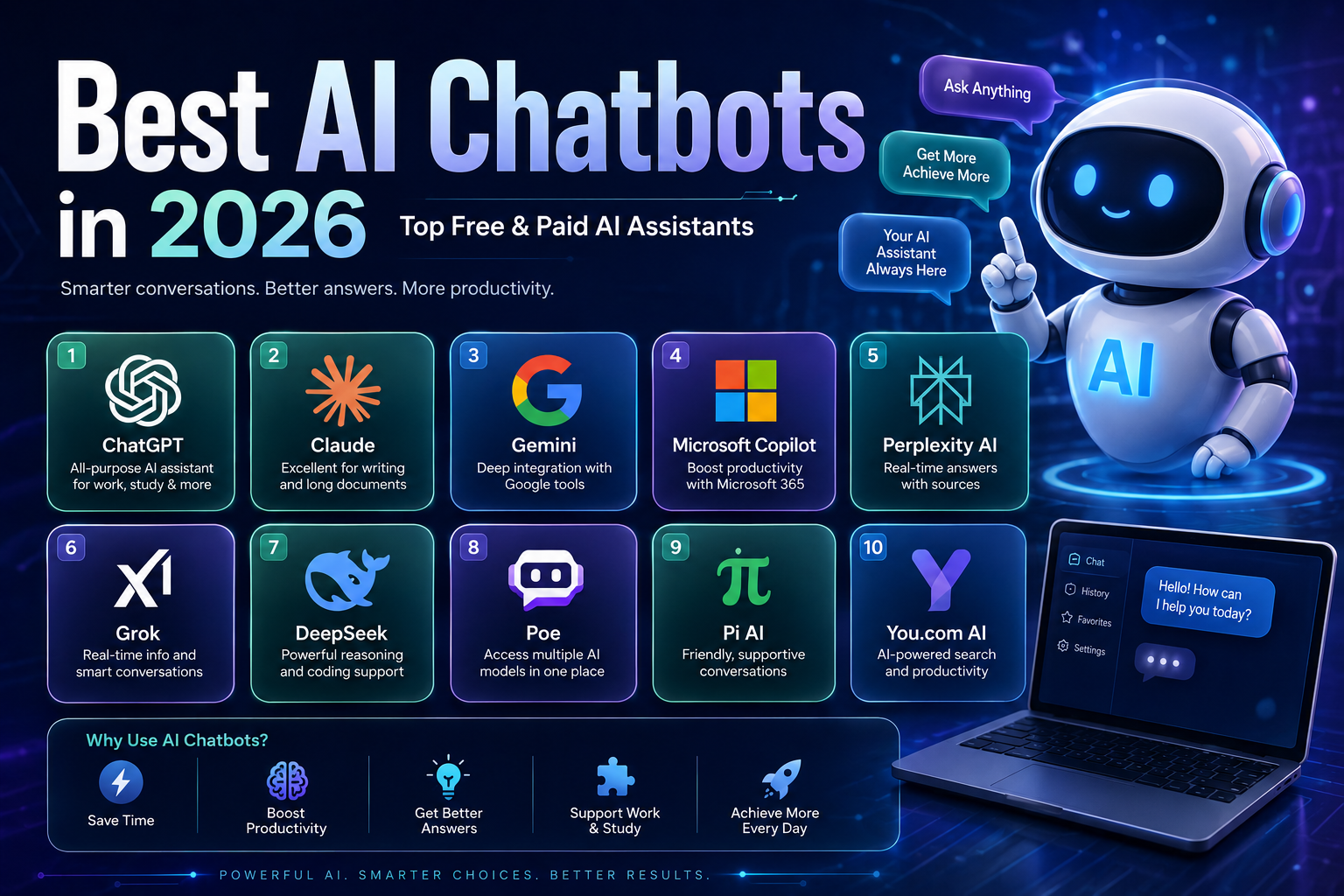
ChatGPT is a strong general-purpose option, while Claude is particularly useful for writing, reasoning, and working with large amounts of information. Gemini is a natural choice for people already using Google’s ecosystem, and Microsoft Copilot makes the most sense for users working heavily inside Microsoft 365.
For research, Perplexity takes a different approach by combining conversational answers with web search and citations. Grok focuses heavily on real-time information and web/X search, while DeepSeek has become a popular option for technical and reasoning-oriented tasks.
This guide compares 10 AI chatbots in 2026 based on their typical use cases, strengths, limitations, free access, paid options, and the type of user each platform is best suited for.
Important: AI features, usage limits, availability, and pricing change frequently. The information below reflects the products and official pricing information available when this guide was reviewed in September 2026. Always check the provider’s current pricing page before subscribing.
Quick Comparison
| AI chatbot | Best for | Free access | Web/search | Coding | Files & analysis |
|---|---|---|---|---|---|
| ChatGPT | General-purpose AI | Yes | Yes | Excellent | Excellent |
| Claude | Writing, reasoning & long documents | Yes | Yes | Excellent | Excellent |
| Google Gemini | Google ecosystem & research | Yes | Yes | Strong | Strong |
| Microsoft Copilot | Microsoft 365 users | Yes / plan-dependent | Yes | Strong | Strong |
| Perplexity | Research & source-backed answers | Yes | Excellent | Good | Good |
| Grok | Real-time information & conversational AI | Yes | Yes | Strong | Strong |
| DeepSeek | Reasoning, mathematics & coding | Yes | Limited/varies | Strong | Varies |
| Poe | Using multiple AI models | Yes | Model-dependent | Model-dependent | Model-dependent |
| Pi | Conversational assistance | Yes | Limited | Limited | Limited |
| You.com | AI search & research workflows | Yes / plan-dependent | Strong | Strong | Strong |
Quick recommendation:
- Best all-around: ChatGPT
- Best for writing and long-form reasoning: Claude
- Best for Google users: Gemini
- Best for Microsoft 365: Copilot
- Best for research: Perplexity
- Best for real-time information: Grok
- Best for technical reasoning: DeepSeek
- Best for accessing multiple models: Poe
- Best for conversational interaction: Pi
- Best for AI-powered search workflows: You.com
What Are AI Chatbots?
AI chatbots are software applications that use artificial intelligence models to communicate with users through natural language.
Modern systems are generally powered by large language models (LLMs) and, depending on the product, may also connect to web search, files, images, software tools, or external services.
Instead of following only fixed scripts, modern AI assistants can generate responses based on the context of a conversation.
Depending on the platform, you can use an AI chatbot to:
- Answer questions
- Explain difficult subjects
- Summarize documents
- Write and edit text
- Generate ideas
- Translate languages
- Analyze data
- Write and debug code
- Search the web
- Analyze images
- Create or edit media
- Prepare reports
- Assist with research
- Organize information
However, these capabilities are not identical across platforms. A chatbot that is excellent at research may not be the best option for coding, while a strong coding assistant may not provide the best web-search experience.
That is why use case matters more than a universal ranking.
How We Compared These AI Chatbots
Rather than ranking chatbots simply by popularity, this comparison focuses on practical differences that matter when choosing an AI assistant.
We considered:
1. General capability
How useful is the chatbot for everyday questions, writing, reasoning, brainstorming, and problem solving?
2. Research and web access
Does it provide current information, web search, source citations, or research-oriented features?
3. Coding
How useful is the platform for writing, explaining, debugging, and analyzing code?
4. Documents and files
Can users upload files and ask the chatbot to summarize, analyze, or transform them?
5. Multimodal capabilities
Does the chatbot work with images, voice, or other types of input and output?
6. Ecosystem and integrations
Does it connect naturally with services users already depend on?
7. Free access
Can users get meaningful value without paying for a subscription?
8. Pricing and limits
Are paid plans useful for frequent users, and are there important usage restrictions to understand?
Because AI products change rapidly, this guide emphasizes what each platform is best suited for rather than treating today’s exact feature list as permanent.
1. ChatGPT
ChatGPT is one of the most versatile general-purpose AI assistants available.
It can handle everyday questions, writing, coding, document analysis, data-related tasks, image generation, voice interactions, and research-oriented workflows.
The free plan provides access to core capabilities with usage limits, while ChatGPT Plus is currently listed at $20 per month. OpenAI notes that limits and model availability can change over time.
Best for
- General-purpose AI assistance
- Content creation
- Coding
- Brainstorming
- Students
- Research
- Data and document analysis
- Everyday productivity
Why ChatGPT stands out
Its main advantage is breadth.
You do not need a separate AI tool for every small task. The same interface can be used to draft an article, analyze a spreadsheet, explain programming code, summarize a document, brainstorm marketing ideas, or work through a complicated problem.
The free version also gives users access to web search and limited versions of several advanced capabilities, while paid plans increase access and usage limits.
Advantages
- Broad range of capabilities
- Strong writing and coding assistance
- Web search
- File uploads and analysis
- Image generation
- Voice features
- Useful for both beginners and advanced users
- Large ecosystem of tools and workflows
Limitations
- Usage limits vary by plan and system conditions.
- Important information still needs verification.
- Some advanced capabilities require a paid subscription.
- The large number of features can make the platform feel complex to new users.
Best choice if:
You want one AI assistant that can handle many different types of work rather than a highly specialized tool.
2. Claude
Claude is developed by Anthropic and has become particularly popular for writing, reasoning, coding, and working with large amounts of information.
Claude offers a free plan. Its Pro plan is listed at $20 per month when billed monthly, with an annual option at a discounted effective monthly rate.
Best for
- Long-form writing
- Document analysis
- Coding
- Research
- Complex reasoning
- Professional writing
- Large projects
Why Claude stands out
Claude is particularly appealing when the quality of the reasoning and writing matters more than having the largest possible collection of consumer features.
It can analyze text and images, generate code, search the web, and support extended projects. Anthropic also provides features such as Projects, Research, Claude Code, and integrations for paid users.
Advantages
- Strong writing quality
- Good handling of complex instructions
- Strong coding capabilities
- Useful for large documents and projects
- Research capabilities
- Clean interface
Limitations
- Usage limits apply.
- Some advanced capabilities are plan-dependent.
- Availability and pricing can vary by region.
- It may not be the best choice if your workflow depends heavily on another company’s ecosystem.
Best choice if:
Your priority is writing, reasoning, coding, and working with substantial amounts of information.
3. Google Gemini
Google Gemini is Google’s AI assistant and is particularly interesting for people already using Google Search, Gmail, Docs, Drive, and other Google services.
Google offers free access alongside paid Google AI plans. Google AI Pro is currently listed at $19.99 per month in the United States, although availability and pricing can vary by country.
Best for
- Google Workspace users
- Research
- Students
- Writing
- Multimodal tasks
- People using Google services heavily
Why Gemini stands out
Its biggest advantage is its connection to Google’s ecosystem.
Depending on the plan and region, Gemini can work alongside Google products and provide access to advanced research and creative capabilities. Google also offers Deep Research and expanded access to its more capable models through paid plans.
Advantages
- Strong connection to Google services
- Web and search capabilities
- Multimodal functionality
- Research features
- Useful for Google Workspace users
- Strong ecosystem integration
Limitations
- Feature availability varies by country.
- Some advanced capabilities are restricted to paid plans.
- Google changes product names, models, and plan structures frequently.
Best choice if:
You already spend much of your working day inside Google Search, Gmail, Docs, Drive, or other Google products.
4. Microsoft Copilot
Microsoft Copilot is Microsoft’s AI assistant ecosystem.
Its biggest advantage is not simply the chatbot itself, but its integration with Microsoft’s productivity software.
For organizations and professionals using Microsoft 365, Copilot can assist with workflows involving applications such as Word, Excel, PowerPoint, Outlook, and Teams.
Microsoft’s current business pricing includes several Copilot options. Microsoft 365 Copilot Business is listed from $18 per user per month when paid yearly under the displayed offer, while other Microsoft 365 packages bundle Copilot with broader software and services. Pricing and eligibility vary by plan and region.
Best for
- Microsoft 365 users
- Business professionals
- Corporate teams
- Enterprise workflows
- Word, Excel, Outlook and Teams users
Advantages
- Deep Microsoft ecosystem integration
- Useful workplace features
- Strong document and productivity workflows
- Coding assistance through Microsoft’s developer ecosystem
- Business-oriented security and administration options
Limitations
- The most useful workplace features can require paid Microsoft licensing.
- Microsoft offers multiple Copilot products, which can make pricing and product selection confusing.
- The experience is most compelling for users already invested in Microsoft 365.
Best choice if:
Your work revolves around Word, Excel, Outlook, Teams, PowerPoint, and Microsoft 365.
5. Perplexity
Perplexity takes a different approach from traditional chatbots.
Instead of focusing primarily on a conversational assistant, Perplexity combines AI-generated responses with web search and source references.
That makes it particularly useful when the user wants to investigate a topic rather than simply generate text.
Best for
- Research
- Current information
- Fact checking
- Students
- Journalists
- Market research
- Source discovery
Why Perplexity stands out
The biggest advantage is its research-oriented workflow.
A useful research answer is not only about producing fluent text. Users often need to know where the information came from so they can investigate the original sources.
Perplexity’s paid plans provide access to additional capabilities and models. Its Pro offering has been listed at $20 per month, while enterprise pricing is separate.
Advantages
- Strong web-search experience
- Source citations
- Research-oriented interface
- Useful for current topics
- Multiple model options on paid plans
Limitations
- It is not necessarily the best tool for every creative or productivity task.
- Search results and citations still need to be checked.
- Some advanced functionality is paid.
Best choice if:
Your primary question is “Help me research this and show me where the information came from.”
6. Grok
Grok is the AI assistant developed by xAI.
Grok has increasingly focused on real-time information, web search, X search, conversation, coding, and multimodal capabilities.
As of the current pricing information, xAI offers a free Grok tier, while SuperGrok is listed at $30 per month and SuperGrok Plus at $100 per month. Paid plans provide higher usage limits and additional capabilities.
Best for
- Current events
- Real-time information
- Web and X search
- Developers
- General conversations
- Multimodal tasks
Advantages
- Real-time web search
- X search
- Voice features
- Coding assistance
- Image and video generation on paid plans
- Free tier available
Limitations
- Higher usage levels require paid plans.
- Information obtained from social platforms should be evaluated carefully.
- Some capabilities vary according to plan and region.
Best choice if:
You want an AI assistant with a strong focus on current information, web search, and X-related content.
7. DeepSeek
DeepSeek has attracted significant attention for reasoning and programming-oriented tasks.
It is particularly interesting for users who want an AI assistant for technical questions, mathematics, logical reasoning, and coding.
Best for
- Programming
- Mathematics
- Technical questions
- Reasoning
- Students
- Developers
Advantages
- Strong technical capabilities
- Useful coding assistance
- Strong reasoning-oriented use cases
- Accessible for users who want to experiment with another major AI model
Limitations
- Its ecosystem is smaller than some major consumer AI platforms.
- Features and availability can change.
- Users should review the provider’s privacy and data practices before submitting sensitive information.
Best choice if:
Your work is heavily focused on coding, technical problem solving, mathematics, or reasoning.
8. Poe
Poe is different from most entries on this list because its main attraction is access to multiple AI models through one platform.
Instead of maintaining separate conversations across several AI services, Poe allows users to interact with different models and bots from a single interface.
Best for
- Comparing AI models
- AI enthusiasts
- Writers
- Students
- Experimenting with different assistants
- Custom bots
Advantages
- Multiple AI models in one platform
- Easy model comparison
- Custom bots
- Web and mobile access
- Convenient for users who experiment with different models
Limitations
- Usage limits depend on the plan and model.
- Access to particular models can change.
- It may be less suitable for users who only need one primary AI assistant.
Best choice if:
You want to compare or use several AI models without constantly switching between different platforms.
9. Pi
Pi is designed around natural and conversational interaction.
Rather than competing directly with every productivity-oriented AI assistant, Pi has traditionally focused on approachable conversations, brainstorming, reflection, and everyday assistance.
Best for
- Casual conversations
- Brainstorming
- Everyday assistance
- Conversational interaction
Advantages
- Natural conversational style
- Simple interface
- Easy to approach for casual users
- Useful for brainstorming and discussion
Limitations
- Less suited to advanced coding workflows.
- Less business-focused than enterprise-oriented assistants.
- Feature depth is narrower than broader AI platforms.
Best choice if:
You care more about natural conversation and brainstorming than advanced productivity features.
10. You.com
You.com combines AI search, research, and AI-powered workflows.
It is particularly interesting for users who want search and research capabilities while also working with AI models.
You.com also provides developer-focused APIs for web search, content extraction, answers, and research. Its current API documentation lists usage-based pricing, including Web Search API pricing of $5 per 1,000 calls and a free allowance for new accounts. These API prices should not be confused with consumer subscription pricing.
Best for
- AI-powered search
- Research
- Developers
- Web research workflows
- AI applications
Advantages
- Strong search orientation
- Research capabilities
- Developer APIs
- Web and news search
- Useful for AI-powered research workflows
Limitations
- Product and pricing structures can change.
- Consumer and developer offerings are different.
- Some advanced features may require paid access.
Best choice if:
You want to combine AI assistance with search and research workflows, especially if you’re also interested in developer tools.
AI Chatbot Pricing: What You Actually Need to Know
A simple price table can be misleading because these products do not sell exactly the same thing.
For example, one provider may charge for a general AI subscription, another may bundle AI with cloud storage, and another may offer usage-based developer APIs.
Here are some useful reference points from current official pricing:
| Platform | Free access | Current paid reference |
|---|---|---|
| ChatGPT | Yes | Plus: $20/month |
| Claude | Yes | Pro: $20/month monthly; annual discount available |
| Gemini | Yes | Google AI Pro: $19.99/month in the U.S. |
| Microsoft Copilot | Yes / varies by product | Business pricing varies by Microsoft 365 package |
| Perplexity | Yes | Pro: $20/month |
| Grok | Yes | SuperGrok: $30/month |
| DeepSeek | Yes | Paid offerings vary |
| Poe | Yes | Paid pricing varies |
| Pi | Yes | Current offering should be checked directly |
| You.com | Yes / varies | Consumer and API pricing differ |
ChatGPT’s official pricing currently lists a free plan and Plus at $20/month. Claude lists Pro at $20/month when billed monthly, with a discounted annual option. Google lists Google AI Pro at $19.99/month in the U.S. Grok currently lists a free plan and SuperGrok at $30/month.
The important point: don’t choose a chatbot based only on the lowest subscription price.
The better question is:
Which platform gives me the capabilities I actually need at a reasonable cost?
Which AI Chatbot Should You Choose?
There is no single winner for every user.
Use this decision framework instead.
| If your priority is… | Start with… |
|---|---|
| General-purpose AI | ChatGPT |
| Writing and reasoning | Claude |
| Google ecosystem | Gemini |
| Microsoft 365 | Copilot |
| Web research and citations | Perplexity |
| Real-time web/X information | Grok |
| Technical reasoning and coding | DeepSeek |
| Multiple AI models | Poe |
| Natural conversation | Pi |
| AI-powered search workflows | You.com |
Free vs. Paid AI Chatbots
A free AI chatbot can be enough for many people.
If you only need occasional answers, brainstorming, simple writing, or basic research, paying for a subscription may not provide enough additional value to justify the cost.
Paid plans become more attractive when AI is part of your daily workflow.
Free plans are usually enough for:
- Occasional questions
- Basic writing
- Simple brainstorming
- Learning
- Light research
- Experimenting with AI
Paid plans become more useful for:
- Frequent professional use
- Larger usage limits
- Advanced models
- Deeper research
- More extensive file analysis
- Advanced image or media generation
- Higher priority during busy periods
- Professional workflows
However, “paid” does not automatically mean “better for you.”
A free chatbot that handles your actual workflow well can be more valuable than an expensive subscription whose advanced features you rarely use.
What Features Matter Most in an AI Chatbot?
Before choosing a platform, focus on the features that directly affect your workflow.
1. Web Search
If you regularly research current events, products, companies, or changing technical information, web access can be extremely useful.
But web access does not eliminate the need for verification. AI can still misunderstand sources or summarize them incorrectly.
2. File and Document Analysis
If you work with PDFs, spreadsheets, reports, or long documents, file support can make a major difference.
Look beyond whether a platform technically accepts files. Check whether the plan you’re considering gives you enough usage for your workload.
3. Coding
For developers, useful features include:
- Code generation
- Debugging
- Explanation
- Refactoring
- Code review
- Working with larger codebases
- Tool or terminal integration
4. Multimodal Input
Some assistants can work with combinations of text, images, documents, audio, or video.
This can be useful for tasks such as analyzing screenshots, understanding diagrams, or discussing visual information.
5. Integrations
An AI assistant becomes more useful when it fits into the tools you already use.
For example:
- Google users may prefer Gemini.
- Microsoft 365 users may prefer Copilot.
- Developers may prefer platforms with strong coding and tool integrations.
- Researchers may prefer assistants built around web search and citations.
6. Privacy Controls
Before uploading confidential documents, review the provider’s privacy policy and the settings available on your plan.
Don’t assume that every AI service handles user data in exactly the same way.
How to Get Better Results From AI Chatbots
The quality of an AI response depends partly on how you structure the task.
Give the AI a Clear Goal
Instead of:
Write something about email marketing.
Try:
Write a 700-word beginner guide explaining how email segmentation works. Use clear headings, practical examples, and avoid unsupported statistics.
The second request gives the model a defined objective.
Provide Relevant Context
Tell the chatbot what it needs to know.
Useful context can include:
- Your target audience
- Your objective
- The desired format
- Your level of expertise
- Important constraints
- Examples of the desired output
Ask for a Specific Format
If you want a table, checklist, summary, outline, or step-by-step explanation, say so.
Break Large Tasks Into Stages
Instead of asking an AI chatbot to perform a complicated project in one prompt, divide the process.
For example:
- Define the objective.
- Create an outline.
- Identify missing information.
- Produce the first version.
- Review it.
- Improve the final output.
This makes it easier to identify mistakes.
Ask the AI to Challenge Its Own Answer
For important work, you can ask:
What assumptions are you making?
or:
Identify the parts of this answer that need verification.
This does not guarantee accuracy, but it can reveal areas that deserve additional checking.
Why You Should Not Trust AI Blindly
AI chatbots are useful, but fluent language is not proof of accuracy.
A chatbot can produce an answer that sounds convincing while containing:
- Incorrect facts
- Outdated information
- Missing context
- Misinterpreted sources
- Incorrect calculations
- Invented references
- Overconfident conclusions
This matters especially for:
- Medical information
- Legal questions
- Financial decisions
- Scientific claims
- Current events
- Business research
- Technical configuration
For important decisions, use the AI response as a starting point and verify critical information using reliable primary or official sources.
Common Mistakes When Using AI Chatbots
Mistake 1: Choosing the most popular chatbot automatically
Popularity does not mean the tool is the best fit for your workflow.
A researcher may prefer Perplexity, a Google Workspace user may prefer Gemini, and a Microsoft 365 user may benefit more from Copilot.
Mistake 2: Paying for features you don’t use
Before subscribing, identify the features you actually need.
If you only ask a few questions per week, a free plan may be enough.
Mistake 3: Treating AI-generated text as automatically accurate
Always review important outputs.
Mistake 4: Uploading confidential information without checking privacy settings
Read the provider’s privacy documentation before submitting sensitive information.
Mistake 5: Comparing chatbots only by model names
The underlying model matters, but so do:
- Search
- File handling
- Integrations
- Usage limits
- Interface
- Ecosystem
- Privacy controls
- Price
The best model on paper may not be the best tool for your actual workflow.
Mistake 6: Using one chatbot for everything
Different assistants have different strengths.
You may get better results by using one platform for research and another for writing or coding.
Are AI Chatbots Actually Worth Paying For?
It depends on how much value they provide in your workflow.
Consider a simple example.
Suppose an AI subscription costs $20 per month and regularly helps you complete tasks that would otherwise require several hours of work.
The subscription may be worthwhile if the time saved is genuinely valuable to you.
But if you only use the chatbot a few times each month, the free plan may be sufficient.
The decision should therefore be based on usage and value, not on the idea that premium AI is automatically superior.
AI Chatbots vs. Traditional Search Engines
AI chatbots and search engines solve related but different problems.
A search engine is excellent for discovering websites, comparing sources, finding specific pages, and exploring a broad set of results.
An AI chatbot is often better when you want to:
- Explain a concept
- Summarize information
- Transform text
- Brainstorm
- Analyze a document
- Work through a problem
- Continue a conversation
The two approaches can complement each other.
For research, a strong workflow is often:
Ask the AI → inspect the sources → open primary sources → verify important claims → form your conclusion.
This is generally safer than accepting an AI-generated answer without checking where it came from.
Are AI Chatbots Safe to Use?
AI chatbots are useful tools, but “safe” depends on how you use them and what information you provide.
Before using a chatbot for sensitive work, review:
- Privacy policies
- Data retention practices
- Training/data controls
- Enterprise security options
- Account security
- Available administrative controls
For personal use, avoid sharing information that you would not want exposed unless you have reviewed the platform’s relevant privacy controls and understand how your data is handled.
For businesses, security requirements should be evaluated separately because enterprise plans may offer controls that consumer plans do not.
Frequently Asked Questions
What is the best AI chatbot in 2026?
There is no universal winner.
ChatGPT is one of the strongest all-purpose choices, while Claude, Gemini, Copilot, Perplexity, Grok, and DeepSeek can be better choices for specific workflows.
Which AI chatbot is best for writing?
ChatGPT and Claude are strong general choices for writing.
Claude is particularly appealing for long-form writing and editing, while ChatGPT provides a broader collection of writing, research, analysis, and multimodal features.
Which AI chatbot is best for research?
Perplexity is one of the strongest choices when source-backed web research is the priority because its workflow is built around search and citations.
Gemini, ChatGPT, and You.com are also useful for research depending on the task.
Which AI chatbot is best for coding?
ChatGPT, Claude, Gemini, Copilot, and DeepSeek can all be useful for coding.
The best choice depends on the programming language, project size, integrations, development environment, and how much tool access you need.
Which AI chatbot is best for students?
There is no single answer.
Students may find ChatGPT or Gemini useful for general learning, Claude useful for writing and document work, and Perplexity useful when researching topics and following sources.
Students should use AI to understand material rather than simply submitting AI-generated work as their own.
Are AI chatbots free?
Many major AI chatbots provide free access.
However, free plans usually have usage limits or restricted access to advanced models and features.
Is ChatGPT better than Claude?
Not universally.
ChatGPT has a broad ecosystem and a wide range of capabilities, while Claude is particularly strong for writing, reasoning, coding, and extended projects.
The better option depends on your workflow.
Can AI chatbots replace Google Search?
They can replace some types of searches, but they do not completely replace traditional search.
Search engines remain useful for discovering multiple sources and navigating directly to websites, while AI assistants are useful for conversational research and transforming information.
Can AI chatbots make mistakes?
Yes.
AI systems can generate incorrect or incomplete information. Important claims should be verified using trustworthy sources.
Should I use more than one AI chatbot?
For many users, yes.
Using two or three complementary tools can be useful when their strengths differ.
For example, you might use one assistant for general work, another for source-backed research, and another for a specific development workflow.
Final Verdict: Which AI Chatbot Is Right for You?
The best AI chatbot in 2026 is not necessarily the one with the longest feature list.
It is the one that fits the way you actually work.
Choose ChatGPT if you want a versatile all-purpose assistant that can handle writing, coding, research, files, images, and everyday tasks.
Choose Claude if your priorities are high-quality writing, reasoning, coding, and working with substantial amounts of information.
Choose Gemini if you rely heavily on Google’s ecosystem and want AI integrated into Google-oriented workflows.
Choose Microsoft Copilot if your work revolves around Microsoft 365 and applications such as Word, Excel, Outlook, and Teams.
Choose Perplexity if research, web search, and source discovery are your main priorities.
Choose Grok if real-time web and X information are particularly important to you.
Choose DeepSeek if you are especially interested in technical reasoning, mathematics, and coding.
Choose Poe if you want convenient access to multiple AI models from one platform.
Choose Pi if natural conversation and brainstorming matter more than advanced productivity features.
Choose You.com if you want AI-powered search and research capabilities, particularly alongside developer-oriented tools.
The most practical strategy is to start with a free plan, identify the tasks you actually perform, and upgrade only when a paid feature or higher usage limit provides enough value to justify the cost.
AI chatbots are powerful assistants, but they work best when users remain involved in the process: provide context, check important information, protect sensitive data, and use the tool that fits the task rather than assuming one chatbot is best at everything.
Related Articles
Continue exploring the best AI software with these expert guides:
- Best AI Automation Tools
- Best AI Productivity Tools
- Best AI SEO Tools
- Best AI Writing Tools
- Best AI Marketing Tools
- Best AI Video Tools
- Best AI Image Generator
- Best AI Email Subject Line Generator