AI Agents vs AI Chatbots: 7 Key Differences You Need to Know in 2026
— August 14, 2026
If you ask an AI chatbot:
“Find the best CRM for my small business.”
It may give you a list of CRM platforms, explain their differences, and help you choose one.
An AI agent can potentially go further. Depending on how it is built and what permissions it has, it could search for relevant products, gather information from websites or connected systems, compare options against your requirements, use external tools, and complete several steps toward a defined goal.
That difference is important—but it is also easy to oversimplify.
An AI agent is not simply a smarter chatbot, and a chatbot is not necessarily incapable of using tools. Modern AI systems can combine conversation, retrieval, tool calling, memory, and automation in many different ways.
The more useful question is:
Is the AI mainly helping you communicate and get an answer, or is it designed to work toward an outcome?
This guide explains the seven practical differences between AI chatbots and AI agents, when each approach makes sense, and why the safest solution is often a combination of AI, automation, tools, and human approval.
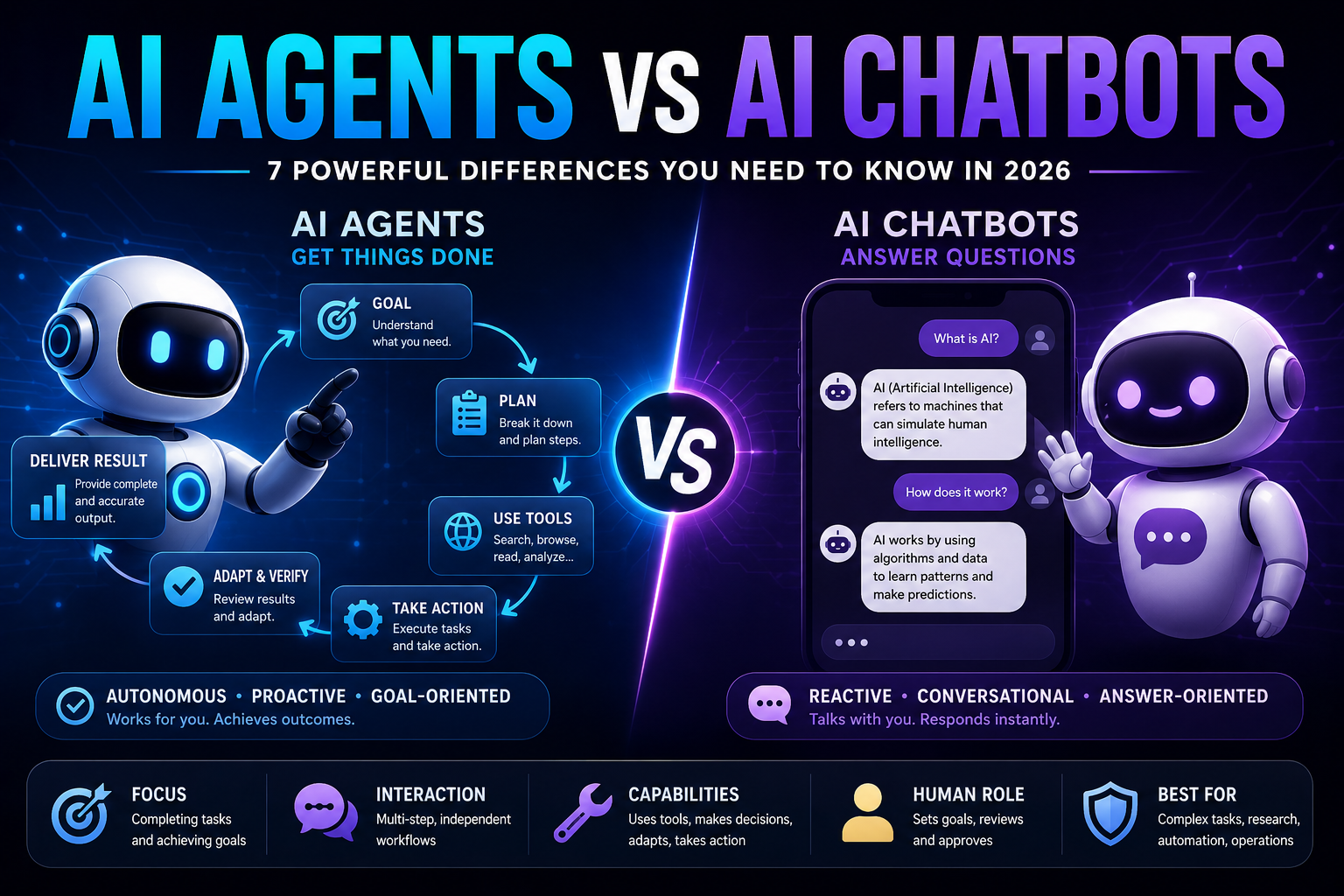
AI Agents vs AI Chatbots: The Difference in 30 Seconds
The simplest way to think about the distinction is:
AI chatbot:
You ask → AI processes the request → AI responds.
AI agent:
You define a goal → AI reasons about the task → uses tools → observes results → decides what to do next → continues until the task is completed or human input is required.
Google Cloud describes AI agents as software systems that pursue goals and complete tasks on behalf of users, with capabilities such as reasoning, planning, memory, and some degree of autonomy.
However, these categories overlap.
A chatbot can use tools.
An agent can communicate through a chat interface.
An agent can also operate with strict human approval rather than being fully autonomous.
So the difference is better understood as system behavior and architecture, not simply the user interface.
Quick comparison
| Capability | AI Chatbot | AI Agent |
|---|---|---|
| Primary purpose | Conversation and assistance | Goal completion |
| Answers questions | Yes | Yes |
| Uses external tools | Sometimes | Often central to the design |
| Multi-step execution | Usually limited | Core capability |
| Makes decisions between steps | Limited or user-driven | Often system-driven |
| Adapts to intermediate results | Sometimes | Usually important |
| Takes actions | Usually limited | Can, if authorized |
| Human approval | Common | Common and often recommended |
| Best for | Answers, explanations, simple assistance | Complex, multi-step tasks |
The important point is that “agent” describes how an AI system operates, not how intelligent the underlying model is.
1. The First Difference: Chatbots Focus on Conversation, Agents Focus on Outcomes
The most useful distinction is the job the system is designed to perform.
What is an AI chatbot?
An AI chatbot is primarily a conversational interface.
You ask:
“What is technical SEO?”
It explains technical SEO.
You follow up:
“What are the most common technical SEO problems?”
It answers again.
The interaction is centered around communication.
This makes chatbots useful for:
- Answering questions
- Explaining concepts
- Summarizing information
- Translating text
- Generating content
- Brainstorming
- Providing simple assistance
- Answering frequently asked questions
The user generally decides what happens next.
What is an AI agent?
An AI agent is designed to pursue a goal through one or more actions.
For example:
“Audit my website and identify the five SEO problems that should be fixed first.”
That task could involve:
Inspect website → collect information → analyze pages → identify problems → prioritize findings → create report
The system is no longer just generating an answer.
It is coordinating a process.
Google Cloud identifies reasoning, planning, tools, data, orchestration, and runtime as important building blocks of agent systems.
The practical rule
Chatbot = answer-oriented
Agent = outcome-oriented
This is a useful mental model, not a formal universal definition.
2. The Second Difference: Agents Can Work Across Multiple Steps
Consider the request:
“Find the best CRM for my five-person ecommerce business. My budget is $300 per month, and I need WhatsApp integration, automation, and lead scoring.”
A conventional chatbot might recommend several CRM platforms and explain their strengths.
That can already be useful.
But you may still need to:
- Visit vendor websites
- Check current pricing
- Verify integrations
- Compare plans
- Check limitations
- Read documentation
- Decide which product fits
An agentic system could potentially perform several of those steps itself.
A simplified workflow might look like this:
1. Understand the requirements
↓
2. Search for candidate CRMs
↓
3. Filter unsuitable options
↓
4. Retrieve pricing and feature information
↓
5. Compare the remaining products
↓
6. Check important requirements
↓
7. Produce a recommendation
The key difference is not that the agent necessarily knows more.
It is that the system is designed to continue working after the initial response.
3. The Third Difference: Agents Make Decisions About What Happens Next
This is one of the most important characteristics of agentic systems.
Imagine an AI system researching a company.
It searches for pricing.
The page doesn’t contain the information.
A simple workflow may stop.
An agent may have several possible next actions:
“The pricing page doesn’t provide the information I need. I should search the company’s documentation or another official source.”
The system then chooses another action based on what it discovered.
That creates a loop:
Goal
↓
Reason
↓
Act
↓
Observe
↓
Reason again
↓
Act again
↓
Verify
↓
Finish
Anthropic distinguishes traditional workflows from agents in a similar way: workflows generally follow predefined paths, while agents dynamically direct their own process and tool use. Anthropic also recommends using the simplest architecture that can reliably solve the problem because agentic systems can introduce additional latency, cost, and failure modes.
Why this matters
A fixed workflow might say:
“If X happens, do Y.”
An agent can potentially determine:
“Given what happened, what should I do next?”
That flexibility is powerful—but it also makes the system harder to predict.
4. The Fourth Difference: Agents Usually Need Tools and External Systems
A language model can generate text, but it cannot automatically access every system in your business.
Tools give an AI system additional capabilities.
Examples include:
- Web search
- Browsers
- Databases
- APIs
- Calculators
- Code execution
- File systems
- Calendars
- CRMs
- Project-management software
- Internal company databases
Google describes tools as defined capabilities that determine what an agent can actually do, while the model acts as the reasoning engine.
For example, consider a customer-support system.
A language model may understand:
“Where is my order?”
But a tool can actually retrieve:
Order #18492 → shipped → expected Tuesday
The AI can then turn that information into a useful response.
Why tool access changes the risk level
There is a major difference between:
“The customer may qualify for a refund.”
and:
“I have issued the refund.”
The first is information.
The second is an action.
If an AI system can access financial systems, customer records, production environments, or email accounts, mistakes can have real consequences.
That’s why tool access should be paired with:
- Least-privilege permissions
- Authentication
- Logging
- Monitoring
- Validation
- Approval steps
- Clear action boundaries
An agent is only as safe as the capabilities you give it.
5. The Fifth Difference: Agents Can Use Memory, Context, and State
Another important distinction is the amount of information an AI system can maintain throughout a task.
Imagine a research task that takes 20 steps.
The system may need to remember:
- What it has already searched
- Which sources it rejected
- Which files it analyzed
- What requirements the user specified
- Which actions have already been completed
- What remains unfinished
This is where context, state, and memory become important.
Google’s agent architecture identifies data architecture and memory as important parts of agent systems.
However, memory does not automatically mean that an agent permanently remembers everything.
Different systems implement memory differently.
Some maintain information only during a task.
Others store selected information for future interactions.
Others use external databases or retrieval systems.
So when evaluating an AI agent, ask:
What does it remember, where is that information stored, and how long does it remain available?
That question matters for both functionality and privacy.
6. The Sixth Difference: Agents Can Take Actions, Not Just Generate Responses
This is where agentic AI becomes especially interesting for businesses.
A chatbot might help write an email:
“Here is a professional follow-up email.”
An agent connected to an email system could potentially:
- Identify the recipient.
- Read relevant context.
- Draft the message.
- Check the user’s instructions.
- Prepare the email.
- Request approval.
- Send it.
The important difference is the transition from:
Generate
to
Generate + execute
That doesn’t mean agents should always be allowed to execute actions automatically.
In many situations, the better architecture is:
AI prepares → human reviews → system executes
This is often called a human-in-the-loop approach.
7. The Seventh Difference: Agents Introduce More Autonomy—and More Risk
The biggest benefit of agents is also one of their biggest risks.
A chatbot might produce an incorrect answer.
An agent might produce an incorrect answer and act on it.
Consider a customer-service system.
Chatbot
“This customer may qualify for a refund.”
A human decides what happens.
Agent with refund permissions
“Refund approved and processed.”
If the underlying decision was wrong, the mistake has already affected the business.
That’s why more autonomy isn’t automatically better.
A useful agent should have the minimum autonomy necessary to create meaningful value.
The AI Autonomy Ladder
You don’t have to choose between a completely passive AI and a fully autonomous system.
There is a spectrum.
Level 1 — Observe
The AI reads information.
It takes no action.
Level 2 — Recommend
The AI recommends what should happen.
A human decides.
Level 3 — Draft
The AI prepares an action.
A human reviews it.
Level 4 — Approve
The AI prepares the action and waits for explicit confirmation.
Level 5 — Limited autonomy
The AI can automatically perform low-risk actions within defined boundaries.
Level 6 — High autonomy
The AI can perform substantial workflows with minimal human intervention.
For many business applications, Levels 2–4 are an excellent starting point.
You can increase autonomy after the system demonstrates acceptable accuracy and reliability.
How an AI Agent Works
A useful simplified architecture looks like this:
User goal
↓
Agent / orchestration layer
↓
Model
↓
Reason about the next step
↓
Select a tool
↓
Tool executes
↓
Observe the result
↓
Update context/state
↓
Decide what happens next
↓
Repeat or finish
A complete agent system may include several components:
Model
The model interprets the request and generates reasoning or actions.
Tools
Tools provide capabilities such as search, APIs, databases, code execution, or business applications.
Grounding and data
External information helps the system work with current or organization-specific data.
Memory and state
The system keeps track of relevant information across steps.
Orchestration
The orchestration layer coordinates the model, tools, data, and workflow.
Runtime
The runtime is where the agent actually operates.
Google’s current agent architecture documentation describes these elements as core concepts for building useful agent systems.
AI Agent vs AI Chatbot: A Practical Example
Let’s compare them using customer support.
Customer
“My package hasn’t arrived.”
Chatbot
The chatbot might ask for the tracking number and then explain the shipping status.
This can be perfectly adequate.
Agent
A connected agent could potentially:
- Identify the customer.
- Find the order.
- Retrieve tracking information.
- Check the expected delivery date.
- Review the company’s shipping policy.
- Determine whether escalation is necessary.
- Update the support ticket.
- Draft the response.
- Request human approval if a refund or compensation is involved.
The agent is not necessarily “smarter.”
It simply has access to more capabilities and is designed to coordinate them.
AI Agents vs Chatbots for Coding
Coding provides another useful example.
Chatbot
You ask:
“Write a Python function that reads a CSV file.”
The model produces the function.
That’s useful when the task is clearly defined.
Coding agent
You ask:
“This application crashes when importing large CSV files. Find the problem and fix it.”
A coding agent could potentially:
- Inspect the repository.
- Locate the relevant code.
- Read configuration files.
- Analyze the error.
- Modify source files.
- Run tests.
- Inspect failures.
- Modify the implementation again.
- Run the tests again.
- Prepare a final change for review.
The first task asks for code.
The second asks for an outcome.
That’s a much better way to understand the practical difference between conversational AI and agentic systems.
AI Agents vs Chatbots for Research
Suppose your goal is:
“Analyze the AI market in Saudi Arabia.”
A chatbot can provide a useful overview.
But if you need a research workflow, an agentic system could potentially:
Search → collect sources → read documents → compare findings → identify contradictions → organize evidence → prepare a report
That can reduce manual work.
But there is an important warning:
Agentic research still requires verification.
An agent can retrieve the wrong source, misunderstand evidence, or make an incorrect conclusion.
The fact that an AI performed multiple research steps does not make the final answer automatically reliable.
AI Agents vs Traditional Automation
AI agents are also frequently confused with traditional automation.
They are not the same thing.
Traditional automation
A workflow might be:
If a new lead arrives → send a welcome email.
This is predictable.
There is no reason to introduce an autonomous AI agent if a simple rule handles the job reliably.
Agentic workflow
Now consider:
“Analyze every new lead, research the company, determine its potential value, personalize the follow-up strategy, and escalate unusual opportunities.”
This task contains more uncertainty.
The system may need to interpret information and decide what to do next.
That’s where agentic behavior can become useful.
Anthropic recommends using the simplest architecture that can reliably solve the problem and notes that predictable workflows are often preferable when tasks can be clearly defined.
A useful rule
Simple rule → Automation
Simple question → Chatbot
Tool-assisted task → AI model with tools
Complex adaptive workflow → Agent
This framework prevents companies from using an agent where a simple automation would be cheaper and more reliable.
When Is a Chatbot Better Than an Agent?
Agents are not automatically better.
For many tasks, an agent would simply add unnecessary complexity.
Use a chatbot or standard AI model when you need:
- Explanations
- Summaries
- Translation
- Brainstorming
- Content generation
- Simple questions
- Basic customer support
- Document understanding
- One-step assistance
For example:
“Summarize this PDF.”
You probably don’t need an autonomous agent.
Or:
“Explain how backlinks work.”
Again, a chatbot is enough.
The best AI architecture is not the most complicated one.
It is the one that solves the problem efficiently.
When Does an AI Agent Make Sense?
An agent becomes more attractive when several of these conditions are true:
1. There is a clear goal
You know what successful completion looks like.
2. The task has multiple steps
The work cannot be reduced to one simple operation.
3. The system needs external tools
For example, a CRM, browser, database, API, or code environment.
4. The next step depends on what happens
The system needs to adapt to intermediate results.
5. The task happens frequently
Repeated work makes automation more valuable.
6. Success can be measured
You can determine whether the agent actually improved the process.
If only one or two of these conditions apply, a simpler solution may be better.
The Six-Question “Do I Need an Agent?” Test
Before building or buying an AI agent, answer these questions:
1. Does the task have a clear goal?
2. Does it require multiple steps?
3. Does the next step depend on what the system discovers?
4. Does it require external tools or systems?
5. Does the task happen frequently enough to justify automation?
6. Can you objectively measure success?
5–6 Yes
You have a strong candidate for an agent.
3–4 Yes
Consider an agentic workflow or a tool-using AI system.
0–2 Yes
A chatbot, standard AI model, or traditional automation is probably enough.
This is a practical framework, not an industry-standard certification.
Why More Autonomy Is Not Always Better
Consider two systems.
System A
Saves 10 minutes per task and makes almost no costly mistakes.
System B
Saves 30 minutes per task but occasionally makes mistakes that require 45 minutes of human correction.
System A may create more value.
This is why you should not evaluate agents based only on how autonomous they appear.
Measure:
- Task completion
- Accuracy
- Reliability
- Human correction
- Cost
- Latency
- Time saved
- Business impact
The right question isn’t:
“How autonomous is this AI?”
It is:
“How much useful work does this system complete reliably?”
How to Evaluate an AI Agent
A good agent evaluation should use real tasks rather than impressive demonstrations.
For example, if you’re evaluating a customer-support agent, create a test set containing:
- Simple requests
- Ambiguous requests
- Missing information
- Incorrect customer information
- Edge cases
- Policy exceptions
- Requests requiring escalation
- Potentially dangerous actions
Then measure the results.
Task completion rate
How often did the agent actually finish the task?
Accuracy
Were its decisions correct?
Tool-use accuracy
Did it call the correct tools with the correct information?
Human intervention
How often did someone need to take over?
Cost per task
How much did the complete workflow cost?
Time to completion
How long did the agent take?
Failure severity
Were errors merely inconvenient, or could they cause financial or operational damage?
This is much more meaningful than asking whether an agent “feels intelligent.”
AI Agent Security: Why Permissions Matter
An AI agent with no external access is fundamentally different from one with broad business permissions.
Compare:
Low-risk agent
Can:
- Read documents
- Search approved websites
- Draft reports
with:
High-risk agent
Can:
- Send emails
- Modify customer accounts
- Issue refunds
- Access financial data
- Change production systems
- Delete records
The second system needs substantially stronger controls.
A useful principle is:
Give the agent only the permissions it needs to complete its job.
You should also consider:
- Authentication
- Access control
- Approval requirements
- Audit logs
- Rate limits
- Monitoring
- Rollback mechanisms
- Data protection
- Tool-level restrictions
The more powerful the tools, the more important these controls become.
Chatbots and Agents Can Work Together
The choice does not have to be:
Chatbot or agent.
A strong architecture can use both.
For example:
Customer-facing layer
Chatbot
Handles the conversation.
↓
Agent layer
Agent
Investigates the customer’s issue.
↓
Business tools
Order system + CRM + shipping API
↓
Response
Chatbot
Explains the result to the customer.
For example:
Customer: “Where is my order?”
The chatbot understands the question.
The agent retrieves the order information.
The shipping system provides the latest status.
The chatbot explains the result.
This division of responsibilities can provide a better balance between user experience, automation, and control.
The Future Is Not Simply “Agents Replace Chatbots”
The AI ecosystem is becoming more layered.
A realistic architecture may include:
AI models for reasoning and generation.
Chatbots for communication.
Retrieval systems for accessing information.
Automation for predictable processes.
Agents for adaptive multi-step tasks.
Humans for judgment, approvals, exceptions, and accountability.
This means the future is unlikely to be about replacing every chatbot with an autonomous agent.
Instead, organizations will increasingly combine different components based on the task.
AI Agents vs AI Chatbots: Which Should You Choose?
Use this decision framework.
| Your requirement | Best starting point |
|---|---|
| Answer questions | AI chatbot |
| Explain a concept | AI chatbot |
| Summarize a document | AI model/chatbot |
| Generate content | AI model/chatbot |
| Follow fixed rules | Traditional automation |
| Retrieve current information | AI model + tools |
| Search several sources | Tool-using AI or agent |
| Complete a multi-step workflow | AI agent |
| Modify files and run tests | Coding agent |
| Investigate customer issues | Agent + business tools |
| Perform sensitive actions | Agent + human approval |
| Execute predictable repetitive tasks | Automation |
The goal is to avoid both extremes:
Under-engineering: using a chatbot for a workflow that requires many manual steps.
Over-engineering: building an autonomous agent for a task that a simple rule can solve.
A Practical Example: Small Ecommerce Business
Imagine a small ecommerce company receives hundreds of support requests each week.
A sensible progression could look like this:
Stage 1: Chatbot
Answer common questions about:
- Shipping
- Returns
- Products
- Store policies
Stage 2: Retrieval
Connect the AI to approved product and policy information.
Stage 3: Tool access
Allow it to retrieve order information.
Stage 4: Drafting
Let it prepare personalized responses.
Stage 5: Human approval
A support employee reviews sensitive responses.
Stage 6: Limited autonomy
Allow automatic handling of low-risk cases.
Stage 7: Higher autonomy
Only after the system demonstrates reliable performance should you consider giving it more authority.
This approach is usually more practical than trying to launch a fully autonomous system on day one.
The Biggest Misconception: “Agent = Smarter AI”
This is worth repeating.
An AI agent is not necessarily powered by a more intelligent model than a chatbot.
You could theoretically use the same underlying model in:
- A chatbot
- A tool-using assistant
- A workflow
- An agent
What changes is the surrounding system.
The agent may have:
- Tools
- Memory
- Planning
- Orchestration
- External data
- State
- Permissions
- Feedback loops
So:
Model intelligence and system autonomy are different things.
A powerful model inside a poorly designed agent can still produce unreliable results.
A less capable model inside a tightly controlled workflow can sometimes be extremely useful.
Final Verdict: AI Agents vs AI Chatbots
The simplest distinction is this:
AI chatbot
You ask.
It answers.
You decide what happens next.
AI agent
You define a goal.
It reasons about the task.
It uses available tools.
It observes results.
It decides what to do next.
It takes authorized actions.
It continues until the task is complete or human input is required.
But that doesn’t make agents universally better.
For a simple question, a chatbot may be faster, cheaper, and easier to control.
For a predictable process, traditional automation may be even better.
For a complex task that requires tools, multiple steps, and adaptation, an agent can provide much more value.
The most important principle is therefore:
Use a chatbot when the answer is the product. Use an agent when the outcome is the product.
And for high-impact workflows:
Give the agent enough autonomy to create value—but no more authority than the task requires.
That is a much better way to think about agentic AI in 2026 than simply asking whether agents are “smarter” than chatbots.
FAQ
Is an AI agent just an advanced chatbot?
No. The two can overlap, but an agent is generally designed around goal completion, tool use, multi-step execution, and some degree of autonomy.
Can an AI chatbot use tools?
Yes. Tool use is not exclusive to agents. A chatbot can use search, retrieval, APIs, or other tools. The more important question is how those tools are orchestrated and whether the system is designed to pursue a multi-step goal.
Does an AI agent have to be fully autonomous?
No. An agent can require human approval before taking important actions. In many business applications, this is preferable to unrestricted autonomy.
Are AI agents more intelligent than chatbots?
Not necessarily. Agentic behavior depends heavily on architecture, tools, context, orchestration, permissions, and autonomy—not simply the intelligence of the underlying model.
Are AI agents more expensive?
They can be. Multi-step execution may involve additional model calls, tool calls, infrastructure, latency, and monitoring. For simple tasks, a chatbot or traditional automation may therefore be more economical. Anthropic recommends increasing system complexity only when the additional capability justifies the trade-off.
Which is better for customer support?
A chatbot is often sufficient for FAQs and straightforward questions. An agent becomes more useful when the system needs to investigate orders, retrieve information from multiple systems, update records, or coordinate a multi-step resolution.
Which is better for coding?
A chatbot is excellent for generating, explaining, and debugging individual pieces of code. A coding agent is more useful when the goal involves inspecting a repository, modifying multiple files, running tests, interpreting failures, and iterating toward a working result.
Which is safer?
Neither category is automatically safe. A chatbot generally has fewer capabilities to cause direct changes, while an agent may have access to powerful tools. Agents therefore require careful permissions, testing, monitoring, and approval controls when they can affect real systems.
Sources and Further Reading
This article is based primarily on current guidance and technical documentation from:
- Google Cloud — What are AI agents? Definition, examples, and types
- Google Cloud — Core concepts of AI agents
- Anthropic — Building effective agents
- Microsoft Learn — AI agents and agent frameworks
- Google Search Central — Creating Helpful, Reliable, People-First Content
- Google AdSense Help — Make sure your site’s pages are ready for AdSense
The article intentionally distinguishes established concepts from our practical decision framework rather than presenting every recommendation as an industry standard.