MCP for AI Agents Explained in 2026: How Model Context Protocol Works
Model Context Protocol (MCP) has become an important open standard for connecting AI applications and agents with external tools, data sources, and business systems.
A language model can reason, summarize information, write code, and generate content. But a model by itself does not automatically have access to your CRM, database, files, calendar, internal documentation, or business applications.
That is where MCP comes in.
MCP provides a standardized protocol for AI applications to discover and interact with external tools and resources. Instead of building a completely different integration pattern for every AI application and data source, developers can use a common protocol for exposing capabilities to compatible AI clients.
Anthropic introduced MCP publicly in November 2024 as an open standard for connecting AI assistants to systems where data lives. Since then, the protocol has evolved considerably.
The MCP 2026-07-28 specification introduced major architectural changes, including a stateless protocol core, improved HTTP routing, cacheable list responses, authorization improvements, Multi Round-Trip Requests, and a formal extensions framework.
This guide explains MCP for AI agents in practical terms, including:
- What MCP is
- How MCP works
- MCP hosts, clients, and servers
- Tools, resources, and prompts
- MCP vs APIs
- MCP vs function calling
- MCP vs RAG
- Real-world AI agent use cases
- MCP and ChatGPT
- What’s new in MCP 2026
- MCP security
- How to build an MCP server
- MCP best practices
- Frequently asked questions
What Is MCP?
MCP stands for Model Context Protocol.
It is an open protocol designed to standardize how AI applications connect with external systems.
An MCP server can expose capabilities such as:
- Tools
- Resources
- Prompt templates
- Business data
- Files
- Search systems
- APIs
- Database-backed operations
A simple way to think about MCP is:
MCP is a standardized interface that helps AI applications connect to external tools and information.
For example, imagine an AI assistant that needs to:
- Search a company’s knowledge base.
- Look up a customer.
- Check an order.
- Create a support ticket.
- Generate a report.
Without a standardized interface, developers may need custom integration logic for different applications and services.
With MCP, an MCP-compatible client can connect to servers that expose those capabilities through a common protocol.
Anthropic’s original MCP announcement described the goal as replacing fragmented integrations with a more universal approach to connecting AI systems with data sources.
MCP is not an AI model
MCP does not replace:
- GPT
- Claude
- Gemini
- Llama
- Other language models
It is infrastructure that can sit between an AI application and external capabilities.
A useful mental model is:
AI model = reasoning and generation
MCP = standardized connectivity
External systems = data and actions
How MCP Works
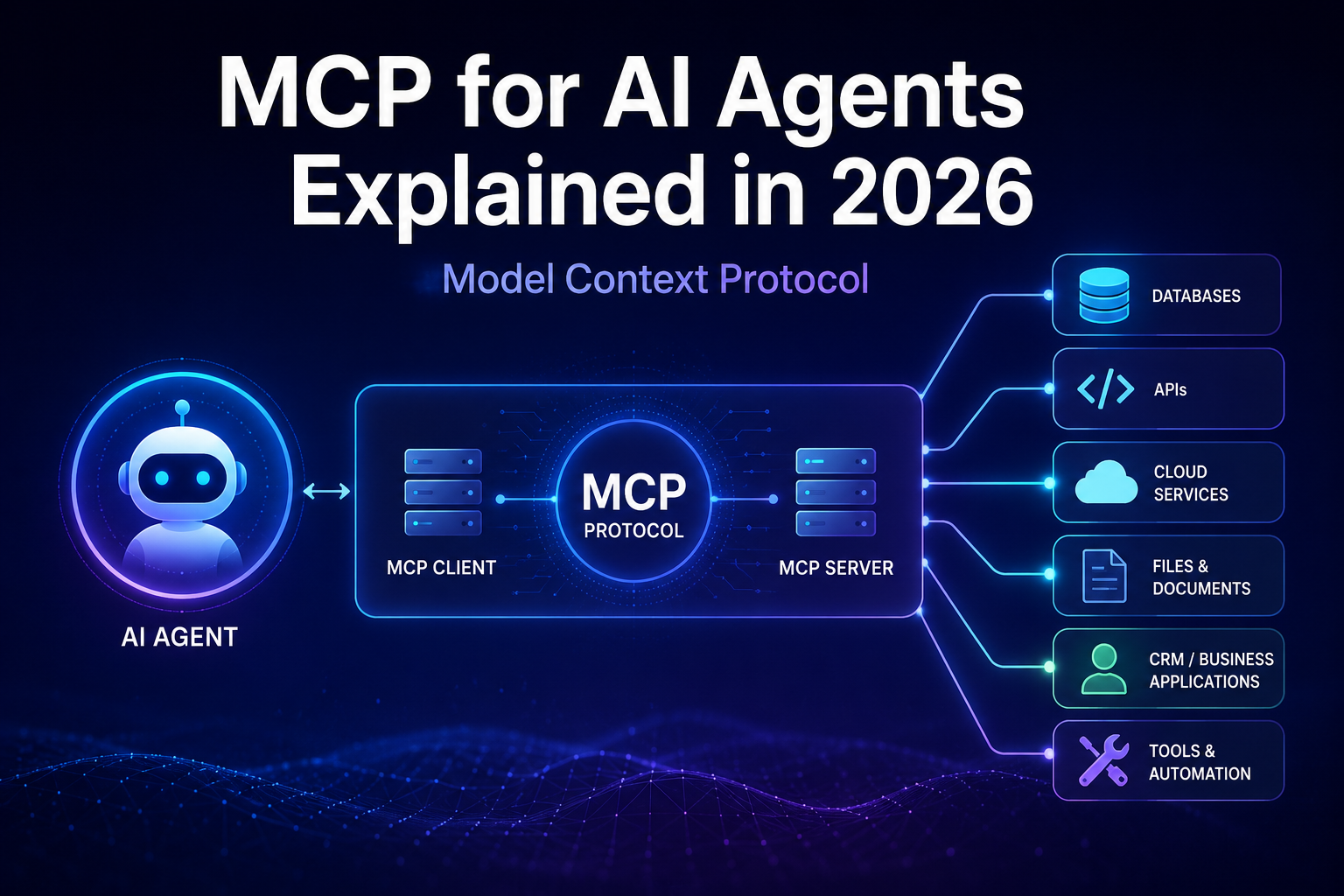
A typical MCP architecture contains three main components:
1. MCP Host
The host is the AI application that the user interacts with.
The host could be an AI assistant, coding environment, desktop application, or another AI-powered application.
2. MCP Client
The MCP client is the component inside the host that communicates with an MCP server.
A host can have one or more MCP clients, with each client maintaining communication with a particular MCP server.
3. MCP Server
The MCP server exposes capabilities that an AI application can use.
For example, an MCP server could provide access to:
- A PostgreSQL database
- A company’s CRM
- A file repository
- An internal API
- A search engine
- A project management system
The server is responsible for implementing the actual operations behind the exposed capabilities.
A simplified architecture looks like this:
User
  ↓
AI Application / Host
  ↓
MCP Client
  ↓
MCP Server
  ↓
External System
  ↓
Tool Result / Resource
  ↓
AI Application
  ↓
User
The important point is that the AI model does not directly connect to your database just because MCP is being used.
The host and MCP client handle the protocol interaction, while the MCP server exposes the capabilities and communicates with the underlying system.
A Simple MCP Example
Imagine an e-commerce company has an AI support assistant.
A customer asks:
“Where is my order #5821?”
The AI model cannot know the current order status unless the application gives it access to the relevant information.
An MCP server could expose a tool such as:
get_order_status(order_id)
The workflow could look like this:
Customer
   ↓
AI Assistant
   ↓
MCP Client
   ↓
Order MCP Server
   ↓
Orders API / Database
   ↓
Order Status
   ↓
AI Assistant
   ↓
Customer
The underlying database implementation remains behind the MCP server.
The AI application only needs to interact with the standardized MCP interface.
MCP Tools
Tools are one of the most important parts of MCP.
A tool represents an operation that an MCP server makes available to an AI application.
Examples include:
search_customer()
get_order_status()
search_documents()
create_invoice()
create_support_ticket()
update_customer()
send_email()
run_report()
A tool typically has a name, description, and input schema.
For example:
Tool:
get_order_status

Input:
{
  "order_id": "5821"
}
The server receives the request, performs the operation, and returns a result.
This makes tools particularly useful for AI agents because agents often need to take actions, not simply generate text.
The MCP specification describes tools as functions that can be invoked by language models and used to interact with external systems such as databases, APIs, and computational services.
Tool design matters
A tool called:
customer_tool()
is much less informative than:
search_customer_by_email()
Clear names and descriptions help the AI application understand when a tool is appropriate.
MCP Resources
MCP also supports resources.
Resources represent information that servers can expose to clients, such as:
- Files
- Documentation
- Database schemas
- Knowledge-base content
- Application data
- Other contextual information
A resource is identified by a URI.
For example:
company://documentation/security-policy
or:
file:///reports/sales-report.csv
The exact resource design depends on the application.
One important distinction is that resources are generally application-driven. The host decides how users or AI models interact with the available resources.
A simplified comparison is:
| MCP Feature | Primary Purpose |
|---|---|
| Tools | Perform operations |
| Resources | Provide contextual information |
| Prompts | Provide reusable prompt templates |
MCP Prompts
MCP can also expose prompt templates.
Prompts allow servers to provide structured messages and instructions that clients can discover and retrieve.
For example:
customer_support_summary
analyze_sales_report
review_code
generate_product_description
A prompt can also accept arguments.
For example:
analyze_sales_report(
    period="August 2026"
)
Prompts are different from tools.
A tool generally represents an operation, while a prompt provides a reusable interaction pattern or set of instructions.
The MCP documentation describes prompts as user-controlled capabilities that clients can expose for explicit selection and use.
MCP vs API: What’s the Difference?
MCP and APIs are related, but they are not the same thing.
API
An API is a general interface that allows software systems to communicate.
For example:
Application
    ↓
REST API
    ↓
CRM
MCP
MCP is a protocol designed around AI applications interacting with tools and resources.
For example:
AI Application
    ↓
MCP Client
    ↓
MCP Server
    ↓
CRM API
An MCP server can therefore use existing APIs behind the scenes.
This is one of the most important things to understand:
MCP does not replace APIs. It can provide a standardized AI-facing layer that uses APIs underneath.
For example, an MCP tool called:
get_customer()
might internally call:
GET /customers/12345
from a company’s existing REST API.
MCP vs Function Calling
MCP is also different from function calling.
Function calling allows an AI model to request execution of a function that the application has made available.
For example:
get_weather(city)
The application defines the function and handles what happens when the model requests it.
MCP provides a broader standardized protocol for exposing and discovering tools and other capabilities between AI applications and servers.
A simplified comparison:
| Feature | Function Calling | MCP |
|---|---|---|
| Define callable tools | Yes | Yes |
| Standard protocol | Not by itself | Yes |
| Tool discovery | Application-dependent | Standardized |
| Resources | Not inherently | Yes |
| Prompt templates | Not inherently | Yes |
| Interoperable server ecosystem | Limited | Designed for interoperability |
| Multiple external systems | Possible | Designed for this use case |
Function calling can be perfectly adequate for a simple application.
MCP becomes more interesting when you want a reusable, standardized interface between AI applications and external systems.
MCP vs RAG
MCP and Retrieval-Augmented Generation (RAG) solve different problems.
RAG
RAG is primarily a technique for retrieving relevant information and providing it to an AI model before it generates an answer.
A simplified RAG workflow is:
User Question
      ↓
Search / Retrieval
      ↓
Relevant Documents
      ↓
AI Model
      ↓
Answer
MCP
MCP provides a standardized way for AI applications to interact with external tools and resources.
For example:
User Request
      ↓
AI Application
      ↓
MCP Tool
      ↓
External System
      ↓
Result
      ↓
AI Application
The two technologies can work together.
For example, an AI agent could use an MCP server to access a company’s search or knowledge system and retrieve relevant documents.
Therefore:
RAG is primarily about retrieving useful knowledge. MCP is primarily about standardized connectivity to tools and resources.
They are complementary rather than direct competitors.
Why MCP Matters for AI Agents
A basic chatbot can answer questions using the information available to its model and application.
An AI agent often needs to do more.
An agent may need to:
- Understand a goal.
- Determine what information it needs.
- Select an appropriate tool.
- Execute an operation.
- Inspect the result.
- Decide what to do next.
- Repeat the process when necessary.
- Return the final result.
For example:
“Find our three best-selling products this month, compare them with last month, and create a report.”
An agent may need access to several capabilities:
1. Query sales data
2. Retrieve historical data
3. Calculate differences
4. Generate a report
5. Save the report
MCP can provide standardized interfaces for those capabilities.
This is why MCP is particularly relevant to agentic AI architectures.
Real-World MCP Use Cases
MCP can be used in many different AI applications.
1. AI Customer Support
A customer-support agent could connect to:
- Customer records
- Orders
- Support tickets
- Product catalogs
- Internal documentation
For example, it could retrieve an order and explain its status to the customer.
If write access is provided, it could also create a support ticket or update a record, subject to the application’s permissions.
2. AI Coding Agents
Coding assistants can use external tools to work with:
- Code repositories
- Files
- Documentation
- Issue trackers
- Development environments
- Build systems
This allows an AI coding application to interact with development infrastructure rather than simply generating code in isolation.
3. AI Sales Agents
An AI sales assistant could connect to:
- CRM records
- Customer history
- Product catalogs
- Sales analytics
- Internal sales documentation
It could retrieve information and, where authorized, perform actions such as creating a task or updating a CRM record.
4. AI Data Analysts
An AI data assistant could connect to:
- SQL databases
- Data warehouses
- Spreadsheets
- Business intelligence systems
- Reporting tools
For example, a user might ask:
“Compare revenue from this month with the same month last year.”
The agent could retrieve the relevant data, perform calculations, and produce a report.
5. AI Research Assistants
A research assistant could access:
- Internal documents
- Search systems
- Knowledge bases
- Structured datasets
- Research repositories
This allows the AI application to work with information that is not contained in the model’s built-in knowledge.
MCP and ChatGPT
MCP is not limited to one AI company.
OpenAI’s Apps SDK is built on MCP and allows developers to build applications that run inside ChatGPT while connecting to external tools and backends. OpenAI describes the Apps SDK as an extension of MCP for building ChatGPT apps.
OpenAI also documents custom MCP apps and developer mode for connecting ChatGPT with external tools and systems.
However, MCP support and permissions depend on the ChatGPT product and workspace configuration. OpenAI’s current documentation distinguishes between capabilities such as read/fetch access and full MCP support with write actions on supported business plans.
This distinction is important because it would be inaccurate to say simply that “all ChatGPT users can use any MCP server.”
The broader trend is clear, however:
AI assistants are increasingly being designed to interact with software and external systems rather than only generate responses.
What’s New in MCP 2026?
If you learned MCP from an older tutorial, the 2026-07-28 specification is especially important.
The July 28, 2026 release introduced several significant changes.
1. Stateless Protocol Core
One of the biggest changes is the move toward a stateless protocol core.
The 2026-07-28 specification removes the previous protocol-level session and Mcp-Session-Id mechanism from the Streamable HTTP transport.
Requests can therefore be handled by different server instances without requiring the protocol itself to maintain a shared session.
This makes MCP easier to operate behind ordinary HTTP infrastructure and load balancers.
Importantly, this does not mean applications cannot maintain state.
A server can still maintain application-level state using explicit identifiers or other application mechanisms.
2. Multi Round-Trip Requests
The new specification also introduces Multi Round-Trip Requests (MRTR).
This is useful when an operation needs additional information or confirmation during execution.
For example, a tool might need to ask:
“Do you want to delete these three files?”
Instead of requiring a permanently open bidirectional connection, the updated protocol can return an input-required result and allow the client to provide the requested response before continuing.
This is particularly relevant to AI agents because agent workflows often need confirmation or additional user input.
3. Header-Based Routing
The 2026-07-28 specification adds standardized HTTP headers such as:
Mcp-Method
Mcp-Name
These allow infrastructure such as gateways, load balancers, and rate limiters to route or authorize MCP traffic without needing to inspect the JSON request body.
This is an infrastructure improvement that becomes increasingly valuable as MCP deployments grow.
4. Cacheable List Results
The updated specification also introduces cache-related information for list and resource operations.
Responses can include information such as:
ttlMs
cacheScope
This allows clients to make better decisions about caching results such as available tools, prompts, and resources.
For large AI applications, reducing unnecessary tool-discovery requests can improve performance and efficiency.
5. Authorization Improvements
Authorization received significant attention in the 2026 specification.
The update includes changes around:
- Issuer validation
- Client credentials
- OAuth interoperability
- Client ID Metadata Documents
- Authorization-server mix-up protection
Dynamic Client Registration remains supported for compatibility but is being deprecated in favor of Client ID Metadata Documents.
These changes reflect a broader shift toward making MCP more suitable for production and enterprise environments.
6. Extensions
The 2026 specification formalizes an extensions framework.
Extensions can evolve independently from the core protocol.
Examples include:
- MCP Apps
- Tasks
- Enterprise-oriented authorization capabilities
This allows the ecosystem to experiment with new functionality without putting every feature directly into the protocol core.
7. Tasks for Long-Running Work
AI agents sometimes need to perform operations that do not finish immediately.
Examples include:
- Large data processing jobs
- Long-running research tasks
- Complex workflows
- Background operations
The Tasks capability was moved into an MCP extension in the 2026-07-28 release and provides a mechanism for handling longer-running work.
This is especially relevant as AI systems move from simple tool calls toward multi-step agent workflows.
Why the 2026 MCP Changes Matter
The evolution of MCP reflects a change in the questions developers are asking.
Early MCP implementations focused heavily on:
“How can I connect an AI application to a tool?”
Production systems increasingly need to answer:
“How can I operate AI-connected tools reliably, securely, and at scale?”
The 2026 release addresses several parts of that problem through stateless HTTP architecture, routing, caching, authorization improvements, extensions, and long-running task support.
The MCP roadmap published in August 2026 also highlights areas such as HTTP-native transport, agent identity, enterprise security, and future agent communication as continuing priorities.
MCP Security: What Developers Need to Know
MCP can give AI applications access to powerful capabilities.
That creates real security risks.
An MCP tool might be able to:
- Read private data
- Access files
- Modify records
- Send messages
- Execute code
- Call external services
- Delete information
Therefore, MCP should not be treated as automatically secure simply because it is a standardized protocol.
The official MCP security guidance emphasizes user consent, authorization, data protection, and careful treatment of tools.
Tool Permissions Matter
Consider these two tools:
search_customer()
and:
delete_customer()
They have very different risk profiles.
The first primarily retrieves information.
The second can perform a potentially irreversible operation.
A production system should therefore use appropriate authorization and approval mechanisms for sensitive actions.
Human Approval and User Consent
Sensitive operations should not automatically happen just because an AI model requested them.
For example:
AI Agent:

"I found three customer records that match the request.
Would you like me to delete them?"

[Cancel]   [Confirm]
A confirmation step can help prevent unintended destructive actions.
The MCP specification emphasizes that users should understand and control data access and tool operations. It also recommends appropriate consent and authorization mechanisms.
The exact user experience is the responsibility of the host application.
Validate Tool Inputs
Never assume that a tool argument generated by an AI model is safe.
For example:
delete_file(file_path)
should not blindly trust arbitrary paths.
A robust implementation should consider:
- Input validation
- Authentication
- Authorization
- Rate limiting
- Path restrictions
- Output handling
- Logging
- Error handling
This is particularly important for tools that interact with files, databases, shell commands, financial systems, or other sensitive infrastructure.
Is MCP Secure?
MCP itself is not a guarantee of security.
It is a protocol.
Security depends on the complete implementation, including:
- The MCP host
- The MCP client
- The MCP server
- Authentication
- Authorization
- Tool permissions
- Data handling
- User-consent mechanisms
- The underlying APIs and infrastructure
A useful analogy is HTTPS.
HTTPS provides important security properties for communication, but an application using HTTPS can still contain serious security vulnerabilities.
The same principle applies to MCP.
Using MCP does not automatically make an AI agent secure.
When Should You Use MCP?
MCP can make sense when an AI application needs standardized access to multiple external systems.
Consider MCP if you are building:
- AI agents
- Coding assistants
- Enterprise AI assistants
- AI automation platforms
- Multi-tool AI applications
- Internal AI systems
- AI-powered business workflows
- Applications that need interoperable tool integrations
MCP is particularly attractive when you want a reusable server interface that can potentially be consumed by multiple compatible AI applications.
When Should You Not Use MCP?
MCP is not automatically the best choice for every AI project.
Suppose your application has one model and one simple internal function:
User
 ↓
AI Model
 ↓
One Internal Function
A normal function-calling implementation may be simpler.
Adding MCP can introduce additional architecture, configuration, deployment, authentication, and operational considerations.
A good rule is:
Use MCP when standardization, interoperability, reusable tool interfaces, or multiple integrations provide meaningful architectural value.
Don’t add MCP merely because your application uses AI.
How to Build an MCP Server
The exact implementation depends on the MCP SDK and programming language you choose, but the overall process can be understood in a few steps.
Step 1: Identify the Capability
Start with the user problem.
For example:
“Allow an AI application to search our product catalog.”
That is more useful than starting with MCP itself.
Step 2: Design the Tool
Define a focused tool such as:
search_products(query)
Specify:
- Tool name
- Description
- Input fields
- Input schema
- Expected result
- Permission requirements
A good tool should do one clear job.
Step 3: Connect the Backend
The MCP server then connects to the system that actually contains the data.
For example:
MCP Server
     ↓
Product Database
Or:
MCP Server
     ↓
Product API
The MCP server acts as the interface between the AI application and the backend.
Step 4: Add Authentication and Authorization
If the system contains private information, determine:
- Who can connect?
- What can they access?
- Which tools can they use?
- Which operations require elevated permissions?
Don’t treat authentication as an optional final step.
It should be part of the architecture from the beginning.
Step 5: Validate Inputs
Validate every argument before executing the underlying operation.
For example:
search_products(query)
might require:
- A maximum query length
- Allowed characters
- Rate limits
- Access checks
More sensitive operations require stronger validation.
Step 6: Test Failure Cases
Don’t only test successful requests.
Test:
- Invalid inputs
- Missing permissions
- Expired credentials
- API failures
- Database failures
- Timeouts
- Unexpected responses
- Rate limits
An AI agent needs clear errors so it can determine what happened instead of guessing.
Step 7: Connect an MCP Client
Finally, connect the server to an MCP-compatible host or client.
Because MCP continues to evolve, developers should verify the SDK and specification version they are targeting before implementing production systems.
The official MCP documentation and SDK documentation are the best starting points for current implementation details.
MCP Best Practices
If you’re building an MCP-powered AI application, these practices can make the system easier to operate and safer.
1. Keep Tools Focused
Avoid a huge tool such as:
do_everything()
Prefer smaller capabilities:
search_customer()
get_customer()
update_customer()
create_ticket()
Focused tools make the available actions easier for both the application and developers to reason about.
2. Write Clear Tool Descriptions
The AI application needs useful information about when a tool should be used.
Instead of:
customer_tool
use something more descriptive:
Search customer records using an email address,
customer ID, or customer name.
Clear descriptions can reduce incorrect tool selection.
3. Minimize Permissions
Give each tool only the access it needs.
A tool that only reads data should not automatically have permission to modify or delete that data.
This follows the principle of least privilege.
4. Separate Read and Write Operations
A useful pattern is:
READ
search_customer()
get_order()
get_invoice()

WRITE
update_customer()
cancel_order()
create_refund()
Write operations can then receive additional authorization or confirmation requirements.
5. Log Important Actions
Maintain appropriate logs for important operations.
Logs can help with:
- Debugging
- Security investigations
- Auditing
- Performance monitoring
- Incident response
For sensitive systems, logging should also consider privacy and data-retention requirements.
6. Design for Failure
External systems fail.
APIs can return errors.
Databases can become unavailable.
Credentials can expire.
Requests can time out.
An MCP server should return structured, understandable errors rather than leaving the AI application with ambiguous results.
7. Treat Tool Descriptions as Security-Relevant
A tool description can influence whether an AI application decides to use that tool.
For that reason, developers should carefully control the MCP servers and tools they trust.
The MCP security guidance specifically warns that tool behavior and annotations should not automatically be treated as trustworthy when they come from an untrusted server.
The Biggest Mistake Beginners Make With MCP
One of the most common misconceptions is:
“MCP makes an AI agent intelligent.”
It doesn’t.
MCP provides standardized access to capabilities.
The quality of an AI agent still depends on many other factors:
- The underlying AI model
- Instructions
- Tool design
- Context
- Permissions
- Memory
- Orchestration
- Error handling
- Evaluation
- Monitoring
A useful way to think about MCP is:
MCP is infrastructure for connecting AI applications to capabilities.
It is an important part of an agent architecture, but it is not the agent itself.
MCP vs API vs RAG vs Function Calling
Here’s a quick comparison:
| Technology | Main Purpose | Typical Use |
|---|---|---|
| MCP | Standardized AI-to-tool/resource connectivity | AI agents and interoperable integrations |
| API | Software-to-software communication | Connecting applications and services |
| RAG | Retrieve relevant knowledge | Knowledge-grounded AI |
| Function Calling | Let a model request function execution | Direct application-specific tool use |
| AI Agent | Reason, plan, and act toward a goal | Multi-step automation |
These technologies can work together.
For example, a production AI agent might use:
AI Model
   ↓
Agent Orchestration
   ↓
MCP Client
   ↓
MCP Server
   ↓
API / Database / Search
   ↓
Result
And the search component could itself use RAG.
The technologies are therefore better understood as different layers of an AI system rather than mutually exclusive alternatives.
A Simple MCP Mental Model
If the architecture seems complicated, remember these six ideas:
The AI model reasons.
The host provides the AI application environment.
The MCP client communicates with servers.
The MCP server exposes capabilities.
Tools perform operations.
Resources provide information.
That gives you a simplified picture:
                 AI MODEL
                     │
                     ▼
                  HOST
                     │
                     ▼
                MCP CLIENT
                     │
                     ▼
                MCP SERVER
              /      |       \
             /       |        \
         TOOLS   RESOURCES   PROMPTS
           │          │          │
           ▼          ▼          ▼
         APIs       Data      Workflows
Once you understand this model, most MCP concepts become much easier to understand.
The Future of MCP and AI Agents
The significance of MCP is not simply that it allows AI applications to call more tools.
Its larger potential is interoperability.
Imagine an AI application that can work with standardized interfaces for:
- CRM systems
- Calendars
- Documents
- Databases
- Analytics
- Development environments
- Business applications
Instead of designing every integration around a completely different interface, developers can build around a common protocol.
That does not mean every system will immediately become interchangeable. Each server still has its own tools, permissions, data model, authentication requirements, and business logic.
But a common protocol can reduce some of the integration friction.
The MCP project is continuing to focus on scalability, enterprise security, agent identity, transport improvements, and broader agent communication.
Frequently Asked Questions
What does MCP stand for?
MCP stands for Model Context Protocol.
It is an open protocol for connecting AI applications with external tools and resources.
Is MCP an AI model?
No.
MCP is a protocol, not an AI model.
It can be used alongside different AI models and AI applications.
Is MCP the same as an API?
No.
An API is a general mechanism for software systems to communicate.
MCP is a protocol designed around AI applications interacting with tools and resources.
An MCP server can use APIs internally.
Is MCP the same as RAG?
No.
RAG primarily focuses on retrieving relevant information for an AI model.
MCP provides standardized connectivity to tools and resources.
They can be used together.
Can MCP be used to build AI agents?
Yes.
MCP is particularly useful for AI applications and agents that need to interact with external tools, data, applications, and services.
MCP does not create the agent’s reasoning or planning logic by itself.
Does MCP work with ChatGPT?
Yes, MCP is part of OpenAI’s current developer ecosystem.
OpenAI’s Apps SDK is built on MCP and is designed for building apps that can run inside ChatGPT and connect to external tools and backends.
However, available MCP capabilities depend on the ChatGPT product, workspace settings, and permissions.
Is MCP only for developers?
Implementing MCP servers and integrations is primarily a developer task.
However, the benefits can extend to businesses and end users because MCP can help AI applications interact with business systems and external data.
Is MCP secure?
MCP includes security and authorization mechanisms, but using MCP does not automatically make an AI system secure.
Developers still need appropriate:
- Authentication
- Authorization
- Input validation
- Access controls
- Consent mechanisms
- Logging
- Data protection
The official MCP security guidance emphasizes these responsibilities.
What changed in MCP in 2026?
The 2026-07-28 MCP specification introduced a stateless protocol core, Multi Round-Trip Requests, header-based routing, cacheable list results, authorization improvements, a formal extensions framework, and updated approaches to long-running Tasks.
Does MCP replace APIs?
No.
MCP and APIs can work together.
An MCP server can expose an AI-friendly tool while using an existing REST or GraphQL API behind the scenes.
Does MCP replace function calling?
Not necessarily.
Function calling is useful for direct application-specific integrations.
MCP provides a broader standardized protocol for connecting AI applications with external servers, tools, resources, and related capabilities.
Does MCP replace RAG?
No.
RAG and MCP solve different problems.
RAG focuses on retrieving useful information, while MCP provides standardized connectivity to tools and resources.
A single AI system can use both.
Final Verdict: Is MCP Worth Learning in 2026?
Yes—especially if you want to build AI agents, AI automation systems, or AI applications that interact with external software.
MCP addresses a practical problem:
How can AI applications interact with external tools, data, and systems through a standardized interface?
It does not replace APIs.
It does not replace RAG.
It does not replace function calling.
And it does not make an AI model intelligent by itself.
Instead, MCP provides an important connectivity layer between AI applications and the external systems that make agents useful.
The 2026-07-28 specification represents a significant step toward making MCP easier to operate at scale, with a stateless protocol core, HTTP-friendly routing, caching support, authorization improvements, extensions, and support for longer-running workflows.
Our recommendation
If you’re a beginner: learn the MCP host-client-server architecture first.
If you’re an AI developer: learn how tools, resources, prompts, authentication, and permissions work.
If you’re building AI agents: focus on tool design, discovery, authorization, error handling, and human approval.
If you’re building enterprise AI automation: understand MCP as one possible standardized connectivity layer rather than assuming it should replace your existing APIs.
The most important idea to remember is simple:
An AI model can reason, but an agent becomes much more useful when it can safely interact with the systems around it. MCP is one of the open standards helping make that interaction possible.
Learn More: Official MCP Resources
For technical implementation details, always prioritize the official MCP documentation and specification because the protocol continues to evolve.
- Model Context Protocol — Official Documentation Model Context Protocol Documentation
- MCP Specification MCP Specification
- MCP 2026-07-28 Specification Release MCP 2026-07-28 Specification Release
- Anthropic — Introducing the Model Context Protocol Anthropic’s MCP announcement
- OpenAI — Build with the Apps SDK OpenAI Apps SDK
- OpenAI — Developer Mode and MCP Apps OpenAI MCP Apps documentation
- MCP — 2026 Roadmap MCP 2026 Roadmap