Best AI Thumbnail Generator Tools in 2026: 5 Tools for Better YouTube Thumbnails
Updated September 2026
A YouTube thumbnail has a simple job: make someone interested enough to stop scrolling and consider watching the video.
That sounds straightforward, but creating effective thumbnails consistently can take time. You need to choose the right image, compose the layout, make text readable at small sizes, maintain visual consistency, and create enough variations to determine what works for your audience.
AI thumbnail tools can simplify much of that process.
Some platforms generate thumbnail concepts from prompts. Others combine AI with traditional design templates. Specialized YouTube tools can go further by analyzing thumbnail packaging, recreating existing concepts, or helping creators maintain a consistent visual style.
But there is an important distinction:
A visually impressive thumbnail isn’t automatically a high-performing thumbnail.
Click-through rate depends on many factors, including the video’s topic, title, audience, traffic source, and the expectations created by the thumbnail. An AI tool can help you produce and iterate on designs, but it cannot guarantee more clicks.
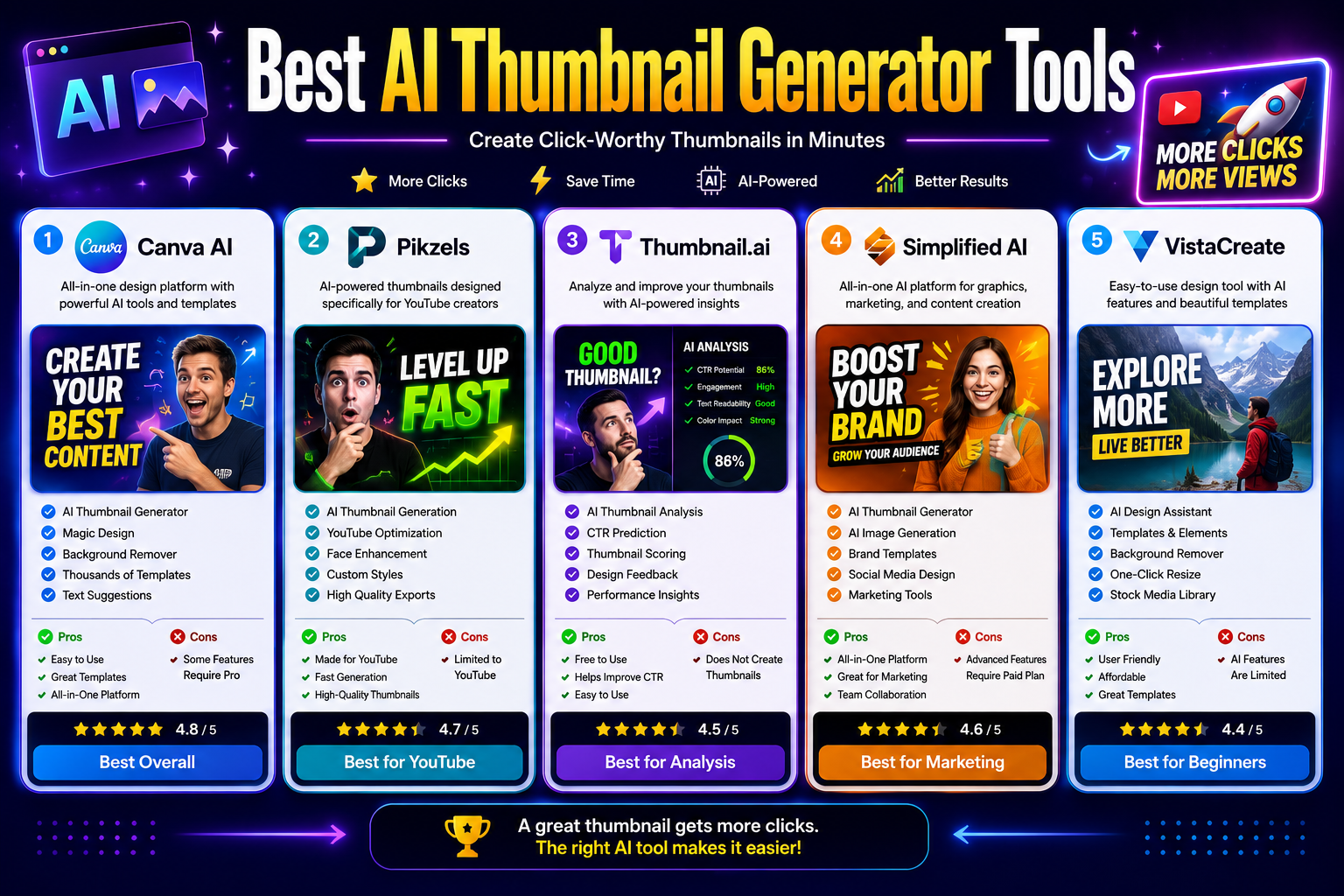
In this guide, we’ll compare five AI-powered thumbnail tools and explain which type of creator each one is best suited for.
Editor’s note: Pricing and features can change. Check the provider’s current pricing page before purchasing a subscription.
Quick Comparison
| Tool | Best For | Free Option | Current Paid Pricing* | Main Strength |
|---|---|---|---|---|
| Canva | General thumbnail design | Yes | Pro pricing varies by billing | Templates + AI design |
| Pikzels | YouTube-focused creators | Trial available | From $28/mo annually | AI thumbnails + packaging analysis |
| Thumbnail.ai | Thumbnail analysis | Yes | Free tool | Evaluating existing thumbnails |
| Simplified | Marketing teams | Yes | Plans vary | Design + marketing workflow |
| VistaCreate | Affordable graphic design | Yes | $10/mo | Templates + AI design tools |
*Prices are based on currently published information and may vary by billing cycle, region, promotions, or plan changes. Canva currently lists its individual Pro plan at $180/year, while VistaCreate lists Pro at $10/month. Pikzels’ Premium plan is currently shown at $28/month when billed annually.
What Is an AI Thumbnail Generator?
An AI thumbnail generator is a design tool that uses artificial intelligence to help create or improve graphics used as video thumbnails.
Depending on the platform, AI can assist with:
- Generating images
- Removing backgrounds
- Editing objects
- Creating layouts
- Generating text
- Resizing designs
- Improving images
- Creating thumbnail variations
- Analyzing existing thumbnails
- Maintaining a consistent visual style
Some tools are general-purpose design platforms.
Others are specifically built around YouTube.
That distinction is important because a creator who wants complete control over typography may prefer Canva, while a YouTuber focused specifically on packaging videos may benefit more from a specialized platform such as Pikzels.
What Makes a Good YouTube Thumbnail?
Before choosing an AI tool, it’s worth understanding what you’re actually trying to create.
A strong thumbnail generally needs to communicate an idea quickly.
When someone sees it at a small size, they should be able to understand the basic subject without studying the image.
Good thumbnail design usually involves:
A clear visual subject
The viewer should immediately know what the thumbnail is about.
Strong visual hierarchy
The most important element should attract attention first.
Readable text
If text is necessary, it should remain readable when the thumbnail appears small.
Contrast
Important elements should be visually separated from the background.
Curiosity
The thumbnail should complement the title rather than simply repeating it.
Consistency
A recognizable visual style can help an established channel build a stronger identity.
AI can help with these tasks, but it shouldn’t replace human judgment.
The 5 Best AI Thumbnail Tools in 2026
1. Canva — Best Overall for Flexible Thumbnail Design
Canva is one of the most versatile choices for creators who want to design thumbnails without learning professional graphic-design software.
Its strength isn’t that it is exclusively a thumbnail generator. Instead, Canva combines templates, image editing, AI features, resizing, branding tools, and a large design ecosystem in one platform.
Canva’s current Free plan includes more than 1,000 design types, 1.6 million+ templates, millions of creative assets, and a limited AI allowance. Pro adds premium content, additional design tools, and expanded AI capabilities.
Why Canva Stands Out
Canva is particularly useful when thumbnails are only one part of your content workflow.
You can create:
- YouTube thumbnails
- Social posts
- Channel graphics
- Presentations
- Ads
- Blog graphics
- Instagram designs
- Marketing materials
That makes it a practical option for creators who don’t want a separate application for every type of visual content.
Key Features
- AI-powered design tools
- AI image generation
- Background removal
- Background editing
- Thumbnail templates
- Brand Kit
- Image editing
- One-click resizing
- Drag-and-drop editor
- Collaboration
- Cloud storage
Pros
- Very beginner-friendly
- Large template library
- Flexible editing
- Useful AI features
- Excellent for multiple types of content
- Free plan available
Cons
- Some advanced AI and design features require Pro.
- It is not exclusively designed for YouTube thumbnails.
- Templates can encourage generic designs if you don’t customize them.
Best For
YouTubers, marketers, educators, businesses, and creators who want flexibility.
2. Pikzels — Best Specialized Tool for YouTube Thumbnails
Pikzels takes a fundamentally different approach from Canva.
It is built specifically around YouTube thumbnails and titles, rather than general graphic design.
Its current platform includes prompt-to-thumbnail generation, thumbnail recreation, text-based editing, thumbnail analysis, title generation, Personas, Styles, and a feature called Pikzels Score that evaluates packaging across factors such as virality, clarity, idea, curiosity, and emotion.
Why We Recommend Pikzels
If YouTube is your primary platform, specialized functionality can be more useful than having thousands of unrelated design features.
Pikzels is designed around the idea that a thumbnail isn’t simply an image—it is part of the video packaging.
You can generate a concept, analyze an existing thumbnail, make changes, and maintain a consistent visual identity.
Key Features
- Prompt-to-thumbnail generation
- YouTube thumbnail creation
- Thumbnail recreation
- Thumbnail analysis
- Pikzels Score
- One-Click Fix
- AI title generation
- Personas
- Custom Styles
- Text-based editing
- Multiple AI models
- Multilingual prompting
Pikzels currently states that a generated thumbnail consumes approximately 10–20 credits depending on the model, while analysis costs 5 credits and title generation costs 1 credit.
Current Pricing
Pikzels’ current Premium plan is listed at $28/month when billed annually, with 18,000 credits and up to 1,800 thumbnails per year based on its published credit assumptions.
Its Ultimate plan is listed at $56/month when billed annually, with 54,000 credits and up to 5,400 thumbnails per year.
Pros
- Built specifically for YouTube
- Thumbnail analysis included
- Supports iterative editing
- Personas can help maintain creator consistency
- Includes title-generation tools
- Strong focus on packaging rather than generic image creation
Cons
- More expensive than basic design tools.
- Credit-based pricing requires attention to usage.
- Primarily valuable to YouTube-focused creators.
- May be unnecessary if you only need occasional thumbnails.
Best For
YouTubers, thumbnail designers, gaming channels, educational channels, and creators publishing videos frequently.
3. Thumbnail.ai — Best for Analyzing Existing Thumbnails
Thumbnail.ai is different from the other tools in this list.
Its primary purpose is not to replace Canva or generate an entire thumbnail from scratch. Instead, it focuses on evaluating an existing thumbnail and helping creators identify potential weaknesses.
That makes it better viewed as a thumbnail analysis tool than a traditional AI thumbnail generator.
Why Use Thumbnail.ai?
Sometimes the problem isn’t that you don’t know how to create a thumbnail.
The problem is deciding whether the thumbnail you’ve already created is strong enough.
An analysis tool can provide another perspective before you publish.
Useful For
- Thumbnail evaluation
- Design feedback
- Comparing concepts
- Identifying visual weaknesses
- Reviewing existing thumbnails
- Getting another perspective before publishing
Pros
- Simple concept
- Useful as a second opinion
- Faster than manually evaluating every design
- Can complement a separate thumbnail editor
Cons
- Not a complete thumbnail-design platform
- Less useful if you need to create graphics from scratch
- AI scoring should not be treated as a guaranteed CTR prediction
Best For
Creators who already make thumbnails but want additional feedback before publishing.
4. Simplified — Best for Marketing Teams
Simplified is broader than a thumbnail generator.
The platform combines design, AI content creation, social-media publishing, copywriting, video, and marketing workflows.
Its current free plan provides access to design projects, fonts, stock assets, templates, icons, publishing features, and 1GB of storage. Simplified’s current pricing structure has also expanded into AI-agent-based marketing workflows, with Starter currently listed at $79/month for five campaigns.
Why Choose Simplified?
Simplified makes more sense when thumbnail creation is part of a larger marketing workflow.
For example:
Thumbnail → social post → promotional graphic → campaign → scheduled publishing
Instead of paying for a dedicated thumbnail platform, a marketing team can use a broader creative platform.
Key Features
- AI design
- AI image generation
- Graphic design
- Background removal
- Templates
- Brand assets
- Social media publishing
- AI writing
- Team collaboration
- Content management
Pros
- Broad marketing feature set
- Free plan available
- Useful for businesses
- Combines design and content workflows
- Team-oriented features
Cons
- More complex than a dedicated thumbnail tool.
- The platform may be unnecessary for creators who only need thumbnails.
- Current AI-agent plans are significantly more expensive than basic design subscriptions.
Best For
Marketing teams, agencies, businesses, freelancers, and creators who need more than thumbnail design.
5. VistaCreate — Best Affordable Alternative
VistaCreate is a general-purpose design platform that can also be used to create YouTube thumbnails and other social graphics.
Its free Starter plan currently includes more than 100,000 templates, over 1 million royalty-free photos, videos and vectors, basic design tools, and social-media scheduling.
The Pro plan is currently listed at $10/month and adds premium templates and assets, AI tools, unlimited Brand Kits, background removal, object removal, one-click resizing, unlimited storage, and team collaboration.
Why Choose VistaCreate?
VistaCreate is worth considering if you want an affordable alternative to larger design platforms.
It is especially useful for creators who make thumbnails alongside other social-media graphics.
Key Features
- Thumbnail templates
- AI image generation
- AI writing
- Background remover
- Object remover
- One-click resizing
- Brand Kits
- Stock media
- HD downloads
- Social-media scheduling
- Team collaboration
Pros
- Affordable Pro plan
- Large template library
- Free Starter plan
- AI design tools
- Useful brand features
- Good for social-media content
Cons
- Not specifically focused on YouTube.
- Less specialized than Pikzels.
- Some advanced features require Pro.
Best For
YouTubers, freelancers, small businesses, educators, and social-media creators.
Which AI Thumbnail Tool Should You Choose?
The answer depends on what you need to do.
| If You Need… | Consider |
|---|---|
| Flexible thumbnail design | Canva |
| YouTube-specific AI packaging | Pikzels |
| Feedback on an existing thumbnail | Thumbnail.ai |
| Thumbnails + marketing workflows | Simplified |
| Affordable general-purpose design | VistaCreate |
There is no reason to use the same tool for every situation.
For example, a creator could use Canva to create the actual design and a specialized analysis tool to evaluate different concepts.
Likewise, a YouTube-heavy creator may prefer Pikzels because the platform is designed specifically around thumbnails and titles.
AI Thumbnail Generator vs. Traditional Design Software
AI tools don’t necessarily replace traditional design software.
They change how quickly you can reach a first draft.
A traditional workflow might look like:
Choose image → remove background → create composition → add text → adjust colors → export
An AI-assisted workflow can look more like:
Describe concept → generate draft → refine composition → edit text → export
The second workflow can be faster, but it still requires judgment.
AI can produce a visually attractive image that doesn’t communicate the video’s actual idea.
That’s why the best workflow is usually:
AI for speed + human judgment for final design.
How to Choose the Right AI Thumbnail Generator
1. Start With Your Platform
Your requirements are different depending on where you publish.
YouTube
Prioritize:
- Strong visual hierarchy
- Clear subject
- Readable text
- Thumbnail variations
- Consistent channel branding
Social Media
Look for:
- Multiple aspect ratios
- Fast resizing
- Templates
- Brand Kits
- Easy exports
Marketing
Prioritize:
- Collaboration
- Brand controls
- Asset libraries
- Multiple design formats
- Workflow management
2. Decide Whether You Need Generation or Editing
This is one of the most important distinctions.
If you already have good photos and simply need better layouts, a design platform may be enough.
If you need completely new visual concepts, look for AI image generation.
If you want feedback on existing designs, an analysis tool may be more appropriate.
3. Look at Customization
AI-generated thumbnails shouldn’t all look identical.
Check whether the platform allows you to control:
- Fonts
- Colors
- Images
- Backgrounds
- Text
- Layout
- Branding
- Visual style
The more control you have after generation, the easier it is to create something that actually fits your channel.
4. Compare Usage Limits
Don’t compare subscriptions based only on the headline monthly price.
Look at:
- Number of AI generations
- Credits
- Premium templates
- Storage
- Export quality
- Team seats
- Brand Kits
- Image-generation limits
Pikzels, for example, uses credits for thumbnail generation, analysis, titles, and other actions. VistaCreate Pro currently includes 100 AI image generations per month.
5. Consider Your Existing Workflow
If you already use Canva, Adobe software, or another editor, adding another application may not save time.
The best tool is often the one that removes the most friction from your current workflow.
How to Create Better AI Thumbnails
Keep the Main Idea Simple
A thumbnail should communicate one main idea.
Trying to show five different concepts at once usually makes the design harder to understand.
Use Short Text
Don’t turn your thumbnail into a paragraph.
The title and thumbnail should work together.
For example:
Title:
“5 AI Tools That Can Save You Hours Every Week”
Thumbnail:
“5 AI TOOLS”
The thumbnail doesn’t need to repeat the entire title.
Design for Small Screens
A thumbnail may look excellent when you’re editing it at full resolution but become unreadable when displayed as a small image.
Always preview the final design at a much smaller size.
Check:
- Text readability
- Face visibility
- Main subject
- Contrast
- Background clutter
Create Multiple Concepts
Instead of assuming your first design is the best one, create several variations.
Change one major element at a time:
- Image
- Composition
- Text
- Background
- Subject position
- Color treatment
This gives you more useful alternatives than generating five nearly identical designs.
Don’t Confuse Clickbait With Good Packaging
A thumbnail should create curiosity without misleading viewers.
If the thumbnail promises something the video doesn’t deliver, you may attract the wrong click and damage viewer trust.
The best packaging creates a clear expectation that the video can actually satisfy.
Common AI Thumbnail Mistakes
1. Using Too Much Text
More text doesn’t necessarily communicate more information.
Use the title for detail and the thumbnail for visual impact.
2. Making Everything Equally Important
If every element is large and colorful, nothing stands out.
Create a clear visual hierarchy.
3. Using Generic AI Images
AI-generated images can look polished while still feeling interchangeable.
Whenever possible, add a distinctive concept, recognizable subject, personal image, or channel-specific visual identity.
4. Ignoring the Video Title
The thumbnail and title should work as a pair.
Repeating the exact same message in both wastes valuable space.
5. Assuming an AI Score Guarantees CTR
An AI score is an evaluation—not a guarantee of real-world performance.
Actual CTR depends on the audience, topic, title, traffic source, competition, and many other variables.
Treat AI analysis as an additional input rather than a prediction you should blindly follow.
How to Evaluate a Thumbnail Before Publishing
You don’t need an expensive tool to perform a basic thumbnail review.
Ask five questions:
1. Can I understand the subject in one second?
If not, simplify it.
2. Is the main subject obvious?
If the viewer doesn’t know where to look, improve the hierarchy.
3. Can I read the text when the image is small?
If not, increase readability or remove text.
4. Does the thumbnail add something to the title?
It should complement the title rather than simply repeat it.
5. Does it accurately represent the video?
If the answer is no, the packaging may be misleading.
Do AI Thumbnails Actually Increase CTR?
They can help you create better designs faster, but there is no universal CTR increase guaranteed by using AI.
This distinction is important.
An AI tool can improve the production process by making it easier to:
- Generate more concepts
- Test different compositions
- Improve image quality
- Remove backgrounds
- Create consistent branding
- Iterate faster
But the tool itself doesn’t determine whether viewers will click.
CTR is influenced by the relationship between the thumbnail, title, topic, audience, and viewer intent.
If you’re serious about improving performance, compare actual results from your own channel rather than relying only on an AI score.
Pros and Cons of AI Thumbnail Generators
Advantages
- Faster design workflow
- Easier experimentation
- Useful templates
- AI image generation
- Background removal
- Image enhancement
- Brand consistency
- Easy resizing
- Accessible to beginners
- Multiple design concepts
Disadvantages
- AI outputs can look generic
- Generated text may require correction
- Premium features often require subscriptions
- Credit limits can restrict heavy users
- AI doesn’t understand your audience as well as your own analytics
- Some platforms provide recommendations without guaranteeing real-world performance
Frequently Asked Questions
What is the best AI thumbnail generator in 2026?
It depends on your workflow.
Canva is the strongest general-purpose option for flexible design, while Pikzels is more specialized for YouTube thumbnail and title packaging.
Thumbnail.ai is better viewed as an analysis tool, Simplified is useful for broader marketing workflows, and VistaCreate is an affordable general-purpose alternative.
What is the best AI thumbnail maker for YouTube?
Pikzels is one of the strongest specialized options for YouTube because it is designed around thumbnails, titles, analysis, iteration, and creator-specific visual styles.
For creators who want more general design flexibility, Canva remains a strong alternative.
Is Canva good for YouTube thumbnails?
Yes.
Canva provides templates, image editing, AI tools, resizing, branding features, and a drag-and-drop interface that works well for thumbnail creation. Its free plan also provides substantial design resources, while Pro expands access to premium content and AI features.
Is Pikzels better than Canva?
Not necessarily.
They solve slightly different problems.
Canva is a broad design platform with extensive creative tools.
Pikzels is specifically focused on YouTube packaging, including thumbnail generation, analysis, titles, Personas, and Styles.
If you create thumbnails occasionally, Canva may provide better value.
If YouTube thumbnails are central to your workflow, Pikzels may be worth considering.
Can AI create a thumbnail from a prompt?
Yes.
Some platforms allow users to describe a concept and generate a thumbnail or visual design from that description.
Pikzels, for example, offers prompt-to-thumbnail generation and allows users to make additional changes through text-based instructions.
Can AI analyze an existing thumbnail?
Yes.
Some specialized tools can evaluate existing thumbnail designs and provide feedback or scores.
Pikzels, for example, includes a thumbnail analysis feature, while tools such as Thumbnail.ai focus more heavily on analyzing existing designs.
Are AI thumbnail generators free?
Several options have free plans or free-to-start workflows.
Canva has a Free plan, VistaCreate has a free Starter plan, and Simplified offers a Free Forever plan.
However, free plans commonly restrict premium templates, AI generations, storage, or other advanced capabilities.
Are AI thumbnail generators worth it?
They can be, especially if you publish videos frequently.
The biggest advantage is often speed and iteration, rather than automatically producing a high-performing thumbnail.
If you publish only a few videos per year, a free design platform may be enough.
If you publish several videos every week, specialized AI tools can potentially save substantial design time.
Final Verdict
AI thumbnail tools are becoming increasingly useful for creators, but the best option isn’t necessarily the platform with the most AI features.
Your choice should depend on your workflow.
Choose Canva if:
You want a flexible design platform that can handle thumbnails and many other types of graphics.
Choose Pikzels if:
You are a YouTube-focused creator who wants specialized thumbnail and title packaging tools.
Choose Thumbnail.ai if:
You already create thumbnails and want additional feedback before publishing.
Choose Simplified if:
You need thumbnails as part of a larger marketing and content workflow.
Choose VistaCreate if:
You want an affordable design platform with templates, AI tools, and branding features.
The most important takeaway is that AI can accelerate thumbnail creation, but it doesn’t replace creative judgment or audience data.
Use AI to generate ideas, improve images, and iterate faster. Then evaluate your actual results and refine your approach based on what your audience responds to.
A better thumbnail isn’t simply prettier.
It is clearer, more relevant to the video, easier to understand at a small size, and compelling without being misleading.
Editorial Methodology
We compared these tools based on the factors that matter most when choosing thumbnail software:
- Thumbnail creation workflow
- AI generation capabilities
- Editing flexibility
- YouTube-specific features
- Thumbnail analysis
- Branding capabilities
- Templates and creative assets
- Collaboration
- Free-plan availability
- Pricing structure
- Intended audience
For current pricing and feature information, we checked the vendors’ published product and pricing information.
Important: This article does not claim that we personally tested every platform unless first-hand testing is explicitly documented. Google recommends that product reviews provide evidence of actual experience where possible, including visuals, measurements, and original research.
If you test these tools yourself, add screenshots of your own generated thumbnails, the prompts you used, generation times, editing steps, and before/after comparisons. That would make this page substantially more original and useful than a generic feature comparison.
Sources
- Google Search Central — High-quality review guidance
- Google Search Central — Reviews system
- Canva — Official pricing and product information
- Pikzels — Official pricing and thumbnail features
- Simplified — Official pricing and AI design information
- VistaCreate — Official pricing and feature information
- Thumbnail.ai — Official product information
Related Articles
Explore more AI design and content creation guides: