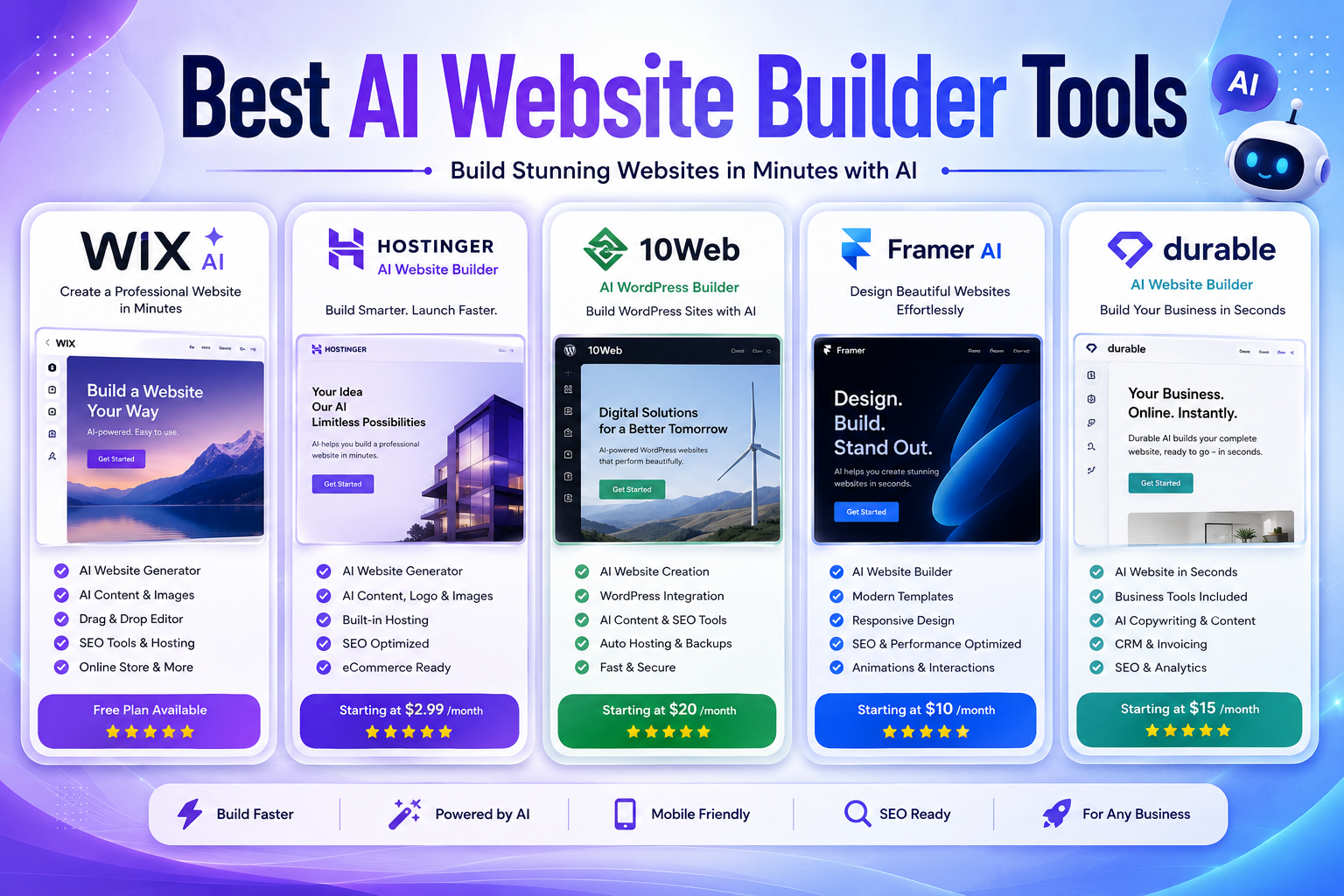
Best AI Website Builder Tools in 2026: 5 Platforms for Building a Better Website
Building a professional website used to require a combination of design skills, development knowledge, hosting, and plenty of time.
In 2026, AI website builders have changed that workflow.
Instead of starting with a blank page, you can describe the website you want and let AI generate the initial structure, page layouts, copy, images, and other elements. You can then refine the result using a visual editor rather than building everything from scratch.
But there is an important distinction between generating a website quickly and building a website that is actually useful for visitors.
The best AI website builder is not necessarily the one that produces a site in the fewest seconds. It is the platform that gives you the right balance of AI automation, design control, SEO capabilities, performance, business features, and long-term flexibility.
In this guide, we compare five popular AI website builders in 2026:
- Wix AI
- Hostinger AI Website Builder
- 10Web AI Builder
- Framer
- Durable
We’ll look at what each platform is best for, where it falls short, current pricing, and which type of website owner should consider it.
Editorial note: Pricing and features can change frequently. Prices mentioned below are based on current official pricing information available in 2026 and may vary by location, billing cycle, taxes, or promotions.
Quick Comparison: Best AI Website Builders in 2026
| AI Website Builder | Best For | Free Option | Starting Paid Price* | Main Strength |
|---|---|---|---|---|
| Wix AI | Businesses and general websites | Yes | $17/mo | Flexibility + business tools |
| Hostinger AI Website Builder | Affordable business websites | Limited | $2.99/mo | Value + hosting |
| 10Web AI Builder | WordPress websites | Free generation/trial | $10/mo | AI + WordPress |
| Framer | Modern marketing sites | Yes | $10/mo | Design + performance |
| Durable | Local businesses and freelancers | Yes | $12/mo | Speed + business tools |
*Starting prices can depend on annual billing, promotions, region, and taxes.
What Is an AI Website Builder?
An AI website builder is a website creation platform that uses artificial intelligence to automate parts of the design and development process.
Instead of manually selecting a template, writing every section, choosing layouts, and creating pages one by one, you can describe your goals in natural language and let the platform generate a starting point.
Depending on the platform, AI may help with:
- Website structure
- Page layouts
- Headlines and website copy
- Images and graphics
- Color palettes
- Sections and components
- SEO titles and descriptions
- Blog content
- Product pages
- Forms
- Mobile layouts
- Custom website elements
However, AI-generated websites should be treated as a starting point rather than a finished product.
Business information, claims, pricing, contact details, images, legal pages, and AI-generated copy should always be reviewed before publication.
Why Use an AI Website Builder?
AI website builders can reduce the amount of repetitive work involved in creating a website.
But their biggest advantage depends on what you’re building.
1. Faster Initial Setup
Traditional website creation often begins with a blank canvas.
AI can create a first version of the site much faster, giving you something concrete to edit instead of starting from nothing.
This is especially useful for:
- Freelancers
- Small businesses
- Startups
- Agencies
- Personal brands
- Local service providers
2. No Coding Required
Most AI website builders are designed for non-developers.
You can create pages, change sections, edit text, replace images, and adjust layouts through visual interfaces or natural-language instructions.
That doesn’t mean developers have no reason to use them. AI can also speed up prototyping and repetitive implementation work.
3. Faster Content Creation
Starting with website copy can be one of the hardest parts of building a new site.
AI tools can generate:
- Headlines
- Product descriptions
- Service descriptions
- Calls to action
- About pages
- FAQs
- Blog outlines
The important step is editing the output so that it accurately represents the business and doesn’t sound generic.
4. Built-In Business Features
Modern website builders are becoming broader business platforms.
Depending on the provider, you may get:
- Online stores
- Appointment scheduling
- Forms
- Email marketing
- Analytics
- CRM tools
- Invoicing
- Blogging
- SEO tools
This can reduce the number of separate services you need to manage.
5. Lower Initial Development Costs
For a simple website, an AI builder can be significantly less expensive than hiring a developer to build everything from scratch.
However, cost should not be the only consideration.
A cheap website can become expensive later if your business outgrows the platform and migration is difficult.
Top 5 Best AI Website Builders in 2026
1. Wix AI — Best Overall for Most Businesses
Wix is our strongest all-around choice for users who want AI website generation without giving up extensive customization.
Its current AI website builder can create a website from a natural-language description, while Wix’s Harmony editor allows users to move between AI-assisted creation and manual editing.
The platform also combines website creation with business tools such as ecommerce, scheduling, marketing, analytics, and SEO features.
Why Choose Wix AI?
The biggest advantage of Wix is its balance.
A beginner can ask AI to create a website, while a more experienced user can continue customizing individual elements manually.
That makes it more versatile than tools that focus almost entirely on instant generation.
Key Features
- AI website generation
- AI-powered website editing
- Drag-and-drop customization
- AI text generation
- AI image creation
- SEO tools
- Ecommerce
- Blogging
- Appointment scheduling
- Analytics
- Marketing tools
- Custom domains
- Managed hosting
Wix also provides AI-powered tools for tasks such as generating sections, text, images, and meta tags.
Pricing
Wix offers a free plan.
Current paid plans shown on its pricing page include Light, Core, Business, and Business Elite. The displayed U.S. reference prices start around $17/month for Light, although pricing varies by location and billing arrangement.
Pros
- Excellent balance of AI and manual control
- Large ecosystem of business tools
- Ecommerce support
- Strong customization
- Free starting option
- Suitable for many website types
Cons
- Advanced business features require paid plans
- The large number of features can feel overwhelming
- Costs can increase as you add business functionality
Best For
Small businesses, freelancers, agencies, bloggers, entrepreneurs, and ecommerce websites.
Our Take
Choose Wix if you don’t want to sacrifice flexibility for AI automation.
It’s particularly attractive if your website may eventually need ecommerce, scheduling, marketing, or other business functionality.
2. Hostinger AI Website Builder — Best Value for Small Websites
Hostinger’s AI Website Builder focuses on combining website generation and hosting in one relatively affordable package.
The platform allows you to describe a website idea, generate it with AI, and then make changes through visual editing or AI instructions. Hostinger also supports an agentic workflow for creating and modifying websites and web apps through conversation.
Why Choose Hostinger?
Hostinger makes sense for users who care about keeping the initial cost low while getting hosting and website-building tools together.
It is especially appealing for simple business websites, blogs, portfolios, and smaller online projects.
Key Features
- AI website generation
- AI-assisted editing
- Drag-and-drop editing
- AI content tools
- AI image tools
- Hosting
- Custom domains on eligible plans
- Ecommerce features
- SEO tools
- Website templates
- AI agents
Current plans include different numbers of websites, AI credits, storage, and business features.
Pricing
Hostinger currently lists its Premium AI Builder plan from $2.99/month when purchased for 48 months, with renewal at a higher rate.
Its Unlimited plan is currently shown from $3.99/month on the same billing basis.
These promotional rates require upfront payment for the selected term, so readers should compare the renewal price rather than looking only at the advertised monthly equivalent.
Pros
- Low introductory pricing
- Hosting included
- AI website generation
- AI editing tools
- Ecommerce support on higher plans
- Good option for beginners
Cons
- Promotional pricing can make comparisons confusing
- AI usage is subject to credit limits
- Advanced users may prefer more specialized platforms
Best For
Small businesses, bloggers, affiliate websites, portfolios, freelancers, and users who want hosting and website creation together.
Our Take
Hostinger is one of the strongest choices when budget matters.
Just make sure you compare the total upfront payment and renewal price rather than judging the service solely by the advertised monthly figure.
3. 10Web AI Builder — Best for WordPress Websites
10Web is different from many AI-first website builders because it is closely connected to the WordPress ecosystem.
Its AI platform can generate websites, redesign existing pages, clone pages from URLs, and work with WordPress-based websites.
The current platform also includes an AI Copilot and a drag-and-drop editor for making changes after generation.
Why Choose 10Web?
If you specifically want WordPress, 10Web deserves serious consideration.
Instead of choosing between AI generation and WordPress flexibility, you can combine the two.
Key Features
- AI WordPress website generation
- AI website redesign
- Website cloning
- Figma-to-website workflow
- WordPress CMS
- Drag-and-drop editing
- AI Copilot
- Managed hosting
- WooCommerce support
- Performance optimization
- Automatic backups
- Custom domains
Pricing
10Web’s current pricing starts at $10/month for its AI Starter plan when billed annually.
The AI Starter plan supports one website and includes 100 AI credits per month. Higher plans increase the number of websites, AI credits, storage, traffic limits, and support.
10Web also states that AI website generation is free to try, followed by a trial period before paid hosting is required.
Pros
- Strong WordPress integration
- AI-powered redesign
- Managed hosting
- WooCommerce support
- Useful for agencies
- Good performance-focused infrastructure
Cons
- More complex than simple AI builders
- Best suited to WordPress users
- Advanced features require paid plans
Best For
WordPress users, agencies, developers, WooCommerce websites, and businesses migrating or rebuilding existing sites.
Our Take
If your priority is specifically AI + WordPress, 10Web is one of the most interesting options in this category.
If you don’t need WordPress, however, simpler platforms may be easier to manage.
4. Framer — Best for Modern Marketing Websites
Framer takes a different approach from traditional business website builders.
Its strength is the combination of visual design, responsive layouts, CMS functionality, publishing, and AI-assisted creation.
Framer’s current AI system can generate editable pages, sections, copy, and visuals directly inside a project. Its AI agents can also create custom code components for certain interactions.
Why Choose Framer?
Framer is particularly attractive when visual presentation matters.
It’s a strong fit for:
- SaaS websites
- Startup websites
- Product landing pages
- Personal portfolios
- Design agencies
- Marketing campaigns
Key Features
- AI website generation
- AI page creation
- AI copy generation
- Responsive layouts
- CMS
- Animations
- Interactive components
- SEO features
- Analytics
- Collaboration
- Custom domains
- AI agents
Pricing
Framer has a free plan.
Its current paid plans include:
- Basic — $10/month
- Pro — $30/month
- Enterprise — Custom
These are monthly prices shown on Framer’s current pricing page; annual billing and other conditions can change the effective price.
AI features use credits, with the allowance depending on the plan.
Pros
- Excellent visual design
- Strong responsive layouts
- Good for landing pages
- Modern editing experience
- AI-assisted design and content
- Fast publishing
Cons
- Not the first choice for complex ecommerce
- Advanced features can become expensive
- Some users may prefer WordPress for highly extensible content sites
Best For
SaaS companies, startups, designers, agencies, portfolios, and marketing websites.
Our Take
If your priority is creating a website that looks modern and design-focused, Framer is one of the strongest options on this list.
5. Durable — Best for Local Service Businesses
Durable is designed around a simple idea: get a small business online as quickly as possible.
The platform asks for basic information about a business and uses AI to generate a complete website with content, images, layouts, and business-oriented sections.
Durable also goes beyond website creation by offering tools such as CRM, invoicing, AI assistance, and SEO features.
Why Choose Durable?
Durable is particularly useful for people who don’t want to spend hours comparing templates or learning a complicated editor.
Its target audience includes many service businesses and solo operators.
Key Features
- AI website generation
- AI copywriting
- Website editor
- SEO tools
- CRM
- Invoicing
- AI assistant
- Analytics
- Contact forms
- Custom domains
- SSL security
- Mobile-responsive websites
Pricing
Durable currently states that its Starter subscription begins at $12/month, while its Business subscription starts at $20/month. The company says subscriptions include the website, custom domain, AI Assistant, invoicing, and AI-powered CRM features.
Pros
- Very fast setup
- Designed for small businesses
- Business tools included
- Simple workflow
- Custom domain support
- No-code approach
Cons
- Less design flexibility than some competitors
- Not ideal for complex websites
- Less attractive for advanced ecommerce projects
Best For
Freelancers, consultants, contractors, local businesses, agencies, and service providers.
Our Take
Durable makes the most sense when your priority is:
“I need a professional business website quickly, and I don’t want to spend days learning a website builder.”
AI Website Builder Comparison by Use Case
There isn’t one winner for every type of website.
Here’s how we’d narrow the choices:
| Your Goal | Best Choice | Why |
|---|---|---|
| General business website | Wix AI | Strong combination of AI and business features |
| Affordable website | Hostinger | Low entry price and hosting included |
| WordPress website | 10Web | AI + WordPress ecosystem |
| Modern SaaS website | Framer | Strong design and responsive layouts |
| Local service business | Durable | Fast setup + business tools |
| Portfolio | Framer | Design-focused workflow |
| Ecommerce | Wix AI | Strong built-in commerce tools |
| Existing WordPress site | 10Web | AI redesign and WordPress support |
How to Choose the Right AI Website Builder
Before paying for a platform, answer five questions.
1. What Type of Website Are You Building?
A portfolio, online store, SaaS website, blog, and local business website have very different requirements.
For example, a restaurant may need:
- Menus
- Reservations
- Location information
- Reviews
- Opening hours
A SaaS company may instead need:
- Pricing pages
- Product screenshots
- Integrations
- Documentation
- Lead-generation forms
Start with the requirements rather than the AI features.
2. How Much Design Control Do You Need?
Some AI builders prioritize speed.
Others give you much more control over:
- Typography
- Spacing
- Layouts
- Animations
- Components
- Responsive behavior
- Branding
If you already have a strong visual identity, don’t choose a platform that makes customization unnecessarily difficult.
3. Does It Have the SEO Controls You Need?
An AI-generated website isn’t automatically optimized for search.
Before choosing a platform, check whether you can control important elements such as:
- Page titles
- Meta descriptions
- URLs
- Image alt text
- Internal links
- Redirects
- XML sitemaps
- Structured data
- Canonical URLs
- Indexing settings
SEO also depends heavily on the quality and usefulness of your actual content.
Google recommends focusing on helpful, reliable, people-first content rather than creating pages primarily to attract search traffic.
4. What Happens If Your Website Grows?
This is one of the most overlooked questions.
Before committing to a platform, think about:
- More pages
- More visitors
- Ecommerce
- Multiple employees
- Additional integrations
- International websites
- Multiple languages
- Advanced analytics
- Custom functionality
The best platform for a five-page website may not be the best platform for a 500-page business.
5. What Is the Real Cost?
Don’t compare only the advertised monthly price.
Check:
- Billing period
- Renewal price
- Domain costs
- Ecommerce fees
- AI credits
- Storage limits
- Traffic limits
- Additional users
- Premium features
- Email accounts
For example, Hostinger’s advertised monthly price is based on a long prepaid term, while Framer and other platforms have different billing structures.
How to Build a Better Website With AI
AI can create the first version quickly, but the quality of the final website depends heavily on what you do afterward.
Start With a Clear Brief
Before generating your website, prepare:
- Business name
- Target audience
- Main services
- Location
- Brand colors
- Main goal
- Contact information
- Competitors
- Desired pages
The more useful information you provide, the more relevant the starting website can become.
Rewrite Generic AI Copy
Don’t publish AI-generated copy without reviewing it.
Look for:
- Generic claims
- Repeated phrases
- Incorrect facts
- Unsupported statistics
- Unnatural wording
- Missing business details
Your website should sound like your business, not like a generic AI template.
Use Real Images Where They Matter
AI-generated images can be useful for concepts and decorative sections.
But for many businesses, authentic images can build more trust.
For example:
- A restaurant can show its actual food.
- A dentist can show its real clinic.
- A contractor can show completed projects.
- A photographer can show their portfolio.
- A SaaS company can show real product screenshots.
Create Useful Pages
Don’t stop after generating a homepage.
Depending on your business, consider creating:
- About
- Services
- Contact
- Pricing
- FAQ
- Case studies
- Portfolio
- Blog
- Privacy Policy
- Terms
- Shipping and returns
Only create pages that genuinely help your visitors.
Test the Website on Mobile
Don’t assume that an AI-generated responsive design is perfect.
Check:
- Navigation
- Font sizes
- Buttons
- Images
- Forms
- Tables
- Spacing
- Page speed
- Checkout
- Pop-ups
A website should be tested on the devices your actual audience uses.
Common AI Website Builder Mistakes
Publishing the First AI Draft
AI-generated websites are starting points.
Review every important page before publishing.
Using Generic Content
A website full of vague statements such as “We provide innovative solutions for your unique needs” doesn’t tell visitors much.
Specific information is more useful.
Explain exactly:
- What you offer
- Who you serve
- Where you operate
- What makes you different
- How customers can contact you
Assuming AI Automatically Handles SEO
AI can assist with SEO, but it doesn’t replace good content strategy.
Search visibility depends on much more than metadata.
Choosing a Platform Only Because It Is Cheap
A low introductory price isn’t necessarily the lowest total cost.
Consider renewal prices and the features you’ll need later.
Ignoring Migration
Before building a serious business website, understand how difficult it would be to move your content and domain somewhere else.
Platform lock-in can become a major issue when a website grows.
AI Website Builders vs Traditional Website Development
AI website builders aren’t necessarily replacing professional web development.
They are changing which projects require custom development.
AI builders are often better for:
- Simple business websites
- Landing pages
- Portfolios
- Small blogs
- Early-stage startups
- Local businesses
- Prototypes
Custom development may be better for:
- Complex web applications
- Highly customized ecommerce
- Large membership platforms
- Advanced databases
- Unique workflows
- Specialized integrations
For many small websites, AI can eliminate a lot of unnecessary technical work.
For complex products, however, a website builder may eventually become a limitation.
Are AI Website Builders Good for SEO?
They can be.
But the platform itself is only one part of SEO.
A technically capable website can still perform poorly if it contains thin, generic, inaccurate, or unhelpful content.
Google’s current guidance emphasizes useful, reliable, people-first content and warns against content created mainly to manipulate search rankings.
For an AI-built website, pay attention to:
- Original content
- Clear page structure
- Search intent
- Internal linking
- Page speed
- Mobile usability
- Descriptive titles
- Useful images
- Accurate information
- Author and business transparency
Do AI Website Builders Create Unique Websites?
Not necessarily.
AI can generate a customized starting point, but many websites can still end up looking similar if users rely heavily on default layouts, generic copy, and stock imagery.
Your strongest differentiators are often:
- Original branding
- Real photography
- Unique copy
- Specific expertise
- Customer stories
- Original data
- Case studies
- Better UX decisions
AI should accelerate your work, not remove the human part of it.
Are AI Website Builders Worth It?
For many small projects, yes.
They can dramatically reduce the time required to go from an idea to a functioning website.
The bigger question is whether the platform matches your long-term needs.
Choose Wix AI if you want the broadest all-around business platform.
Choose Hostinger if keeping costs low is a major priority.
Choose 10Web if you specifically want WordPress.
Choose Framer if design and modern marketing websites are your priorities.
Choose Durable if you run a service business and want to get online quickly.
Frequently Asked Questions
What Is the Best AI Website Builder in 2026?
For most users, Wix AI is the strongest all-around choice because it combines AI website creation with extensive editing, ecommerce, marketing, SEO, and business functionality.
However, the best choice depends on the type of website you’re building.
What Is the Cheapest AI Website Builder?
Among the platforms reviewed here, Hostinger currently has one of the lowest advertised entry prices, starting at $2.99/month on its long-term promotional plan.
However, the total upfront payment and renewal price should be considered before comparing it with competitors.
What Is the Best AI Website Builder for WordPress?
10Web is one of the strongest options if you want AI-assisted website creation while staying within the WordPress ecosystem.
Its current platform includes AI generation, redesign, cloning, WordPress CMS, hosting, and an AI Copilot.
Can AI Build a Complete Website?
Yes.
Modern AI website builders can generate the initial structure, pages, layouts, copy, images, and responsive design.
However, a generated website still needs human review.
Business information, branding, legal information, SEO, accessibility, and user experience should be checked before publication.
Can I Build a Website Without Coding?
Yes.
All five platforms covered in this guide are designed to allow users to build websites without traditional programming knowledge.
Some also provide advanced tools for users who want more control.
Are AI Website Builders Good for Small Businesses?
Yes.
Small businesses can benefit particularly from platforms that combine website creation with hosting, SEO, analytics, scheduling, ecommerce, CRM, or invoicing.
The best choice depends on which business functions you actually need.
Does an AI Website Automatically Rank on Google?
No.
Generating a website does not guarantee search rankings.
Search visibility depends on many factors, including content quality, relevance, technical accessibility, competition, authority, links, and the overall usefulness of the site.
Final Verdict
AI website builders have evolved far beyond simple template generators.
In 2026, platforms such as Wix, Hostinger, 10Web, Framer, and Durable can help users move from an idea to a functional website much faster than traditional manual workflows.
But speed shouldn’t be the only measurement.
Our top choices:
Best overall: Wix AI
Best value: Hostinger AI Website Builder
Best for WordPress: 10Web AI Builder
Best for modern design: Framer
Best for local service businesses: Durable
The right platform depends on what you’re building and how much control you’ll need later.
If you’re creating a straightforward business website, an AI builder can be an excellent way to launch quickly. If you’re building a complex digital product, ecommerce operation, or highly customized platform, you may eventually need more advanced development tools.
The smartest approach is to use AI for what it does best—accelerating the repetitive parts of website creation—while keeping human judgment in control of the final result.
Editorial Methodology
We evaluated these AI website builders around the factors that matter most to typical website owners:
- AI website generation
- Ease of use
- Design flexibility
- SEO controls
- Business functionality
- Ecommerce capabilities
- Hosting
- Scalability
- Pricing structure
- Intended audience
Pricing and feature information was checked against current official product pages where available. Because website-builder pricing and AI credit systems can change, readers should verify the final price and plan limits before subscribing.
For review-style content, Google recommends evaluating products from the user’s perspective, explaining meaningful differences, discussing benefits and drawbacks, and supporting recommendations with original research or first-hand evidence where possible.
Important: This editorial comparison is based on current product information and editorial assessment. It should not be presented as hands-on testing unless the tools have actually been tested and documented by the author.
Frequently Updated Information
Website builders frequently change their:
- AI models
- Pricing
- Credit systems
- Templates
- Hosting limits
- Ecommerce features
- Business tools
For that reason, this article should be reviewed periodically rather than simply changing the publication date without making substantive updates