
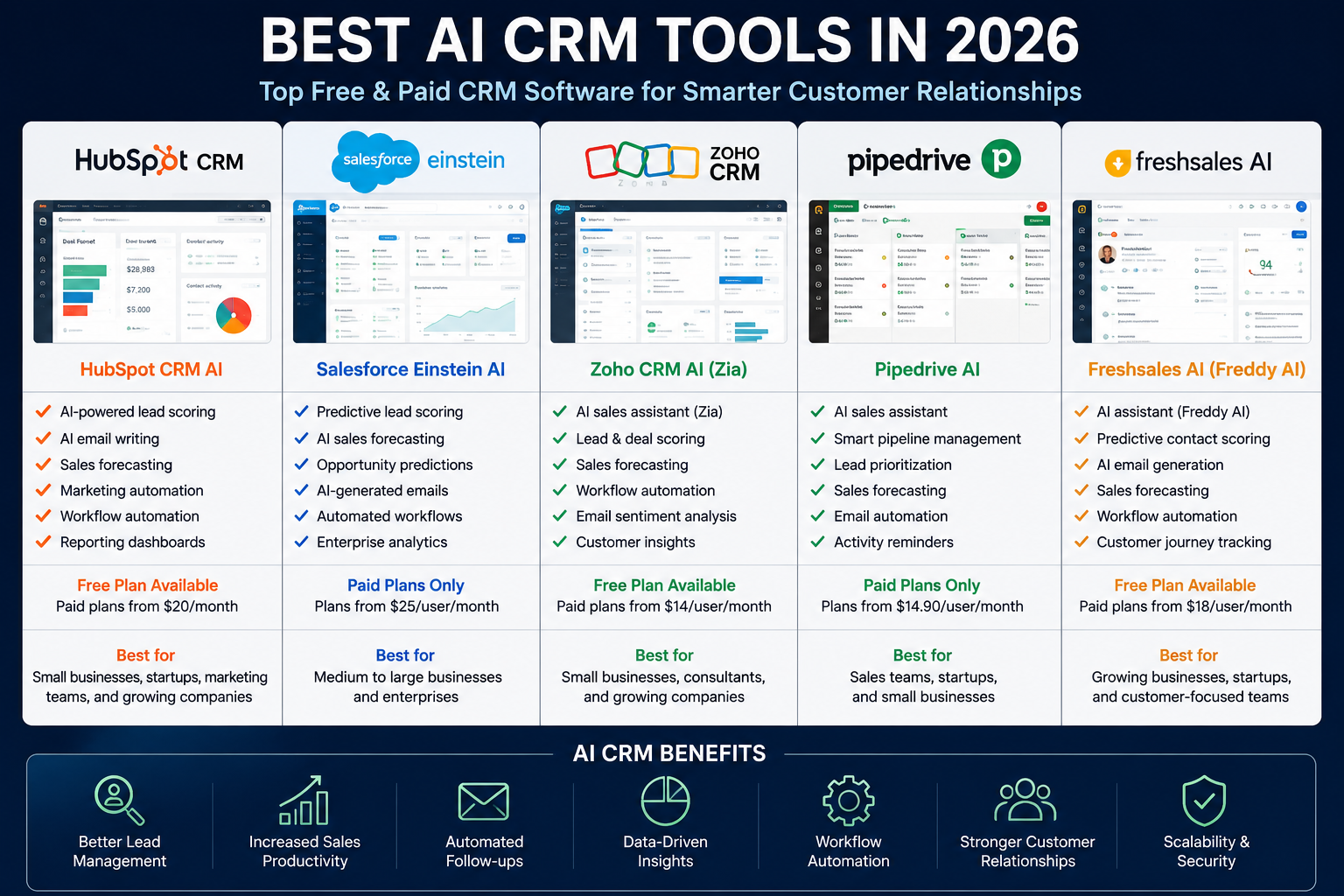
Best AI CRM Tools in 2026: 5 CRM Platforms for Smarter Sales and Customer Management
Managing customer relationships used to mean keeping contact lists, updating spreadsheets, and manually following up with prospects.
Modern CRM software has changed that.
Today’s AI-powered CRM platforms can help sales teams organize customer data, summarize conversations, identify opportunities, automate repetitive work, and surface information that might otherwise be missed. But the best CRM isn’t necessarily the one with the largest number of AI features.
The right choice depends on how your business sells, how much automation you actually need, how many people will use the system, and how much complexity your team can handle.
In this guide, we compare five widely used AI CRM platforms in 2026:
- HubSpot Smart CRM
- Salesforce with Einstein and Agentforce capabilities
- Zoho CRM with Zia
- Pipedrive with AI features
- Freshsales with Freddy AI
Rather than simply listing features, we’ll look at what each platform is best suited for, where it can become expensive or complicated, and what type of business should consider it.
Editor’s note: CRM features, AI capabilities, pricing, and plan limits can change frequently. Always check the provider’s current pricing page before purchasing.
Quick Comparison
| CRM | Best For | Free Option | Main Strength |
|---|---|---|---|
| HubSpot Smart CRM | Small businesses and growing teams | Yes | Easy-to-use CRM ecosystem |
| Salesforce | Large organizations | Trial options vary | Enterprise customization and scale |
| Zoho CRM | Small and mid-sized businesses | Limited free plan | Value and customization |
| Pipedrive | Sales-focused teams | 14-day trial | Simple pipeline management |
| Freshsales | Growing sales teams | Free option available | CRM + AI + communication tools |
What Is an AI CRM?
An AI CRM is customer relationship management software that uses artificial intelligence to help businesses work with customer and sales data.
A traditional CRM mainly stores information such as:
- Customer names
- Email addresses
- Phone numbers
- Deals
- Sales activities
- Notes
- Communication history
An AI-powered CRM can use that information to assist with tasks such as:
- Summarizing customer interactions
- Identifying sales opportunities
- Prioritizing leads
- Generating or improving emails
- Analyzing sales data
- Automating repetitive workflows
- Recommending actions
- Detecting unusual patterns in customer or sales data
However, AI does not replace the need for clean data or a well-designed sales process.
If your CRM contains incomplete or inaccurate information, AI-generated recommendations may also be less useful.
Best AI CRM Tools in 2026
1. HubSpot Smart CRM — Best for Small Businesses and Growing Teams
HubSpot is one of the easiest places for a business to start if it wants a CRM that can grow into a broader sales, marketing, and customer-service platform.
Its free CRM provides core functionality without an expiration date, while paid plans add more advanced capabilities. HubSpot now positions its CRM as an AI-powered system that can unify customer information and provide AI assistance across workflows.
What Makes HubSpot Different?
The biggest advantage is not one particular AI feature.
It’s the ecosystem.
A company can start by managing contacts and deals and later connect marketing, sales, service, content, and data tools within the same broader platform.
HubSpot’s AI capabilities can help with tasks such as data enrichment, recommendations, routine automation, and customer-related workflows. Some advanced AI functionality uses HubSpot Credits, so businesses should understand usage-based costs before relying heavily on AI agents.
Key Features
- Contact and company management
- Deal pipelines
- AI-assisted CRM workflows
- Breeze AI capabilities
- Sales automation
- Marketing tools
- Customer service functionality
- Reporting and analytics
- Large integration ecosystem
- Data enrichment
- AI agents on supported plans
Pros
- Free CRM option
- Easy starting point for smaller companies
- Strong ecosystem
- Good integration options
- CRM can expand with business needs
- AI is integrated into the broader platform
Cons
- Advanced functionality can become expensive
- Some AI capabilities use credits
- The platform can become complex as more products are added
- Businesses may pay for functionality they don’t need
Best For
Small businesses, startups, agencies, marketing teams, and growing companies that want an accessible CRM with room to expand.
Our Take
HubSpot is a strong choice when your priority is building a broader customer-management system rather than simply tracking a sales pipeline.
If you only need a lightweight sales CRM, however, HubSpot may provide more functionality than necessary.
2. Salesforce — Best for Enterprise CRM and Complex Sales Operations
Salesforce is designed for organizations that need a highly configurable CRM environment.
Its AI capabilities are integrated into the broader Salesforce ecosystem, allowing organizations to use customer data for analysis, automation, recommendations, and AI-assisted workflows.
The major advantage is flexibility.
The major disadvantage is the complexity that comes with that flexibility.
What Makes Salesforce Different?
Salesforce is particularly useful when a company has complex processes that cannot easily be handled by a simple out-of-the-box CRM.
Large organizations may need:
- Multiple sales teams
- Custom objects
- Complex permissions
- Automated workflows
- Advanced reporting
- Integrations with internal systems
- Enterprise security requirements
- Custom customer journeys
Salesforce is designed to accommodate those requirements.
Key Features
- Advanced CRM customization
- AI-assisted sales workflows
- Sales forecasting
- Lead and opportunity management
- Workflow automation
- Reporting and analytics
- Extensive integrations
- Custom objects
- Role and permission management
- Enterprise-focused capabilities
Pros
- Extremely flexible
- Highly scalable
- Large ecosystem
- Strong customization capabilities
- Suitable for complex organizations
Cons
- Can be difficult for beginners
- Implementation may require specialized expertise
- Costs can increase significantly as requirements grow
- More configuration is often needed than with simpler CRMs
Best For
Medium-sized businesses, enterprises, large sales organizations, and companies with complex CRM requirements.
Our Take
Salesforce makes the most sense when CRM is a major part of your company’s infrastructure.
For a small company with a simple sales process, starting with Salesforce may introduce unnecessary complexity.
3. Zoho CRM with Zia — Best for Value and Customization
Zoho CRM takes a different approach from enterprise-first platforms.
It combines CRM functionality, automation, analytics, integrations, and AI assistance while generally positioning itself as a more accessible option for small and mid-sized businesses.
Its AI assistant, Zia, can assist with CRM-related tasks such as analyzing information, identifying patterns, and helping users work with customer and sales data.
What Makes Zoho CRM Different?
Zoho’s main attraction is the balance between functionality and cost.
A growing business can access many CRM capabilities without necessarily adopting the complexity associated with a large enterprise CRM deployment.
Key Features
- Contact management
- Lead management
- Deal pipelines
- Workflow automation
- Sales analytics
- AI assistance through Zia
- Forecasting capabilities
- Email and communication tools
- Customization options
- Third-party integrations
Pros
- Strong value proposition
- Broad CRM functionality
- Flexible customization
- Useful automation tools
- Suitable for growing businesses
Cons
- Interface can require some learning
- Advanced features may depend on the selected plan
- Configuration can take time
- The large number of options may feel overwhelming to new users
Best For
Small businesses, consultants, startups, agencies, and growing sales teams that want more functionality without immediately moving into a highly complex enterprise environment.
Our Take
Zoho is worth considering if you want a feature-rich CRM but don’t want to start with an enterprise platform.
Its biggest advantage is flexibility, but that flexibility means you should spend time configuring the system around your actual workflow.
4. Pipedrive — Best for Sales Pipeline Management
Pipedrive is different from platforms such as HubSpot and Salesforce because its identity is strongly centered around sales pipeline management.
The interface is designed around deals and the progression of opportunities through different sales stages.
That makes it particularly attractive to sales teams that want to see what is happening across their pipeline without dealing with unnecessary complexity.
Pipedrive’s current plans include AI functionality, including AI-assisted reporting, AI import assistance, marketplace search, recommendations, and its Sales Assistant. Some AI features may be in beta or have plan-specific availability.
Current Pricing Snapshot
Pipedrive currently offers four main plans:
- Lite: from $14 per seat/month when billed annually
- Growth: from $39 per seat/month when billed annually
- Premium: from $59 per seat/month when billed annually
- Ultimate: from $79 per seat/month when billed annually
A 14-day free trial is also available without requiring a credit card. Prices and plan features can change, so verify the current offer before subscribing.
Key Features
- Visual sales pipelines
- Lead and deal management
- AI-assisted reporting
- AI Sales Assistant
- Email synchronization
- Sales automation
- Follow-up management
- Forecasting
- Workflow automation
- 500+ integrations
- Quotes and proposals
- E-signatures on supported plans
Pipedrive’s AI Sales Assistant can analyze sales information and provide insights based on the data inside the CRM.
Pros
- Simple sales-focused interface
- Easy-to-understand pipeline
- Useful AI assistance
- Strong automation
- Large integration ecosystem
- Relatively quick to implement
Cons
- Less comprehensive than some all-in-one business platforms
- Marketing functionality is not its primary focus
- Costs increase as more users and advanced features are added
Best For
Sales teams, agencies, consultants, startups, and small businesses that primarily need a straightforward system for managing opportunities.
Our Take
If your biggest CRM problem is answering “Which deals need attention right now?”, Pipedrive is one of the platforms worth evaluating first.
Its sales-focused design can be an advantage for teams that don’t need a large collection of marketing or customer-service features.
5. Freshsales with Freddy AI — Best for Growing Sales Teams
Freshsales is part of the Freshworks ecosystem and combines CRM functionality with sales automation, communication tools, analytics, and AI capabilities.
Its AI assistant, Freddy AI, is designed to help sales teams work with customer and deal information and automate parts of the sales process.
What Makes Freshsales Different?
Freshsales is particularly interesting for businesses that want CRM functionality combined with communication and automation tools without immediately moving into an enterprise-oriented platform.
Key Features
- Contact and account management
- Lead management
- Deal pipelines
- Freddy AI capabilities
- Sales automation
- Email tools
- Activity tracking
- Sales analytics
- Workflow automation
- Customer engagement features
Pros
- User-friendly interface
- Strong focus on sales teams
- AI capabilities
- Automation tools
- Good fit for growing companies
Cons
- Some advanced functionality depends on the selected plan
- Enterprise requirements may require additional configuration
- Businesses should compare its feature limits with competing CRMs before subscribing
Best For
Startups, growing businesses, SaaS companies, and sales teams looking for CRM software with integrated automation and AI functionality.
Our Take
Freshsales deserves consideration if your business wants a sales-focused CRM but also values integrated communication and automation.
AI CRM Comparison by Business Type
There isn’t one CRM that is objectively best for every company.
Your shortlist should depend on your situation.
Best for a Small Business
HubSpot Smart CRM is a strong starting point because its free CRM provides core functionality and allows businesses to upgrade as their needs increase.
Best for Enterprise
Salesforce is more appropriate when your organization needs extensive customization, complex workflows, and enterprise-level CRM infrastructure.
Best for Value
Zoho CRM is worth considering when you want a broad collection of CRM capabilities while keeping the platform accessible to a small or mid-sized business.
Best for Sales Pipeline Management
Pipedrive is particularly well suited to teams that want a visual, sales-focused pipeline and AI-assisted sales insights.
Best for Growing Sales Teams
Freshsales is a good option to investigate when you want CRM, communication, automation, and AI capabilities in one environment.
How to Choose the Right AI CRM
Choosing a CRM based only on the number of AI features can lead to a poor purchase decision.
Instead, evaluate the entire workflow.
1. Define Your Main CRM Problem
Before comparing software, identify what you actually want the CRM to solve.
For example:
- Are leads getting lost?
- Are sales representatives forgetting follow-ups?
- Is customer information scattered across spreadsheets?
- Do managers lack visibility into the pipeline?
- Are sales reports created manually?
- Does your team need better customer communication?
- Do you need marketing and customer service in the same platform?
The answer will help you eliminate tools that don’t fit your needs.
2. Look at the AI Features You Will Actually Use
Not every business needs every AI capability.
Useful features may include:
- AI-assisted email writing
- Conversation summaries
- Lead prioritization
- Sales forecasting
- Automated data entry
- AI reporting
- Workflow recommendations
- Customer-data analysis
The important question isn’t:
“How much AI does this CRM have?”
Instead ask:
“Which AI features will save my team meaningful time or improve our decision-making?”
3. Compare the Total Cost
Don’t compare CRM prices using only the advertised starting price.
Consider:
- Number of users
- Required plan
- AI usage or credits
- Add-ons
- Integrations
- Data storage
- Onboarding
- Implementation
- Support
- Additional automation
- Contract requirements
A CRM that appears inexpensive at first may become significantly more expensive once your team needs advanced features.
4. Test the User Experience
A powerful CRM is not useful if your team refuses to use it.
Before purchasing, test common workflows:
- Add a new lead.
- Create an opportunity.
- Move the opportunity through the pipeline.
- Add a customer interaction.
- Create a follow-up.
- Generate a report.
- Try the AI features your team expects to use.
This gives you a much better understanding of whether the software actually fits your workflow.
5. Check Integrations
Your CRM should work with the tools your business already depends on.
Depending on your workflow, you may need integrations with:
- Gmail
- Outlook
- Google Workspace
- Microsoft 365
- Slack
- Zoom
- Shopify
- Stripe
- Marketing platforms
- Accounting software
- Customer support software
- Automation platforms
Good integrations can eliminate repetitive data entry and reduce the number of disconnected systems your team has to manage.
6. Think About Future Growth
The CRM you choose today may become the system containing years of customer information.
Consider whether it can support:
- More users
- More contacts
- Multiple sales pipelines
- Additional teams
- Advanced permissions
- Custom workflows
- Reporting
- API access
- Data migration
- Additional integrations
Switching CRM platforms later can be much more disruptive than choosing an appropriate system from the beginning.
How to Use AI CRM Software Effectively
Installing an AI CRM does not automatically improve sales performance.
The results depend heavily on how the system is configured and how consistently your team uses it.
Keep Customer Data Clean
AI depends on the quality of the information available to it.
Regularly:
- Remove duplicate contacts
- Update outdated information
- Standardize important fields
- Record customer interactions
- Keep deal stages accurate
Better data generally produces more useful CRM reports and recommendations.
Automate Repetitive Work
Look for repetitive activities that don’t require human judgment.
Examples include:
- Task creation
- Lead assignment
- Follow-up reminders
- Internal notifications
- Data updates
- Basic email workflows
- Routine reporting
Automation should reduce administrative work without removing necessary human oversight.
Use AI for Assistance, Not Blind Decisions
AI can help identify patterns and prioritize information, but important customer or business decisions should still be reviewed by people.
For example, a salesperson should not automatically reject a lead simply because an AI system gives it a low score.
AI recommendations are useful inputs—not guaranteed predictions.
Personalize AI-Generated Communication
AI can help create an email draft quickly, but generic messages can still feel generic.
Review every important customer-facing message and add relevant information such as:
- The customer’s business
- Previous conversations
- Their specific problem
- Relevant product information
- The next logical step
Human review is especially important when the message contains pricing, commitments, or claims about your company.
Common AI CRM Mistakes
Choosing a CRM Because It Has the Most AI
More features don’t automatically mean better results.
A smaller CRM that your team uses consistently can be more valuable than a sophisticated platform that nobody fully adopts.
Automating Everything
Not every customer interaction should be automated.
Important conversations often require context, judgment, and empathy.
Use automation for repetitive work while keeping meaningful customer interactions human.
Ignoring Data Quality
Bad data can produce bad reports and unreliable recommendations.
CRM maintenance should be part of the normal sales process rather than something done only when problems appear.
Forgetting AI Usage Costs
Some modern CRM platforms use credits or usage-based pricing for certain AI agents and features.
Always check how AI usage is billed before building a workflow around an expensive automated feature.
Buying for Future Features Instead of Current Needs
Don’t purchase an enterprise CRM because you might need an advanced feature several years from now.
Choose a platform that solves today’s problems while providing a reasonable path for growth.
Advantages and Disadvantages of AI CRM Software
Advantages
- Reduces repetitive administrative work
- Helps organize customer information
- Can surface sales insights
- Supports sales forecasting
- Makes follow-up management easier
- Can assist with customer communication
- Automates routine workflows
- Improves visibility into sales pipelines
- Helps teams analyze larger amounts of data
Disadvantages
- Advanced plans can become expensive
- AI recommendations are not always correct
- Poor data can reduce usefulness
- Setup and migration can take time
- Teams need training
- Some AI features may use additional credits or usage limits
- Larger CRM platforms can introduce unnecessary complexity
Frequently Asked Questions
What Is an AI CRM?
An AI CRM is customer relationship management software that uses artificial intelligence to assist with tasks such as analyzing customer information, automating workflows, generating content, identifying opportunities, and providing business insights.
Are AI CRM Tools Free?
Some CRM providers offer free plans, while others offer free trials.
Free plans usually provide basic CRM functionality, while advanced automation, analytics, integrations, and AI capabilities may require paid subscriptions.
For example, HubSpot currently offers free CRM functionality with no expiration date, while Pipedrive offers a 14-day free trial.
Which AI CRM Is Best for Small Businesses?
There is no universal winner.
HubSpot is a strong option for businesses that want a free starting point and a broader business ecosystem.
Zoho CRM is worth considering for companies prioritizing flexibility and value.
Pipedrive may be a better fit when the main requirement is sales pipeline management.
Which CRM Is Best for Enterprise Companies?
Salesforce is one of the strongest choices for organizations that need extensive customization, complex workflows, and enterprise-scale CRM infrastructure.
However, enterprise buyers should evaluate implementation requirements, integrations, user adoption, and total cost rather than choosing a platform based only on its AI capabilities.
Can AI Improve Sales Productivity?
AI can reduce manual work and help sales teams analyze information more efficiently.
Examples include automated summaries, reporting assistance, lead prioritization, email assistance, and workflow automation.
However, AI should be treated as an assistant rather than a guarantee of better sales results.
Is AI CRM Software Secure?
Security depends on the provider, plan, configuration, integrations, and how your organization manages access to customer data.
Before choosing a CRM, review its security documentation, access controls, compliance information, data-processing terms, and policies for AI features.
Businesses should also avoid putting sensitive information into AI tools without understanding how that information is handled.
Our Final Verdict
The best AI CRM in 2026 depends more on your workflow than on the number of AI features advertised.
HubSpot Smart CRM stands out as a strong starting point for small businesses and growing companies that want an accessible CRM with a broader ecosystem.
Salesforce is better suited to organizations that require extensive customization and enterprise-scale infrastructure.
Zoho CRM offers an attractive combination of CRM functionality, automation, customization, and value.
Pipedrive is particularly compelling for sales teams that want a straightforward pipeline-focused CRM with increasingly capable AI assistance.
Freshsales is worth considering for growing businesses that want CRM, sales automation, communication, and AI capabilities in one platform.
Before making a purchase, don’t simply compare feature lists. Start a trial where available, test the workflows your team actually uses, calculate the total cost, and determine whether the AI features solve a real business problem.
The best CRM is ultimately the one your team can adopt, maintain, and use consistently.
How We Evaluated These AI CRM Tools
For this comparison, we focused on practical factors that matter when choosing CRM software:
- AI capabilities
- Core CRM functionality
- Ease of adoption
- Sales and workflow automation
- Integrations
- Scalability
- Pricing structure
- Free plans or trials
- Potential complexity
- Best-fit business types
Product features and pricing can change, so this article should be treated as a practical comparison rather than a permanent pricing reference.
For a purchasing decision, verify the provider’s current plan details directly before subscribing.

One Comment