Best AI Logo Generator Tools in 2026: 5 Tools for Creating Better Brand Logos
A logo is one of the first visual elements people associate with a business.
Whether you’re launching a startup, creating an online store, building a YouTube channel, or developing a personal brand, a well-designed logo can help create a consistent visual identity across your website, social profiles, packaging, and marketing materials.
For years, creating a professional logo usually meant hiring a designer or learning design software. Today, AI logo generator tools can help entrepreneurs and creators develop logo concepts in minutes.
These platforms can suggest typography, symbols, colors, layouts, and brand styles based on information about your business. Some also go beyond the logo itself by generating business cards, social media graphics, brand guidelines, and other branded assets.
However, AI-generated doesn’t automatically mean better.
The best tool depends on how much customization you need, whether you require vector files, what branding assets you need, and whether you plan to use the logo commercially.
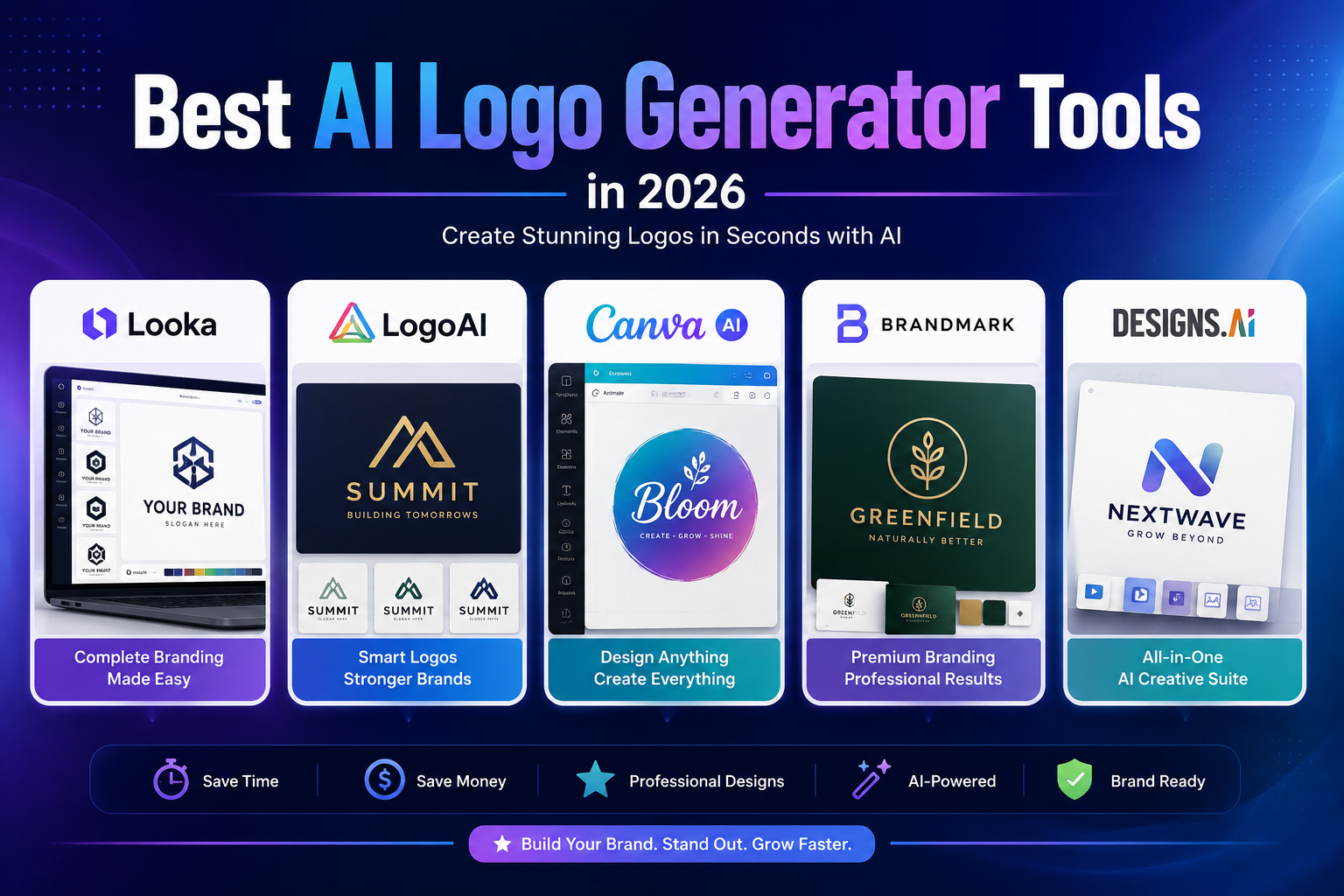
In this guide, we’ll compare five AI logo maker tools in 2026, explain what each one is best at, discuss their limitations, and show you what to check before purchasing a logo.
Quick Comparison
| Tool | Best For | Free Design | Standout Feature | Pricing Approach |
|---|---|---|---|---|
| Looka | Complete brand identity | Yes | Logo + Brand Kit | One-time logo packages + subscriptions |
| LogoAI | Fast AI logo creation | Yes | AI logo + brand assets | One-time logo purchases |
| Canva | Beginners and marketers | Yes | Flexible design editor | Free + Pro subscription |
| Brandmark | Minimalist branding | Yes | AI-generated brand concepts | Paid downloads |
| Designs.ai | Business creative workflows | Trial/free access varies | Multiple AI design tools | Subscription |
Pricing and plan availability can change. Check the provider’s current pricing page before purchasing.
What Is an AI Logo Generator?
An AI logo generator is a tool that uses artificial intelligence and automated design systems to help create logo concepts.
Instead of drawing a logo manually, you typically provide information such as:
- Business name
- Industry
- Brand personality
- Preferred colors
- Design style
- Symbols or keywords
- Typography preferences
The platform then generates or recommends logo concepts based on those inputs.
Some services use generative AI directly, while others combine AI-assisted recommendations with traditional templates, icons, fonts, and automated design systems.
That distinction is worth understanding.
A platform doesn’t necessarily need to generate every pixel from scratch to be useful. For many businesses, the ability to quickly create, customize, and export a consistent identity is more valuable than having a purely generative system.
Why Use an AI Logo Maker?
1. Generate Ideas Quickly
One of the biggest advantages is speed.
Instead of starting with a blank canvas, you can generate multiple directions and use them as a starting point for your identity.
This is particularly useful when you know roughly what you want but don’t yet have a finished concept.
2. Lower the Cost of Early Branding
Hiring a professional designer can be the right decision for an established company, but early-stage businesses may not have the budget for a complete branding project.
AI logo platforms provide a lower-cost way to explore initial concepts.
For a small business or side project, that can be enough to establish a basic visual identity while the company grows.
3. Experiment With Different Styles
You can quickly compare different directions:
- Minimalist
- Modern
- Corporate
- Luxury
- Playful
- Geometric
- Tech-focused
- Handwritten
- Monogram
- Abstract
This experimentation can help you determine which visual direction fits your brand before investing more heavily in professional design.
4. Create More Than Just a Logo
Some platforms can turn your logo into a broader branding system.
Depending on the provider, you may get:
- Social media designs
- Business cards
- Email signatures
- Presentations
- Brand guidelines
- Posters
- Advertisements
- Website graphics
Looka’s Brand Kit, for example, provides hundreds of branded templates generated around a purchased logo, including social posts, business cards, letterheads, advertisements, and other materials.
5. Customize the Result
A generated logo should usually be treated as a starting point rather than a finished answer.
The ability to modify:
- Fonts
- Colors
- Icons
- Layout
- Spacing
- Backgrounds
- Text
can be just as important as the initial AI generation.
The 5 Best AI Logo Generator Tools in 2026
1. Looka — Best for Complete Brand Identity
Looka is one of the strongest options for entrepreneurs who want more than a standalone logo.
Its logo maker allows you to generate, edit, preview, and save logo concepts before purchasing the files. Looka also offers separate logo-only packages and Brand Kit subscriptions.
Why Looka Stands Out
Looka’s biggest advantage is the ecosystem around the logo.
Instead of stopping after generating a symbol and wordmark, its Brand Kit can create branded marketing materials using your logo, colors, fonts, and industry-related content.
That makes it useful for businesses that need a consistent visual identity across multiple channels.
Key Features
- AI-assisted logo creation
- Logo customization
- Brand Kit
- Social media designs
- Business card designs
- Email signatures
- Letterheads
- Brand guidelines
- Advertising templates
- Presentation designs
- Multiple logo file formats
- Website options
Looka’s Brand Kit currently provides access to 300+ branded templates, while its documentation also describes thousands of customizable templates depending on the subscription and asset type.
Pricing
Looka allows users to create and save logos for free. Downloading and using the logo requires purchasing a package. Its current help documentation lists a $20 Basic Logo Package and a $65 Premium Logo Package.
The Premium package includes high-resolution PNG, PDF, EPS, and SVG files, transparent versions, black-and-white versions, and commercial ownership.
The Brand Kit is a separate subscription. Looka currently lists its annual Brand Kit at $96/year, while the Brand Kit Web option is $129/year.
Pros
- Easy logo creation
- Strong customization
- Excellent brand-asset ecosystem
- Multiple professional file formats
- Commercial ownership with appropriate package
- Useful for small businesses
Cons
- Logo downloads aren’t free
- Brand Kit requires a subscription
- Users who only need a simple logo may not need the additional branding tools
Best For
Startups, entrepreneurs, small businesses, freelancers, and anyone who wants a logo plus supporting brand assets.
2. LogoAI — Best for Fast AI Logo Creation
LogoAI focuses specifically on automated logo creation and brand identity.
Its current LogoAI 2.0 system introduces a Brand DNA approach that analyzes information such as the business name, industry, and personality before generating logo directions. The platform also offers a matching brand kit with colors, fonts, and other assets.
Why LogoAI Stands Out
LogoAI is particularly appealing if you want to go from a business idea to multiple logo concepts quickly.
The platform can also generate different types of visual marks, including abstract symbols, monograms, lettermarks, mascots, app icons, and other styles.
Key Features
- AI logo generator
- Brand DNA
- Logo style matching
- AI icon generation
- Typography suggestions
- Color direction
- Brand kit
- Social branding assets
- Business stationery
- Logo customization
- Multiple logo styles
Pricing
LogoAI follows a pay-to-download model for its logo packages rather than requiring a traditional recurring logo subscription. The platform states that designing is free and users pay when they want to download the logo they intend to use.
Exact package prices can vary, so check the current checkout page before purchasing.
Pros
- Free logo design exploration
- Fast generation
- Strong AI-focused workflow
- Brand identity features
- Multiple logo styles
- One-time logo purchase model
Cons
- Some branding features require payment
- AI-generated concepts may still need refinement
- Users looking for extensive manual design control may prefer Canva
Best For
Creators, startups, small businesses, and entrepreneurs who want to generate several logo directions quickly.
3. Canva — Best for Beginners and Flexible Editing
Canva isn’t exclusively an AI logo generator.
That’s actually one of its strengths.
Instead of focusing only on generating a logo, Canva gives you a complete visual design environment where you can create and manually edit logos alongside social posts, presentations, advertisements, websites, and other marketing materials.
Why Canva Stands Out
Canva is particularly useful when you don’t just need a logo.
Once you’ve created a concept, you can continue editing the design using Canva’s drag-and-drop interface and apply the visual identity to other marketing materials.
Canva’s current Free plan includes more than 1,000 design types, 1.6 million-plus templates, 4.7 million-plus photos, videos, graphics and audio, and a limited AI allowance. Canva Pro expands access to premium content, AI features, resizing, background removal, and other tools.
Key Features
- Logo templates
- AI-assisted design tools
- Drag-and-drop editor
- Brand Kit
- Typography library
- Graphics and icons
- Social media designs
- Presentations
- Marketing materials
- Team collaboration
- Cloud storage
- AI image generation
Pricing
Canva has a free plan.
Its current individual Pro plan is listed at $180/year in the United States, although monthly and regional pricing can differ.
Pros
- Very easy to learn
- Large design ecosystem
- Excellent manual editing
- Free plan available
- Useful beyond logo creation
- Strong for social media and marketing
Cons
- Not as specialized as dedicated logo platforms
- Template-based designs can require more customization to feel distinctive
- Some premium assets require Pro
Best For
Beginners, creators, marketers, students, freelancers, and businesses that need a broader design platform rather than only a logo maker.
4. Brandmark — Best for Minimalist Brand Concepts
Brandmark is focused specifically on automated logo and brand identity creation.
Its logo generator asks for information such as your brand name, slogan, keywords, and preferred color style before generating concepts.
Why Brandmark Stands Out
Brandmark is a good option if your preferred aesthetic is clean, modern, and relatively minimalist.
Rather than starting with a blank design canvas, the platform guides you through a structured branding process.
Key Features
- AI logo generation
- Brand concepts
- Color palettes
- Typography
- Business card designs
- Social media assets
- Brand guidelines
- Logo customization
- Marketing materials
Pros
- Simple workflow
- Strong focus on branding
- Modern visual direction
- Useful for exploring multiple concepts
Cons
- Paid download required for final assets
- Less suitable if you want a full manual design environment
- Some users may prefer Canva’s broader editing capabilities
Best For
Startups, agencies, consultants, and businesses looking for a clean visual identity.
5. Designs.ai — Best for Broader AI Creative Workflows
Designs.ai is different from the other tools in this comparison because its logo maker is part of a larger AI-powered creative platform.
The service is designed around multiple creative tasks rather than logo generation alone.
Why Designs.ai Stands Out
If your business needs more than a logo, an all-in-one creative platform can be useful.
Instead of switching between several services, you can potentially use one ecosystem for different marketing and design tasks.
Key Features
Depending on the current plan and product availability, Designs.ai provides tools covering areas such as:
- Logo creation
- Graphic design
- Video creation
- Brand assets
- Typography
- Color selection
- Marketing content
- Team workflows
The platform currently offers subscription plans for users who need greater creative capacity.
Pros
- Broader creative toolkit
- Useful for marketing teams
- Multiple AI-assisted design functions
- Suitable for businesses producing different types of content
Cons
- More expensive than a logo-only purchase can be
- Broader feature set can be unnecessary for users who only need a logo
- Pricing and feature availability can change
Best For
Marketing teams, agencies, startups, and businesses that need multiple AI-assisted creative tools.
Looka vs. LogoAI vs. Canva: Which Is Better?
These three tools are easy to compare because they approach logo creation differently.
Choose Looka if:
You want a logo plus a complete brand identity.
Choose LogoAI if:
You want fast AI-generated concepts and a relatively straightforward purchase model.
Choose Canva if:
You want maximum editing flexibility and a broader design platform.
There isn’t a universal winner.
The best choice depends on whether your priority is automated branding, AI generation, or manual creative control.
How to Choose the Right AI Logo Generator
1. Decide What You Actually Need
Before choosing a platform, determine whether you need:
- Logo only
- Logo + social media assets
- Complete brand identity
- Business cards
- Brand guidelines
- Website graphics
- Marketing materials
If you only need a logo, paying for an entire creative suite may not make sense.
2. Look at the Customization Options
A good starting concept isn’t enough.
Check whether you can change:
- Typography
- Colors
- Icons
- Layout
- Spacing
- Symbol size
- Background
- Logo variations
The more control you have, the easier it is to adapt the concept to your actual brand.
3. Check the File Formats
This is one of the most important factors.
For professional use, look for:
- SVG
- EPS
- High-resolution PNG
- Transparent PNG
Vector files such as SVG and EPS are particularly useful because they can be scaled for different applications without becoming pixelated.
Looka’s Premium Logo Package, for example, includes SVG, EPS, PDF, and PNG formats.
4. Understand Ownership and Licensing
Don’t assume that generating a logo automatically gives you every possible intellectual-property right.
Before purchasing, check:
- Commercial usage rights
- Ownership terms
- Stock asset restrictions
- Font licensing
- Icon licensing
- Whether the design can be trademarked
- Whether similar designs can be generated for other users
If you’re building a serious brand, consider having the final logo reviewed for trademark conflicts before investing heavily in it.
Looka, for example, states that its Premium Logo Package provides full ownership for commercial or non-commercial purposes.
5. Compare the Total Cost
Don’t compare tools only by their advertised starting price.
Consider:
Logo price + required subscription + brand assets + file formats + future editing needs.
A $20 logo may be cheaper than a yearly branding subscription—but the subscription could provide much more value if you need hundreds of branded marketing assets.
How to Create a Better AI Logo
Start With a Clear Brand Brief
Before opening an AI logo maker, write down:
- Brand name
- Industry
- Target audience
- Brand personality
- Preferred colors
- Colors to avoid
- Competitors
- Preferred visual style
- Where the logo will be used
This gives the AI more useful direction.
Choose a Simple Concept
A logo needs to work in many environments.
Test it at:
- Website header size
- Social media profile size
- Mobile screen
- Business card size
- Large print size
If the logo stops being recognizable when reduced, simplify it.
Create Several Directions
Don’t automatically choose the first AI-generated result.
Generate several different concepts and compare:
- Symbol
- Typography
- Color
- Shape
- Memorability
- Readability
Then refine the strongest direction.
Test Black and White
A strong logo should not depend entirely on color.
Create a black-and-white version and see whether the design still works.
This is especially important for:
- Documents
- Printing
- Stamps
- Packaging
- Embroidery
- Faxed or photocopied materials
Check the Logo Without the Mockup
AI logo websites often display designs on attractive:
- Buildings
- Business cards
- Phones
- Packaging
- Storefronts
These mockups can make an average logo look impressive.
Evaluate the actual logo itself, not just the presentation.
Common AI Logo Mistakes
Choosing a Generic Symbol
A random globe, light bulb, rocket, or abstract shape may look professional but tell customers very little about your actual brand.
Ask whether the symbol contributes something meaningful.
Using Too Many Colors
A complicated color palette can make branding harder to maintain.
Start with one primary color and a small supporting palette.
Choosing Difficult Fonts
A decorative font may look interesting in a large preview but become difficult to read at small sizes.
Always test the logo at realistic sizes.
Copying a Competitor’s Style
Your logo should be recognizable as your own.
Avoid asking AI to reproduce a competitor’s exact branding or creating a design that could easily be confused with another company.
Ignoring Trademark Research
An AI-generated logo is not automatically unique in the legal sense.
Before building a major business around a logo, check whether similar marks already exist in the markets where you intend to operate.
For important brands, professional trademark advice may be worthwhile.
Forgetting Vector Files
A PNG can be perfectly adequate for a website, but print designers often need vector formats.
If you’re paying for a professional logo, check whether SVG, EPS, or another vector format is included.
AI Logo Generators vs. Professional Designers
AI logo makers aren’t necessarily replacements for professional designers.
They solve a different problem.
| AI Logo Generator | Professional Designer |
|---|---|
| Fast concept generation | Deep strategic process |
| Lower initial cost | Higher investment |
| Many variations quickly | Highly customized concepts |
| Easy self-service | Human collaboration |
| Useful for small projects | Strong for major brands |
| Limited strategic context | Brand research and strategy |
| Automated customization | Detailed manual refinement |
For a new side project or small business, an AI logo maker may be perfectly reasonable.
For a company investing heavily in its identity, packaging, signage, advertising, and long-term brand strategy, professional design can provide considerably more strategic depth.
Are AI-Generated Logos Actually Unique?
Not necessarily.
AI systems can generate original-looking combinations, but visual similarity is still possible.
The fact that a tool generates a logo specifically for you doesn’t automatically mean that nobody else can receive something visually similar.
That’s why businesses planning to build a long-term brand should consider:
- Checking competitors.
- Searching trademark databases.
- Reviewing similar logos.
- Customizing the generated concept.
- Keeping records of the final purchased files and licensing terms.
For a major commercial brand, don’t treat an AI-generated logo as legally protected simply because it looks original.
Are AI Logo Makers Worth It?
For many small businesses and creators, yes.
They’re particularly useful when you need a logo quickly and don’t have the budget or time for a complete branding project.
They’re less compelling when:
- Your brand requires extensive strategy.
- You need highly original illustration.
- Your logo is central to a large rebrand.
- You require detailed trademark guidance.
- You want a designer to develop the entire visual identity.
The right question isn’t:
“Can AI replace a designer?”
It’s:
“Is an AI logo maker sufficient for what my business needs right now?”
For many early-stage businesses, the answer can be yes.
Frequently Asked Questions
What is the best AI logo generator in 2026?
Looka is one of the strongest choices for businesses that want a logo combined with a broader brand identity system.
LogoAI is a strong alternative for fast AI-assisted logo creation, while Canva is better suited to users who want extensive manual editing and a broader design ecosystem.
Are AI logo generators free?
Many platforms allow you to create or preview logo concepts for free, but downloading high-resolution or vector files often requires payment.
For example, Looka allows users to design and save logos for free but requires a purchase to download and use the logo.
What file format should I download for my logo?
If available, download both raster and vector versions.
Useful formats include:
- SVG — websites and scalable graphics
- EPS — professional printing and editing
- PDF — sharing and print workflows
- PNG — websites and social media
A transparent PNG is also useful for placing a logo over different backgrounds.
Can AI create a professional logo?
Yes. AI logo tools can produce polished concepts suitable for many small businesses, creators, and online brands.
However, “professional” doesn’t simply mean visually attractive.
A useful logo should also be:
- Readable
- Scalable
- Appropriate for the industry
- Distinctive enough to identify the brand
- Practical across different media
Can I use an AI-generated logo commercially?
Potentially, but it depends on the provider’s licensing and the specific assets used.
Always check the terms associated with the package you purchase.
Don’t assume that a free preview gives you commercial rights.
Can an AI-generated logo be trademarked?
Possibly, but this is a legal question rather than simply a design question.
Trademark eligibility can depend on factors such as originality, distinctiveness, jurisdiction, and similarity to existing marks.
Before investing heavily in a new brand identity, consider searching the relevant trademark databases and consulting a qualified professional if the brand is commercially important.
Final Verdict
AI logo generators have made it much easier for entrepreneurs and creators to develop a visual identity without starting from a blank canvas.
But choosing the right platform depends on what you need after the logo is generated.
Looka is our strongest overall choice for businesses that want a logo plus a broader brand kit.
LogoAI is a strong option for fast AI-assisted logo creation and automated brand development.
Canva is ideal for beginners who want maximum flexibility after generating their initial concept.
Brandmark is worth considering if you prefer a dedicated platform focused on minimalist branding.
And Designs.ai makes more sense when logo creation is only one part of a larger AI-powered creative workflow.
Most importantly, don’t judge a logo only by how impressive it looks in an AI-generated mockup.
Check how it performs at small sizes, whether the typography remains readable, whether you can obtain the required vector files, and whether the licensing terms fit your intended use.
A good AI logo isn’t simply the one that looks impressive in the preview.
It’s the one that remains clear, recognizable, usable, and appropriate for your brand across real-world applications.
Editorial Methodology
We evaluate AI logo generators based on factors that matter to entrepreneurs, creators, and small businesses:
- Logo generation workflow
- Design quality
- Customization
- Typography controls
- Brand identity features
- Export formats
- Commercial licensing
- Ease of use
- Pricing structure
- Overall value
We prioritize information from the providers themselves for pricing, features, and licensing because these details can change frequently.
For stronger first-hand review evidence, future updates to this comparison should include the same brand brief submitted to each platform, screenshots of the generated concepts, the number of usable concepts produced, editing time, available file formats, and the total cost of obtaining the final assets.
That type of original testing provides substantially more value than simply repeating marketing claims from the vendors.