Best AI Text to Speech Tools in 2026: 5 Tools Compared
Free and paid AI voice generators for YouTube, podcasts, e-learning, audiobooks, and business content
AI text-to-speech technology has changed significantly. Modern voice generators can produce narration with natural pacing, pronunciation, accents, and expressive delivery, making them useful for far more than simple screen readers.
Today, creators can use AI voices for YouTube videos, podcasts, online courses, product demonstrations, advertisements, audiobooks, accessibility projects, software applications, and multilingual content.
But not every AI voice platform is designed for the same job.
Some tools focus primarily on realistic voice generation and voice cloning. Others are better suited to business presentations, e-learning, or video production. Some are designed primarily as reading assistants, while developer-focused platforms provide APIs for integrating speech into applications.
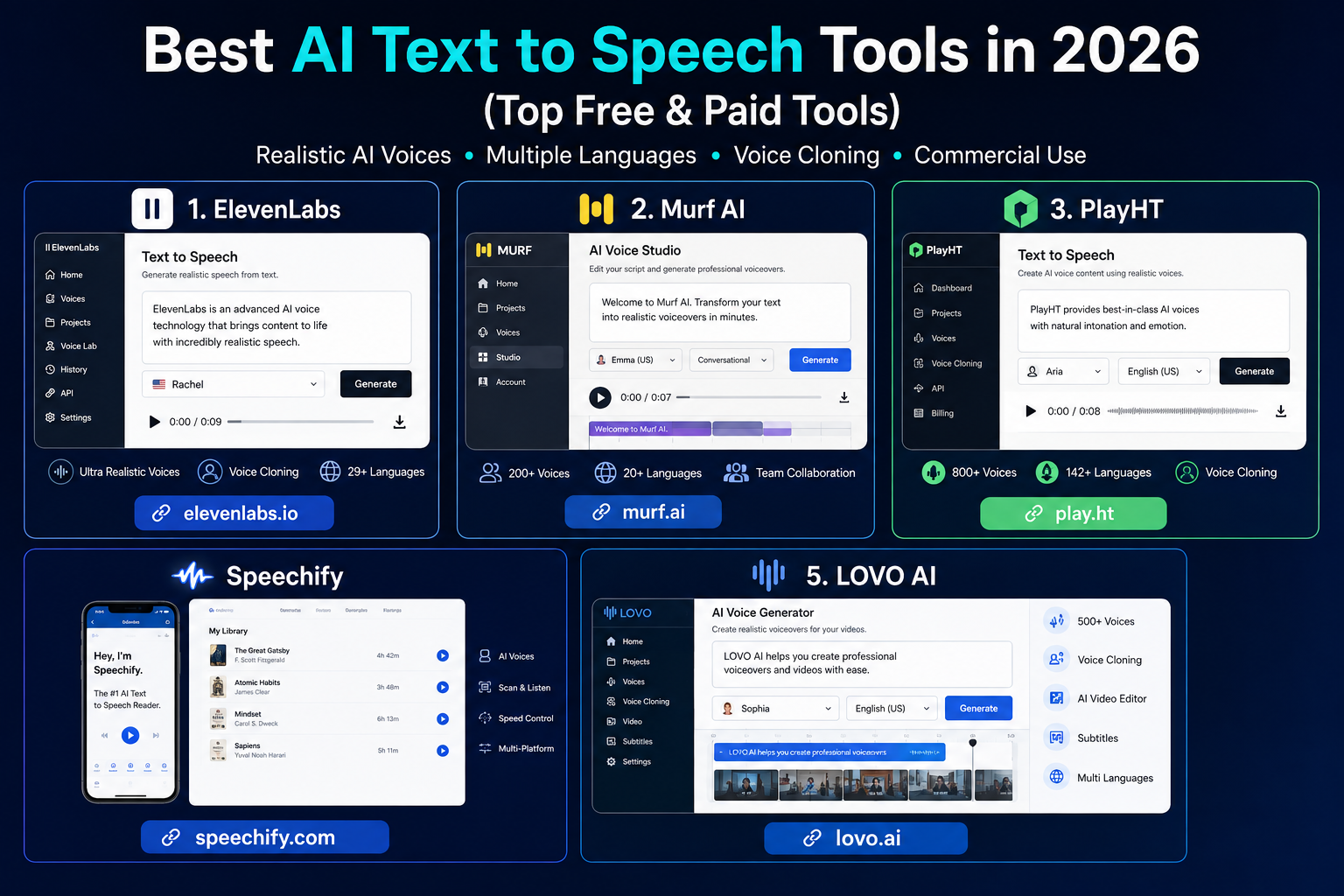
In this guide, we compare five established AI text-to-speech platforms:
- ElevenLabs — best for realistic AI voice generation
- Murf AI — best for business and professional voiceovers
- PlayHT — best for developers and multilingual voice applications
- Speechify — best for reading and listening to documents
- LOVO AI — best for creators looking for an integrated voice and video workflow
The goal is not to claim that one tool is objectively the best for everyone. Instead, we’ll compare their strengths, limitations, pricing approach, and ideal use cases so you can choose the platform that fits your workflow.
Methodology: This comparison is based primarily on current official product documentation, feature pages, and pricing information available in 2026. We did not run a controlled audio benchmark across identical scripts, so the rankings below should be treated as use-case recommendations rather than laboratory accuracy scores.
Quick Comparison: Best AI Text to Speech Tools in 2026
| Tool | Best For | Free Option | Main Strength |
|---|---|---|---|
| ElevenLabs | Realistic voiceovers | Yes | Voice quality, cloning, expressive speech |
| Murf AI | Business and e-learning | Yes | Voiceover production workflow |
| PlayHT | Developers and multilingual content | Yes | APIs, real-time TTS, voice variety |
| Speechify | Reading and accessibility | Yes | Documents, PDFs, reading assistance |
| LOVO AI | Video creators | Yes | Voice generation + multimedia workflow |
Our picks at a glance
- Best overall for AI voice generation: ElevenLabs
- Best for businesses: Murf AI
- Best for developers: PlayHT
- Best for reading documents: Speechify
- Best for multimedia creators: LOVO AI
1. ElevenLabs
Best for realistic AI voice generation
ElevenLabs is one of the strongest choices for creators who care primarily about the quality and expressiveness of generated speech.
The platform offers text-to-speech, voice design, voice cloning, dubbing, and other audio-generation tools. Its current product lineup also includes Studio and API access, allowing the same ecosystem to serve individual creators as well as developers and businesses.
One important advantage is the range of control available to users. Depending on the model and plan, creators can choose voices, generate speech in multiple languages, work with longer-form content, and use custom voices.
ElevenLabs also supports voice cloning. However, voice cloning should be used responsibly and only with appropriate permission for the voice being reproduced.
Why choose ElevenLabs?
ElevenLabs is particularly attractive when voice realism is more important than having a large built-in video editor.
For example, a YouTube creator might write a documentary script, select a suitable narrator, generate the voiceover, and then combine the audio with video in a separate editor.
Developers can also integrate ElevenLabs speech generation through its API. Current API pricing is usage-based, with different rates depending on the model.
Key features
- Text-to-speech
- Voice cloning
- Voice design
- Multilingual speech
- AI dubbing
- Studio editing
- API access
- Multiple voice options
- Long-form audio generation
- Commercial-use options on eligible paid plans
ElevenLabs pricing
ElevenLabs currently offers a free plan with 10,000 monthly credits. Paid plans include Starter at $6/month, Creator at $22/month, Pro at $99/month, with larger business plans available. The exact amount of audio you can generate depends on the model and how credits are consumed.
The company also offers pay-as-you-go API pricing for developers. Current API rates include $0.05 per 1,000 characters for Flash/Turbo models and $0.10 per 1,000 characters for Multilingual v2/v3.
Pros
- Strong focus on natural-sounding AI voices
- Voice cloning and voice design
- Multilingual capabilities
- Studio and API options
- Free plan available
- Suitable for both creators and developers
Cons
- Advanced production features require paid plans
- Usage is credit-based
- Commercial rights depend on the plan
- Voice cloning requires responsible use and appropriate authorization
Best for
YouTubers, podcasters, audiobook creators, agencies, developers, educators, and businesses that prioritize realistic AI narration.
2. Murf AI
Best for business voiceovers and e-learning
Murf AI takes a slightly different approach from ElevenLabs.
Instead of focusing only on voice synthesis, Murf provides a broader voiceover production environment. This makes it particularly useful for presentations, training videos, advertisements, e-learning projects, product demonstrations, and other business content.
Its current Studio plans provide access to more than 200 voices, multiple languages and accents, voice styles, pronunciation controls, and integrations such as Canva.
Murf also provides controls for pronunciation and voice delivery, which can be important when creating professional narration.
Why choose Murf AI?
Murf is a strong option if you don’t want your workflow to end with simply generating an MP3 file.
For example, an e-learning creator may need to create several lessons, adjust pronunciation, organize projects, and produce consistent narration across a course.
Murf’s workflow is designed around these kinds of production tasks.
The platform also provides business-oriented plans with collaboration and enterprise features.
Key features
- AI text-to-speech
- 200+ voices
- 30+ languages and accents
- Voice styles and tonalities
- Pronunciation controls
- Voiceover production
- Canva integration
- Commercial rights on eligible plans
- Business collaboration
- API access
Murf also provides a separate API with usage-based pricing for developers.
Murf AI pricing
Murf currently offers a free plan. Its Creator plan starts at $19/month, while the Business plan starts at $66/month on the current monthly pricing page. Enterprise pricing is custom.
The free plan has significant usage and export limitations, so creators planning commercial projects should check the rights and limits associated with their chosen plan before publishing.
Pros
- Professional voiceover workflow
- Large voice library
- Useful pronunciation controls
- Strong business and e-learning focus
- Canva integration
- Free plan available
- Business and enterprise options
Cons
- Higher tiers can become expensive
- Some advanced controls are reserved for paid plans
- Better suited to structured production than extremely simple one-off TTS
Best for
Businesses, educators, marketers, presentation creators, course developers, agencies, and professional voiceover production.
3. PlayHT
Best for developers and multilingual voice applications
PlayHT is particularly interesting for users who need more than a simple online voice generator.
Its platform provides text-to-speech, voice cloning, real-time speech generation, APIs, and tools for integrating AI voices into applications.
The current platform supports more than 30 languages and provides a library of AI voices with regional variations. Its Studio also provides controls for speech styles, pronunciation, and other aspects of generated audio.
PlayHT has also continued updating its models in 2026. Its documentation describes models such as PlayDialog and Play3.0-mini, including support for multilingual and real-time use cases.
Why choose PlayHT?
The biggest reason to consider PlayHT is flexibility.
A developer could use its API to add generated speech to:
- AI assistants
- Customer-support applications
- Mobile apps
- Accessibility tools
- Games
- Websites
- Voice agents
- Automated content systems
The platform also supports streaming APIs for applications where audio needs to be generated in real time.
For creators, PlayHT can also be used for narration, podcasts, videos, and other audio projects.
Key features
- Text-to-speech
- Voice cloning
- Multilingual voices
- Real-time TTS
- API access
- Streaming
- Voice customization
- Multiple-speaker capabilities
- WAV and other audio formats
- Developer integrations
PlayHT currently offers a free starting option with 10,000 characters per month on its TTS page, although usage limits and commercial terms should be checked before relying on the free tier for published work.
Pros
- Strong API capabilities
- Real-time speech options
- Multilingual support
- Voice cloning
- Suitable for applications and software
- Useful for both creators and developers
Cons
- Developer features can be unnecessary for casual users
- The number of options can make the platform more complex for beginners
- Commercial and usage limits should be checked for the selected plan
Best for
Developers, SaaS companies, AI applications, voice agents, multilingual businesses, YouTubers, podcasters, and technical users.
4. Speechify
Best for reading documents and consuming information
Speechify is different from the other tools on this list because its core strength is not simply creating voiceovers.
Its main reading product is designed to turn written material into spoken audio. Users can listen to documents, PDFs, web content, and other written material instead of reading everything on screen.
Speechify’s current Premium plan includes more than 1,000 natural voices, 60+ languages, scanning features, AI summaries and chats, and integrations with services such as Google Drive, Dropbox, and OneDrive.
This makes Speechify particularly relevant for students, professionals, researchers, language learners, and people who prefer auditory learning.
Speechify Reader vs. Speechify Studio
One important distinction is that Speechify has multiple products.
Speechify Reader is focused on listening to written content.
Speechify Studio is focused more on creating voiceovers, dubbing, and AI-generated audio.
Speechify Studio currently has a free plan with 600 Studio credits and access to more than 1,000 voices. Paid Studio plans add features such as voice cloning and commercial usage rights.
This distinction matters because comparing Speechify’s Reader subscription directly with a creator-focused TTS platform can be misleading.
Key features
- Text-to-speech reading
- PDF reading
- Document narration
- OCR scanning
- Adjustable playback speed
- AI summaries
- AI conversations
- Mobile and desktop apps
- Browser extensions
- Studio voiceover creation
- Voice cloning in eligible Studio plans
Speechify pricing
The current Speechify Reader pricing page lists a free plan and Premium at $29/month on monthly billing.
Speechify Studio uses a separate credit system. Its current free Studio plan includes 600 credits, while paid plans add commercial rights, voice cloning, and larger credit allowances.
Pros
- Excellent for reading written material aloud
- Strong document and PDF workflow
- Useful scanning functionality
- Large voice selection
- Cross-platform availability
- Separate Studio product for creators
Cons
- Reader and Studio are different products
- Premium features require a subscription
- It may be more than you need if your only goal is generating a short voiceover
Best for
Students, researchers, professionals, language learners, accessibility users, and people who prefer listening to written content.
5. LOVO AI
Best for multimedia creators
LOVO AI is designed around a broader content-creation workflow rather than text-to-speech alone.
Its Genny platform combines AI voice generation with tools intended for multimedia production, making it relevant to YouTube creators, marketers, educators, and social media teams.
LOVO provides a free option as well as paid subscriptions, although its pricing and plan structure can change, so users should check the current official pricing page before subscribing.
Why choose LOVO AI?
The main attraction is convenience.
A creator producing a marketing video may need:
- A script
- AI narration
- Video editing
- Subtitles
- Audio adjustments
- Final export
A platform that combines several of these steps can reduce the need to move between multiple applications.
This makes LOVO worth considering when your priority is content production rather than pure speech synthesis.
Key features
- AI text-to-speech
- AI voice generation
- Voice customization
- Voice cloning
- Video creation tools
- Subtitle features
- Script workflow
- Multiple languages
- Commercial-oriented plans
- Cloud-based content creation
Pros
- Broader multimedia workflow
- Useful for social media creators
- Voice generation and video tools in one ecosystem
- Beginner-friendly approach
- Free option available
Cons
- Advanced features require paid access
- Users looking only for basic TTS may not need the additional tools
- Pricing and plan details can change
Best for
YouTubers, social media creators, marketers, educators, agencies, and businesses creating video content.
How We Compared These AI Text to Speech Tools
A useful AI voice comparison should look beyond a simple list of features.
We considered several factors when deciding which tools are most suitable for different users.
1. Voice quality
A good TTS platform should produce speech that is clear and comfortable to listen to.
Important characteristics include:
- Pronunciation
- Pacing
- Intonation
- Voice consistency
- Expressiveness
- Clarity
However, voice quality is subjective. A voice that works well for a documentary may not be appropriate for an advertisement or educational video.
2. Voice customization
Different projects require different delivery styles.
Useful controls may include:
- Speed
- Pauses
- Pronunciation
- Emphasis
- Pitch
- Emotion
- Speaking style
The amount of control available varies significantly between platforms.
3. Language and accent support
Multilingual support becomes especially important for businesses and creators targeting international audiences.
Don’t look only at the number of languages advertised.
Check whether the platform supports the specific:
- Language
- Accent
- Regional pronunciation
- Voice style
you actually need.
4. Commercial licensing
This is one of the most important considerations for businesses.
A free plan does not automatically mean that every generated voice can be used commercially.
Before publishing an AI-generated voice in:
- YouTube videos
- Advertisements
- Paid courses
- Client projects
- Commercial software
- Audiobooks
check the provider’s current licensing terms.
For example, ElevenLabs lists commercial licensing as a benefit of its Starter plan, while Murf includes commercial rights in its Creator plan.
5. API availability
If you’re building software, an online editor may not be enough.
Developers should look for:
- API access
- SDKs
- Streaming
- Authentication
- Usage limits
- Latency
- Pricing per character or minute
- Voice cloning APIs
ElevenLabs, Murf, and PlayHT all provide developer-oriented options.
How to Choose the Right AI Text to Speech Tool
The best platform depends on what you’re actually trying to accomplish.
For YouTube videos
Look for:
- Natural narration
- Fast generation
- Multiple voices
- Pronunciation controls
- Commercial rights
- Easy export
Best starting points: ElevenLabs, Murf AI, and LOVO AI.
For podcasts
Podcasters should prioritize:
- Natural long-form narration
- Consistent voice output
- Multiple-speaker support
- Editing controls
- High-quality exports
Best starting points: ElevenLabs and PlayHT.
For online courses
Course creators usually need:
- Consistent narration
- Pronunciation controls
- Professional voices
- Project organization
- Commercial rights
Best starting point: Murf AI.
For developers
Developers should prioritize API performance rather than simply looking at the web editor.
Look at:
- API pricing
- Latency
- Streaming
- SDK support
- Voice selection
- Rate limits
- Documentation
Best starting points: PlayHT and ElevenLabs.
For reading PDFs and documents
If your goal is to listen to written content rather than produce a commercial voiceover, a dedicated reading assistant may be more appropriate.
Best starting point: Speechify.
Tips for Getting Better AI Voiceovers
Even a powerful AI voice generator cannot fix a poorly written script.
1. Write for speech
Written language and spoken language are different.
Instead of writing extremely long sentences, use shorter phrases that sound natural when read aloud.
For example:
Less natural:
The implementation of artificial intelligence technologies has resulted in substantial changes throughout the digital marketing ecosystem.
More conversational:
AI is changing the way digital marketing works.
The second version is easier for both the listener and the voice model.
2. Use punctuation intentionally
Punctuation affects pacing.
Commas can create short pauses.
Periods create stronger breaks.
Question marks can change the delivery.
Paragraph breaks can help separate ideas.
3. Check difficult words
Always review:
- Brand names
- Names of people
- Technical terminology
- Acronyms
- Foreign words
- Numbers
- Product names
These are common places for pronunciation problems.
4. Choose a voice that matches the content
Don’t automatically choose the most realistic voice.
A voice should also fit the subject.
For example:
- Documentary → calm and authoritative
- Tutorial → clear and conversational
- Advertisement → energetic
- Meditation → slower and softer
- Corporate presentation → professional
- Children’s content → friendly and expressive
5. Listen before publishing
Never assume that generated audio is perfect.
Listen to the complete file before publishing it.
Pay attention to:
- Mispronounced words
- Awkward pauses
- Incorrect emphasis
- Unnatural pacing
- Audio inconsistencies
A few minutes of review can significantly improve the final result.
Common Mistakes to Avoid
Choosing a voice based only on realism
The most realistic voice isn’t necessarily the best voice for your project.
Context matters.
Ignoring commercial rights
Don’t assume that a free voice can automatically be used in monetized content.
Check the provider’s license.
Uploading sensitive material without checking privacy terms
If you’re using AI voice or document tools for business projects, review how the provider handles uploaded content and generated data.
This is especially important for confidential scripts, customer information, and unpublished materials.
Creating long recordings without reviewing sections
For long-form narration, review the output in sections.
This makes pronunciation and pacing problems easier to find.
Using AI voices without disclosure where appropriate
Different platforms, clients, schools, publishers, and jurisdictions may have different expectations around synthetic media.
If transparency is appropriate for your project, make it clear that the narration was AI-generated.
Advantages and Disadvantages of AI Text to Speech
Advantages
- Faster voiceover production
- Lower production costs for many projects
- Easy experimentation with different voices
- Multilingual content creation
- Useful accessibility applications
- Consistent narration
- API-based automation
- Easy scaling for large content libraries
Disadvantages
- Voice quality varies between models
- Some voices can still sound artificial
- Pronunciation mistakes can occur
- Commercial rights vary by plan
- Voice cloning creates ethical and consent considerations
- Human actors can provide more nuanced performance for some projects
AI voice generation is therefore best viewed as a production tool rather than a universal replacement for human voice talent.
Frequently Asked Questions
What is an AI text-to-speech tool?
An AI text-to-speech tool converts written text into synthesized speech using machine-learning models.
Modern systems can produce voices with different accents, pacing, styles, and levels of expressiveness.
Are AI text-to-speech tools free?
Yes. Several major platforms provide free tiers or free trials.
However, free plans often have restrictions involving generation limits, commercial licensing, voice selection, or advanced features.
For example, ElevenLabs currently offers a free plan with 10,000 monthly credits, while Murf offers a free plan with limited generation and export capabilities.
Which AI text-to-speech tool is best overall?
There isn’t a universal winner.
For users primarily interested in realistic AI narration and voice customization, ElevenLabs is one of the strongest choices.
For business-oriented production, Murf AI may be a better fit.
For developers, PlayHT is worth considering because of its API and real-time capabilities.
For document reading, Speechify is more specialized.
For multimedia production, LOVO AI can be a useful option.
Which AI voice generator is best for YouTube?
For YouTube creators, ElevenLabs, Murf AI, PlayHT, and LOVO AI are all worth considering.
The best choice depends on your content style.
A documentary channel may prioritize voice realism, while a high-volume Shorts creator may care more about generation speed, price, and workflow.
Can AI voices replace human voice actors?
For some projects, yes.
AI voices can be highly effective for tutorials, internal training, product demonstrations, automated content, accessibility, and certain types of online video.
However, professional voice actors still provide advantages when a project requires nuanced acting, character performance, improvisation, or a highly specific emotional delivery.
Can I use AI-generated voices commercially?
Often, yes, but the answer depends on the provider and plan.
Commercial rights are not automatically included with every free tier.
Always check the current license before using generated audio in monetized or client work.
Is voice cloning safe to use?
Voice cloning should be approached carefully.
Only clone a voice when you have the necessary permission or rights to do so.
For commercial projects, keep records of consent and review the provider’s current policies.
Final Verdict
AI text-to-speech technology has moved far beyond the robotic voices associated with older TTS software.
In 2026, creators can generate narration for videos, podcasts, courses, applications, advertisements, accessibility projects, and other forms of digital content using increasingly sophisticated AI voice platforms.
But the best AI text-to-speech tool depends on the job.
Our recommendations
ElevenLabs — Best for realistic AI voice generation
Choose ElevenLabs if voice quality, expressive narration, voice customization, and cloning are your main priorities. Its current platform also provides Studio, dubbing, and API options.
Murf AI — Best for business voiceovers
Murf is particularly suitable for professional presentations, e-learning, corporate training, marketing, and structured voiceover production.
PlayHT — Best for developers
PlayHT stands out when you need APIs, real-time generation, multilingual speech, or integration with an application.
Speechify — Best for reading
Speechify is a stronger fit when the objective is listening to documents, PDFs, books, or web content rather than simply producing a voiceover.
LOVO AI — Best for multimedia creators
LOVO is worth considering if you want AI voice generation as part of a broader content-production workflow.
The smartest approach is to test the same short script in two or three platforms before subscribing. Listen for pronunciation, pacing, emotional delivery, and consistency rather than judging a tool solely by its feature list.
And if you’re publishing commercial content, always check the current licensing terms before using the generated audio.
Related Articles
Continue exploring the best AI software with these expert guides: