Best AI Music Generators in 2026: 5 Tools for Creating Music with AI
Updated September 10, 2026
AI music generators have changed how creators approach music production. Instead of starting with a blank digital audio workstation, you can now describe a genre, mood, instrument, or musical idea and let an AI system generate a track in minutes.
But not every AI music generator is designed for the same job.
Some tools focus on complete songs with vocals and lyrics. Others are better suited to instrumental background music, cinematic soundtracks, or professional composition workflows. Licensing also varies considerably, which matters if you plan to monetize videos, release music commercially, or use generated tracks for client projects.
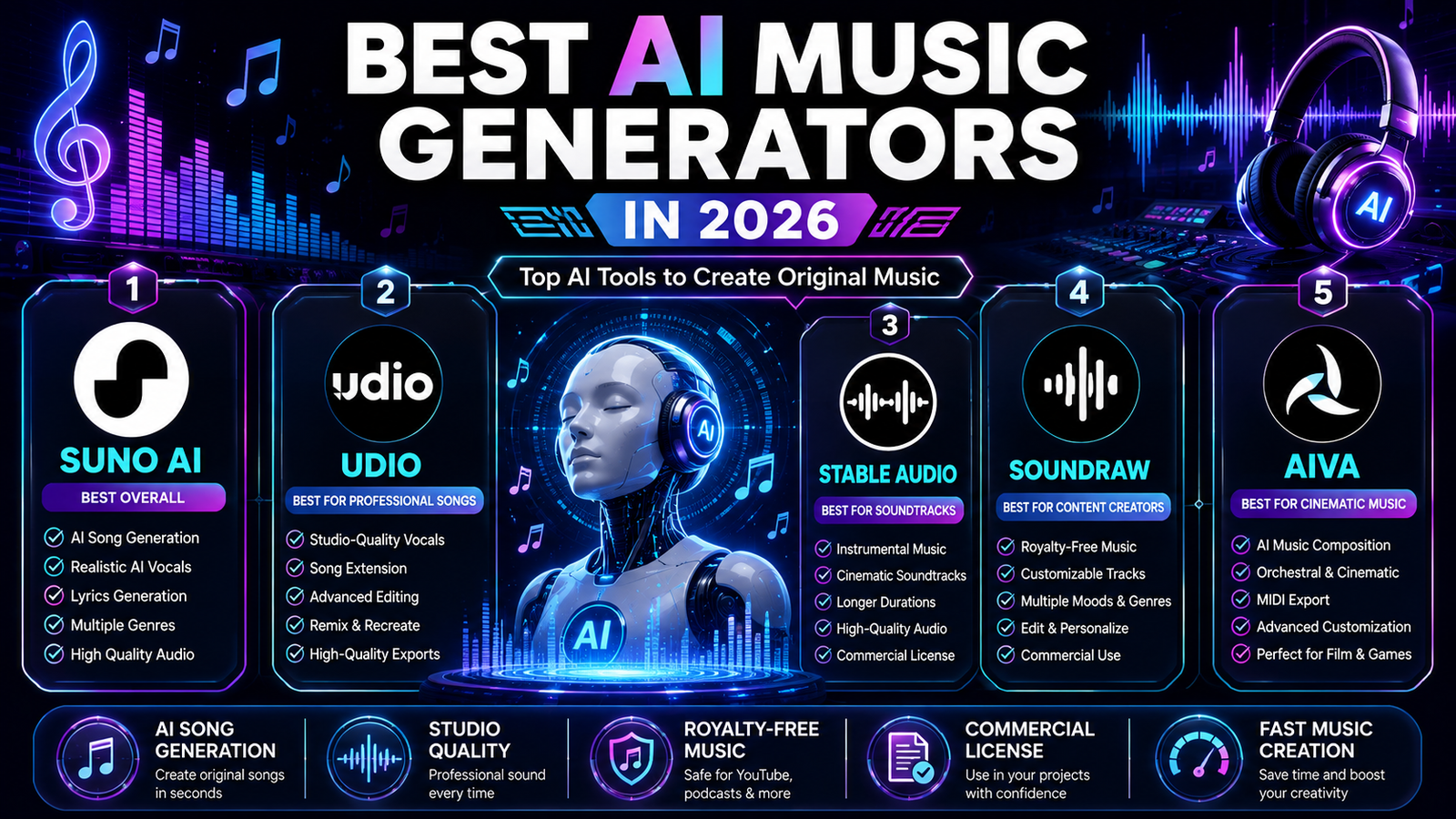
In this guide, we compare five established AI music platforms—Suno, Udio, Stable Audio, SOUNDRAW, and AIVA—based on their creative capabilities, editing options, licensing approach, ease of use, and suitability for different types of creators.
Important: AI music licensing and copyright are not the same thing. A platform may grant you commercial-use rights while copyright protection for AI-generated material depends on applicable law and the amount of human authorship involved. Always check the current terms of the service before using AI-generated music commercially.
Table of Contents
- Quick Comparison
- 1. Suno — Best for Complete AI Songs
- 2. Udio — Best for Creative Control
- 3. Stable Audio — Best for Instrumentals and Soundtracks
- 4. SOUNDRAW — Best for Content Creators
- 5. AIVA — Best for Cinematic and Orchestral Music
- How to Choose an AI Music Generator
- Commercial Licensing and Copyright
- Tips for Getting Better AI Music
- Common Mistakes to Avoid
- Pros and Cons of AI Music Generators
- Frequently Asked Questions
- Final Verdict
Quick Comparison
| AI Music Generator | Best For | Vocals | Instrumentals | Commercial Use |
|---|---|---|---|---|
| Suno | Complete AI songs | Yes | Yes | Yes on eligible paid plans |
| Udio | Song creation and creative editing | Yes | Yes | Check current plan terms |
| Stable Audio | Instrumentals and soundtracks | No | Yes | Yes, subject to applicable license |
| SOUNDRAW | Background music for content | No | Yes | Yes, under its license |
| AIVA | Cinematic and orchestral composition | No | Yes | Depends on plan |
Our top pick for most people: Suno
Best for instrumental soundtracks: Stable Audio
Best for content-focused background music: SOUNDRAW
Best for cinematic composition: AIVA
1. Suno — Best for Complete AI Songs
Suno AI is one of the most accessible AI music platforms for creating complete songs from natural-language descriptions.
Rather than requiring users to understand music theory, production software, or audio engineering, Suno lets you start with an idea. You can describe a genre, mood, concept, lyrics, or musical direction and generate a song from that description.
Suno is particularly useful when the goal is to create a complete song rather than just background music. Its current feature set includes vocals, instrumental generation, song extension, audio uploads, editing, stem separation, and other production-oriented tools.
Why Suno Stands Out
The biggest advantage of Suno is the distance between an idea and a finished musical draft.
A creator who has never used a DAW can experiment with song structures, genres, vocals, and arrangements without first learning a traditional production workflow.
Its paid plans also provide commercial-use rights for eligible songs created while subscribed. Suno specifically distinguishes commercial-use rights from copyright protection, so those concepts should not be treated as interchangeable.
Key Features
- Text-based song generation
- AI vocals
- Instrumental generation
- Lyrics and songwriting assistance
- Song extension
- Audio uploads
- Song editing
- Stem separation
- Multiple musical styles
- Voice-related creation features
- Suno Studio on the Premier plan
Current Pricing
Suno currently offers a free plan and paid subscriptions.
The Free plan costs $0/month and provides limited generation access but does not include commercial-use rights.
The Pro plan starts at $8/month when billed annually and includes commercial-use rights for eligible new songs, additional credits, advanced creation tools, and other features.
The Premier plan starts at $24/month when billed annually and adds higher monthly usage and access to Suno Studio.
Because pricing and included features can change, check Suno’s current pricing page before subscribing.
Important Licensing Note
A common mistake is assuming that upgrading today automatically gives commercial rights to songs created previously on the free plan.
Suno states that paid subscriptions do not automatically provide retroactive commercial rights for songs generated under the free plan.
Best For
Suno is a strong choice for:
- Songwriters
- YouTubers
- TikTok and social media creators
- Musicians experimenting with AI
- Podcasters
- Advertisers
- Content creators
- Beginners who want complete songs quickly
2. Udio — Best for Creative Control
Udio is another major AI music platform focused on generating songs from prompts while giving creators more ways to manipulate and develop their ideas.
The platform supports workflows such as extending music, remixing, inpainting, and working from uploaded audio. Udio’s audio-upload workflow is particularly useful for creators who want to begin with their own musical material rather than generating everything from scratch.
Why Udio Stands Out
Udio is interesting for creators who want AI generation to feel more like an iterative production process.
Instead of accepting the first output, you can experiment with variations and develop a musical idea over multiple generations.
This makes it useful for people who care about creative iteration, rather than simply generating a finished track with one prompt.
Key Features
- Text-to-music generation
- AI vocals
- Song generation
- Music extension
- Remixing
- Inpainting and editing
- Audio upload
- Multiple musical styles
- Iterative music creation
- Browser-based workflow
Audio Uploads
Udio allows paid subscribers to upload their own audio and use it as a starting point for extending, remixing, stylizing, or editing music.
The company requires users to confirm that they own the rights to uploaded audio.
That is important for creators working with samples, recordings, or existing compositions.
Pricing and Licensing
Udio’s pricing, credits, and licensing conditions can change, so creators should check the platform’s current terms before publishing or monetizing generated music.
Do not assume that a free generation automatically has the same commercial rights as a paid creation.
Best For
Udio is particularly useful for:
- Musicians
- Songwriters
- Producers
- Content creators
- Filmmakers
- Audio experimenters
- Creators who want more iterative control over generated songs
3. Stable Audio — Best for Instrumentals and Soundtracks
Stable Audio, developed by Stability AI, takes a different approach from platforms focused primarily on AI singers.
Stable Audio is especially useful for instrumental music, sound design, and soundtrack creation.
In May 2026, Stability AI introduced Stable Audio 3.0, a model family capable of generating coherent musical tracks of up to six minutes and designed around fully licensed training data. Stability AI says the models can generate complete tracks with complex musical structure and are designed for commercial creative workflows.
Why Stable Audio Stands Out
If you need a cinematic instrumental rather than a complete vocal song, Stable Audio can be a better fit than a song-first platform.
It is suited to workflows such as:
- Background music
- Film and video soundtracks
- Ambient music
- Game audio
- Creative experiments
- Instrumental compositions
- Sound design
Stable Audio 3.0 also supports longer-form generation and audio-to-audio workflows.
Key Features
- Text-to-audio generation
- Instrumental music generation
- Longer musical compositions
- Audio-to-audio workflows
- Sound-effect generation
- Multiple musical styles
- High-quality audio generation
- Open-weight Stable Audio models
- Commercial-use options
Licensing Advantage
Stability AI states that Stable Audio 3.0 models were trained using fully licensed data.
The company also states that users can own, distribute, and commercialize outputs under the applicable Stability AI Community License, while organizations above the relevant revenue threshold may need an Enterprise license.
This makes licensing transparency one of Stable Audio’s more interesting differentiators.
Current API Pricing
For developers using Stability AI’s API, pricing is credit-based. Stability AI currently lists Stable Audio 3.0 generation at 26 credits per generation, with one credit priced at $0.01.
The consumer-facing product and API are not necessarily identical, so creators should check the relevant pricing page for their intended workflow.
Best For
Stable Audio is a strong option for:
- Filmmakers
- Video editors
- Game developers
- YouTubers
- Podcast creators
- Sound designers
- Businesses producing branded content
- Creators who primarily need instrumental music
4. SOUNDRAW — Best for Content Creators
SOUNDRAW focuses heavily on music for creators and commercial content rather than AI-generated vocal songs.
Its workflow is particularly attractive if you need background music for videos, social media, podcasts, advertising, tutorials, or other content where the music supports the main piece rather than becoming the main attraction.
Why SOUNDRAW Stands Out
SOUNDRAW emphasizes customization and licensing for content creators.
Instead of simply generating a song and accepting the result, creators can work with musical characteristics such as genre, mood, duration, and energy to find a track that fits their content.
The company’s licensing page states that its plans provide personal and commercial use across various projects, including YouTube, social media, product videos, games, client work, radio, and TV, subject to the applicable license terms.
Key Features
- AI-generated instrumental music
- Genre selection
- Mood customization
- Music customization
- Adjustable track characteristics
- Background music workflows
- Commercial-use licensing
- Creator-focused workflow
- Music for video projects
An Important Licensing Detail
SOUNDRAW’s licensing model has specific rules depending on how you use the music.
For example, the company distinguishes ordinary background use from distributing music through streaming services. Its Artist plans can allow distribution when the downloaded beat is modified appropriately.
That means creators should read the license instead of assuming that every use case is covered by the same subscription.
Best For
SOUNDRAW is especially suitable for:
- YouTubers
- Video creators
- Social media creators
- Podcasters
- Agencies
- Freelancers
- Businesses
- Marketing teams
- Creators who need background music
5. AIVA — Best for Cinematic and Orchestral Music
AIVA is designed around AI-assisted music composition and is particularly interesting for cinematic, orchestral, classical, and instrumental projects.
Compared with song-generation platforms focused heavily on vocals, AIVA is more appropriate when you want the music itself to be the main creative element.
Why AIVA Stands Out
AIVA provides a composition-oriented workflow with support for different musical styles and formats.
One useful feature is MIDI export, which can make AIVA more interesting to musicians who want to continue editing a generated composition inside a digital audio workstation.
Key Features
- AI music composition
- Cinematic music
- Orchestral composition
- Classical styles
- Instrumental music
- MIDI export
- MP3 downloads
- Musical customization
- Different licensing plans
Current Pricing
AIVA currently lists three main individual options.
Its Free Forever plan is designed for non-commercial use and requires credit to AIVA.
The Standard plan is listed at €11/month when billed annually and is aimed at creators who want to monetize compositions on platforms such as YouTube, Twitch, TikTok, and Instagram.
The Pro plan is listed at €33/month when billed annually and provides broader monetization rights, with AIVA stating that the user owns the copyright of compositions created under that plan.
Because licensing is one of the most important differences between these plans, choose the subscription based on how you intend to use the music—not simply on the number of generations.
Best For
AIVA is a good fit for:
- Film composers
- Game developers
- Documentary creators
- Musicians
- Video editors
- Cinematic content creators
- Orchestral music projects
- Creators who want MIDI-based workflows
How to Choose an AI Music Generator
The best AI music generator depends less on which platform has the longest feature list and more on what you actually need to create.
1. Decide Whether You Need Vocals
If you want a complete song with AI vocals, start with a platform such as Suno or Udio.
If you mainly need instrumental music, platforms such as Stable Audio, SOUNDRAW, or AIVA may be more appropriate.
2. Think About Your Workflow
Ask yourself:
- Do I want a complete song?
- Do I need background music?
- Do I need cinematic music?
- Do I want to edit the composition afterward?
- Do I need MIDI?
- Do I need to upload my own audio?
- Do I need commercial licensing?
The answers will quickly narrow your options.
3. Check the License Before You Publish
This is one of the most important steps.
A music generator can technically allow you to create a track while still restricting how that track can be used.
Before publishing, check:
- Commercial-use rights
- Monetization rights
- Streaming distribution rights
- Client-work rights
- Content ID restrictions
- Download rules
- Whether the license applies to free or paid generations
- Whether the rights remain after cancellation
4. Consider Editing Capabilities
Generation quality is only part of the equation.
For professional projects, editing tools can be just as important.
Look for:
- Section replacement
- Song extension
- Remixing
- Stem separation
- MIDI export
- Audio uploads
- Tempo control
- Arrangement editing
5. Compare the Total Cost
Don’t compare subscriptions only by monthly price.
Also consider:
- Monthly generation limits
- Download limits
- Audio quality
- Commercial rights
- Export formats
- Editing features
- Additional credits
- Whether annual billing is required for the advertised price
Commercial Licensing and Copyright
This is where many AI music articles oversimplify the subject.
Commercial use rights are not automatically the same as copyright ownership.
For example, Suno explicitly says that paid subscribers receive commercial-use rights for eligible songs, but also explains that it does not guarantee copyright protection because copyright law depends on the relevant jurisdiction.
AIVA uses a different licensing structure, with its higher-tier plan stating that the user owns the copyright of compositions created under that plan.
SOUNDRAW has its own specific rules for commercial content, streaming distribution, and modified beats.
Stable Audio 3.0 uses Stability AI’s licensing framework, under which the company says users can own and commercialize outputs subject to the applicable license and revenue thresholds.
What should creators do?
Before monetizing AI-generated music:
- Check the current terms of the platform.
- Confirm that the specific plan grants the rights you need.
- Keep records of your subscription and creation date.
- Save copies of relevant license documentation.
- Avoid uploading music or samples you do not have permission to use.
- Check the rules of the platform where you plan to publish the music.
For example, Udio explicitly requires users uploading audio to confirm that they own the necessary rights.
Tips for Getting Better AI Music
Write Specific Prompts
Instead of:
“Make a relaxing song.”
Try describing several dimensions of the music:
“Relaxing cinematic instrumental with warm piano, soft strings, subtle ambient textures, slow tempo, emotional but hopeful mood, suitable for a documentary introduction.”
Specific prompts give the model more information about the creative direction.
Define the Purpose
Tell the AI what the music is for.
For example:
- YouTube intro
- Podcast background
- Product advertisement
- Documentary soundtrack
- Game menu
- Social media video
- Meditation content
- Cinematic trailer
The intended use can help you think more clearly about tempo, intensity, duration, and arrangement.
Experiment With Variations
Don’t stop after the first generation.
Create several versions and compare:
- Tempo
- Instrumentation
- Mood
- Structure
- Vocal style
- Energy
- Song length
Small changes can produce substantially different results.
Edit the Best Version
AI generation should often be treated as the beginning of the workflow rather than the final step.
Trim unnecessary sections, adjust the arrangement, mix the audio, or combine the generated music with your own creative work when the platform and license allow it.
Match the Music to the Content
The strongest track isn’t necessarily the most complicated one.
For example:
- A documentary may benefit from subtle cinematic music.
- A short social video may need a stronger rhythmic hook.
- A podcast may need restrained background music.
- A product advertisement may need music that leaves enough space for narration.
Common Mistakes to Avoid
1. Using Vague Prompts
A generic prompt often produces generic results.
Give the generator meaningful information about genre, mood, instruments, tempo, structure, and purpose.
2. Assuming “AI-Generated” Means “Copyright-Free”
It doesn’t.
The legal status of AI-generated content can vary by jurisdiction, and platform licensing is separate from copyright law.
3. Ignoring Commercial Restrictions
A free plan may be intended for personal use even when a paid plan provides commercial rights.
Always check the exact plan you used to create the track.
4. Uploading Copyrighted Music Without Permission
If a platform allows audio uploads, that does not mean you can upload any song you find online.
Only upload material for which you have the necessary rights.
5. Publishing the First Generation
AI music generation is inherently iterative.
Create multiple versions and select the one that actually works for your project.
6. Treating AI as the Entire Production Process
The best result may come from combining AI generation with human decisions.
Editing, arrangement, mixing, lyrics, instrumentation, and creative direction can all improve the final product.
Pros and Cons of AI Music Generators
Advantages
- Rapid music creation
- Lower barrier to entry
- Useful for brainstorming
- Wide range of genres
- Easy experimentation
- Useful for video and social content
- Can reduce the need for stock-music searching
- Some platforms provide commercial-use licensing
Disadvantages
- Licensing differs significantly between platforms
- Copyright protection is not guaranteed simply because music is AI-generated
- Some outputs still require editing
- Results can vary between generations
- Premium plans may be required for commercial workflows
- Platform terms can change
- AI-generated vocals and arrangements are not always consistent
Frequently Asked Questions
What Are AI Music Generators?
AI music generators are software tools that use machine-learning models to create music or audio from prompts, musical parameters, uploaded material, or other instructions.
Depending on the platform, they can generate complete songs, vocals, instrumentals, cinematic compositions, sound effects, or background music.
What Is the Best AI Music Generator in 2026?
For users who want complete songs with vocals and a simple text-based workflow, Suno is our top pick.
However, the best option depends on the project. Stable Audio is more appropriate for many instrumental workflows, SOUNDRAW focuses strongly on creator background music, and AIVA is particularly useful for cinematic and orchestral composition.
Are AI Music Generators Free?
Several platforms provide free access or free tiers, but the limitations vary.
Free access may restrict:
- Number of generations
- Downloads
- Commercial use
- Audio quality
- Editing features
- Available models
Always check the current pricing and licensing information before using a free plan for commercial work.
Can AI Generate Complete Songs?
Yes.
Platforms such as Suno and Udio can generate complete songs containing vocals, lyrics, melodies, and instrumental arrangements.
Other platforms focus more heavily on instrumental music and composition.
Can I Use AI-Generated Music on YouTube?
In many cases, yes—but it depends on the platform’s license and the plan used to create the music.
For example, Suno states that eligible paid-plan songs receive commercial-use rights, while its free-plan songs are intended for non-commercial use.
Always verify the current terms before monetizing a video.
Is AI-Generated Music Copyright-Free?
Not necessarily.
“Royalty-free,” “commercial use,” and “copyright-free” are different concepts.
A platform may give you permission to commercially use a track without guaranteeing that the generated material receives copyright protection in your country.
Suno explicitly makes this distinction in its documentation.
Which AI Music Generator Is Best for YouTube Background Music?
For creators who primarily need background music, SOUNDRAW is worth considering because its licensing is specifically designed around creator and commercial content workflows.
Stable Audio is another strong option when you want instrumental or cinematic music with more generative flexibility.
Which AI Music Generator Is Best for Cinematic Music?
AIVA is a strong choice for orchestral and cinematic composition, particularly if MIDI export and composition-oriented workflows are important.
Stable Audio is another good option for generating longer instrumental tracks and soundscapes.
Can I Sell AI-Generated Music?
Potentially, but you need to check both the platform’s license and applicable copyright law.
Some platforms grant commercial-use rights while others provide different levels of ownership or monetization depending on the plan.
Do not assume that every AI-generated track can automatically be sold, distributed, or registered with a rights-management system.
Final Verdict
AI music generators are no longer limited to simple experimental melodies. In 2026, creators can use AI to produce complete songs, vocals, instrumental tracks, cinematic compositions, background music, and production ideas.
But there is no single best platform for every project.
Suno is our best overall choice for creators who want complete AI-generated songs with vocals and a straightforward workflow.
Udio is a strong alternative for creators who want to experiment with song generation and iterative editing.
Stable Audio stands out for instrumental music, soundtracks, and longer-form generative audio.
SOUNDRAW is particularly useful for YouTubers, businesses, and content creators who need customizable background music under a creator-focused license.
AIVA remains a strong choice for cinematic, orchestral, and composition-oriented workflows.
The most important lesson is to look beyond audio quality. Licensing, editing capabilities, export options, and your intended use can matter just as much as the generated music itself.
If you’re just getting started, test more than one platform with the same creative brief. Compare the results, read the licensing terms, and choose the tool that fits your actual workflow rather than simply choosing the platform with the most impressive demo.
Sources and Official Documentation
- Suno pricing and plans
- Suno commercial-use rights
- Suno copyright information
- Udio audio-upload documentation
- Stability AI Stable Audio 3.0
- Stability AI licensing
- Stability AI API pricing
- SOUNDRAW licensing
- AIVA official website and pricing
- Google Search Central — Helpful, Reliable, People-First Content
Related AI Guides
If you’re exploring AI tools for creative work, you may also want to read:
- Best AI Voice Generators
- Best AI Voice Cloning Tools
- Best AI Video Editors
- Best AI Animation Tools
- Best AI Image Upscalers
- Best AI PowerPoint Generators