AI Deep Research Tools in 2026: 5 Powerful Research Agents Compared
AI search has changed the way people find information.
Instead of opening a list of search results and reading dozens of pages manually, you can now ask an AI system to search the web, summarize sources, and provide citations.
But AI Deep Research goes a step further.
Rather than answering from a single search, a research agent can break a complex question into smaller tasks, investigate multiple sources, compare conflicting information, follow promising leads, and synthesize the findings into a structured report.
That makes Deep Research useful for tasks such as:
- Market research
- Competitor analysis
- Product research
- Industry research
- SEO research
- Academic literature discovery
- Business intelligence
- Complex fact-finding
However, there is an important limitation:
A longer AI-generated report is not automatically a more accurate report.
A research agent can still misunderstand a source, rely on outdated information, or connect facts that do not actually support the conclusion.
So the best way to use these tools is not to treat them as unquestionable authorities. Treat them as research assistants that accelerate investigation while leaving important judgment and verification to you.
In this guide, we compare five major AI Deep Research tools in 2026, explain how they work, show what each is best for, identify their weaknesses, and give you practical prompts for getting better research results.
Table of Contents
- What Is AI Deep Research?
- AI Search vs. AI Deep Research
- How AI Deep Research Works
- Best AI Deep Research Tools in 2026
- AI Deep Research Tools Compared
- Which AI Deep Research Tool Should You Choose?
- Best Use Cases for Deep Research
- How to Write Better Deep Research Prompts
- How to Verify an AI Research Report
- When You Should Not Use Deep Research
- Deep Research vs. AI Search, RAG, and Human Research
- Common Deep Research Mistakes
- The Future of AI Deep Research
- Final Verdict
- FAQ
- Official Tools and Sources
What Is AI Deep Research?
AI Deep Research is an agentic approach to research in which an AI system performs multiple steps to investigate a question rather than simply generating an immediate answer.
A typical workflow looks like this:
Question → Plan → Search → Read → Compare → Investigate → Synthesize → Cite
The exact workflow differs between products, but the underlying idea is similar.
For example, instead of asking:
What are the best AI automation tools?
you could ask:
Compare the leading AI automation platforms for small businesses in 2026. Analyze pricing, integrations, AI capabilities, automation limits, ease of use, target customers, and major weaknesses. Prioritize official documentation and recent independent sources, and identify claims that cannot be independently verified.
That second task requires much more than retrieving a few search results.
It requires the system to:
- Understand the research objective.
- Break the problem into subtopics.
- Search for relevant evidence.
- Read and extract information.
- Compare sources.
- Investigate missing or conflicting information.
- Synthesize the evidence.
- Produce a report with traceable sources.
OpenAI describes Deep Research in similar terms: the system can create a research plan, search the public web or selected sites, use uploaded files and connected apps, track progress, and produce a structured report with citations or source links.
Google’s Gemini Deep Research also uses an agentic workflow that plans, searches, reasons over findings, and produces multi-page reports. It can use the web and, when enabled, information from Gmail, Drive, and Chat.
The key distinction is therefore simple:
AI Search retrieves information. Deep Research attempts to conduct an investigation.
AI Search vs. AI Deep Research
These technologies overlap, but they are designed for different jobs.
| AI Search | AI Deep Research | |
|---|---|---|
| Primary goal | Find information quickly | Investigate a complex question |
| Typical task | One or several related facts | Multi-step research |
| Search depth | Usually limited | Usually much deeper |
| Source comparison | Limited | Central to the workflow |
| Research planning | Limited | Often built into the process |
| Report generation | Usually concise | Usually structured and detailed |
| Speed | Faster | Slower |
| Best for | Quick answers | Complex decisions |
Example
AI Search:
What does RAG mean?
Deep Research:
Compare the major RAG architectures used in enterprise AI systems in 2026. Explain their retrieval methods, indexing approaches, strengths, limitations, costs, and ideal use cases. Prioritize technical documentation and recent research papers.
The first question needs a quick answer.
The second requires investigation.
Simple rule
Need an answer? Use search.
Need an investigation? Use Deep Research.
How AI Deep Research Works
Although each product implements the process differently, modern research agents generally follow a similar pattern.
1. Understand the objective
The system identifies the question, scope, constraints, and desired output.
The quality of this step depends heavily on your prompt.
A vague question such as:
Research AI marketing.
gives the agent too much freedom.
A better request defines the market, audience, time period, criteria, and expected output.
2. Build a research plan
The agent breaks the main question into smaller research tasks.
For example:
Main question:
Which AI marketing platform is best for a small business?
Possible subquestions include:
- Pricing
- Features
- Integrations
- Automation capabilities
- Ease of use
- Target audience
- Limitations
- Security
- Recent updates
- Alternatives
Some systems allow you to review or modify the plan before the research starts. ChatGPT and Gemini both currently provide planning controls for Deep Research workflows.
3. Search multiple sources
The agent then gathers information from relevant sources.
Depending on the platform, these may include:
- Public websites
- Official documentation
- News sources
- Research papers
- Uploaded documents
- Connected applications
- Other supported data sources
The important distinction is that the research is iterative rather than simply one search followed by one answer.
4. Read and extract evidence
The system processes the sources and identifies information relevant to the research question.
This is where Deep Research can save substantial manual work.
Instead of reading 30 pages yourself, the agent can identify the sections that appear relevant and synthesize them.
5. Cross-check information
Suppose one page says a product costs $20 per month while another says $30.
A good research process should investigate:
- Are these different plans?
- Are the pages from different dates?
- Is one price promotional?
- Is one source unofficial?
- Did the company recently change pricing?
This is more useful than simply repeating the first number found.
6. Follow new leads
Research is rarely linear.
One source may reveal a company, study, product, or technical term that requires additional investigation.
Research agents can use those discoveries to refine subsequent searches.
This is one of the characteristics that separates Deep Research from a conventional search query.
7. Synthesize the findings
After gathering enough evidence, the system turns the individual findings into a coherent report.
The goal is not to reproduce every source.
It is to answer the original question using the evidence gathered.
8. Cite the evidence
A useful research report should make important claims traceable to their sources.
For example, ChatGPT’s current Deep Research outputs include citations or source links and a sources-used section for verification.
But remember:
A citation is evidence of a source, not proof that the conclusion is correct.
You still need to inspect important claims.
Best AI Deep Research Tools in 2026
There is no universal winner.
The better question is:
Which research workflow fits your needs?
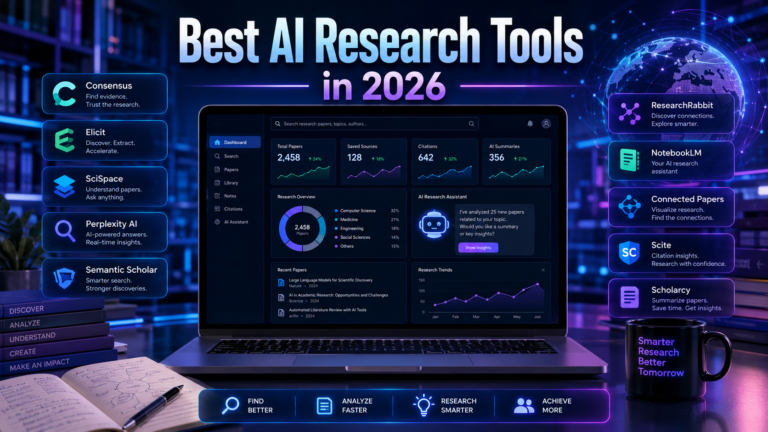
For this comparison, five tools stand out:
- ChatGPT Deep Research
- Gemini Deep Research
- Perplexity Advanced Deep Research
- Claude Research
- Manus
They overlap, but their strengths are different.
1. ChatGPT Deep Research
Quick Overview
ChatGPT Deep Research is designed for complex, multi-source research that needs planning, investigation, synthesis, and citations.
OpenAI’s current documentation says Deep Research can use the public web, specific websites, uploaded files, and connected apps. You can review and modify the proposed research plan, monitor progress, and receive a structured report with citations or source links.
What makes it stand out
The strongest part of the workflow is the combination of:
Source control + planning + research + synthesis
That makes it particularly useful when you don’t simply want a list of search results.
Best use cases
- Market research
- Competitor analysis
- Industry research
- Business research
- Content research
- Research involving uploaded documents
- Multi-source comparisons
Example
Analyze the AI video generation market in 2026. Identify the major platforms, compare their features and pricing, evaluate their target customers, and identify recent product developments. Prioritize official sources and reputable independent publications. Separate verified facts from estimates and flag conflicting information.
Strengths
- Strong multi-step research workflow
- Research-plan controls
- Source selection and restrictions
- Support for uploaded files
- Connected app support
- Structured reports
- Traceable citations
Weaknesses
- More time-consuming than ordinary search
- Not necessary for simple questions
- Important claims still require verification
- Availability and usage limits depend on plan and region
Best for
Complex research projects where source control and structured synthesis matter.
When I would not choose it
Don’t use Deep Research simply because the topic sounds complicated.
If you need a current price, definition, headline, or one specific fact, ordinary search is usually faster.
2. Gemini Deep Research
Quick Overview
Gemini Deep Research is Google’s agentic research system.
Its major differentiator is the ability to combine web research with Google’s ecosystem.
Gemini can browse the web and, when the relevant integrations are enabled, use information from Gmail, Drive, and Chat. It can also turn research into interactive content through Canvas.
Why the Google ecosystem matters
Consider a company whose research information is spread across:
- Public websites
- Gmail
- Google Drive
- Google Chat
- Internal documents
A research workflow that can combine those sources can be significantly more useful than one limited to the public web.
Developer option
Google also offers a Deep Research agent through its API.
The current developer documentation describes it as a multi-step research agent that can plan, search, read, synthesize, use code execution, connect to MCP servers, process files, and create visualizations. The Deep Research API agent is currently in preview.
Strengths
- Strong Google ecosystem integration
- Multi-step research
- Web browsing
- File support
- Research planning
- Data analysis capabilities
- Developer access through the API
Weaknesses
- Some of its biggest advantages matter most to Google ecosystem users
- API availability and pricing can change while the research agent remains in preview
- A polished report still requires human verification
Best for
Google Workspace users and developers building research workflows around Google’s ecosystem.
When I would not choose it
If you only need a quick web answer and do not use Google’s connected data ecosystem, a simpler search workflow may be more efficient.
3. Perplexity Advanced Deep Research
Quick Overview
Perplexity began with a strong focus on AI-powered search and visible sources. Its current Deep Research capabilities extend that model into a more comprehensive research workflow.
Perplexity’s July 2026 update says Advanced Deep Research can search more sources, cross-reference information, process documents, perform calculations, and analyze data.
What makes Perplexity different?
Its strongest identity remains:
Search + sources + research
That makes it especially attractive when source visibility is one of your priorities.
Best use cases
- Current information
- Product comparisons
- Fact finding
- Market research
- Academic research
- Professional due diligence
- Web-first investigations
Perplexity says its Research mode performs iterative searches, reads many sources, reasons through the findings, and produces a comprehensive report.
Strengths
- Strong web-first workflow
- Source visibility
- Current information
- Multi-source investigation
- Document processing
- Calculations and data analysis
- Useful for fast-moving topics
Weaknesses
The biggest mistake is assuming that more citations automatically mean better research.
A report can contain 30 legitimate links and still make an unsupported conclusion.
You need to evaluate:
What does the source actually prove?
not:
How many sources did the AI cite?
Best for
Web-first research where current information and source visibility are especially important.
When I would not choose it
If the main task is analyzing a large set of documents rather than investigating the open web, another workflow may fit better.
4. Claude Research
Quick Overview
Claude’s Research feature takes an agentic approach to web research.
Anthropic says Research can perform multiple searches that build on one another, determine what to investigate next, explore different angles, and provide citations. It can also use connected internal context such as Google integrations when available.
Where Claude is particularly useful
Claude becomes interesting when research is not simply about finding information.
It is especially useful when the job involves:
Reading → comparing → reasoning → synthesizing
For example:
Compare these 15 research papers. Identify the methodologies, disagreements, limitations, and areas where the evidence is strongest.
That is fundamentally an analysis problem.
Strengths
- Iterative research
- Strong synthesis workflows
- Long-form analysis
- Document-heavy research
- Citation support
- Useful for complex reasoning
Weaknesses
- Less compelling if your only priority is rapid web search
- Research sessions can consume usage limits faster because they involve multiple searches and sources
- Important conclusions still need verification
Best for
Research tasks where analysis and synthesis matter as much as information retrieval.
When I would not choose it
If your goal is simply to find the latest information on a topic quickly, a search-first tool may be more efficient.
5. Manus
Quick Overview
Manus takes a more autonomous approach to AI work.
Rather than treating research as the final product, its workflow can combine research with other tasks such as analysis, content creation, and deliverable generation.
For example:
Research → Analyze → Create → Deliver
Manus currently describes its products as using broad web research to investigate prospects, industries, competitors, and other context before producing deliverables such as proposals and visual reports.
Why Manus is interesting
Imagine asking:
Research this market, identify the major competitors, analyze their positioning, and turn the findings into a presentation.
The objective isn’t just a research report.
It’s a completed workflow.
Strengths
- Autonomous workflows
- Web research
- Research combined with content creation
- Useful for deliverables
- Strong fit for multi-step tasks
Weaknesses
- More autonomy means more need for oversight
- You should verify important claims before using the final deliverable
- It can be unnecessary if you only need a research answer
Best for
Users who want research to become part of a broader automated workflow.
When I would not choose it
If all you need is a carefully sourced answer to a single question, a dedicated research or search tool may be simpler.
AI Deep Research Tools Compared
The following ratings are editorial assessments, not official benchmark scores.
| Tool | Best For | Research Depth | Source Visibility / Control | Analysis | Best User |
|---|---|---|---|---|---|
| ChatGPT Deep Research | Complex research | ★★★★★ | ★★★★★ | ★★★★★ | Professionals |
| Gemini Deep Research | Google ecosystem research | ★★★★★ | ★★★★☆ | ★★★★★ | Google Workspace users |
| Perplexity | Web-first research | ★★★★★ | ★★★★★ | ★★★★☆ | Researchers |
| Claude Research | Analysis-heavy research | ★★★★★ | ★★★★☆ | ★★★★★ | Analysts |
| Manus | Autonomous workflows | ★★★★☆ | ★★★☆☆ | ★★★★★ | Power users |
Important note
These ratings should not be interpreted as scientific benchmark results.
There is no single score that determines which research system is best for every task.
A better comparison is:
Which tool gives you the workflow you need?
Which AI Deep Research Tool Should You Choose?
Choose ChatGPT Deep Research if…
You need:
- Complex reports
- Multiple sources
- Source restrictions
- Uploaded documents
- Connected data
- Structured synthesis
Best overall choice for complex general-purpose research.
Choose Gemini Deep Research if…
You work heavily with:
- Gmail
- Google Drive
- Google Chat
- Google Workspace
- Google’s developer ecosystem
Best choice for Google-centered research workflows.
Choose Perplexity if…
Your priority is:
- Current information
- Web research
- Visible sources
- Fact finding
- Product research
- Fast-moving topics
Best choice for web-first research.
Choose Claude Research if…
Your task involves:
- Long documents
- Evidence comparison
- Deep synthesis
- Complex analysis
- Research-heavy writing
Best choice for analysis-heavy workflows.
Choose Manus if…
You want:
- Autonomous research
- Research plus execution
- Automated deliverables
- Multi-step workflows
Best choice when research is only one part of a larger task.
Best Use Cases for AI Deep Research
Deep Research becomes valuable when the question is too complex for a single search.
1. Market Research
You can investigate:
- Competitors
- Pricing
- Customer segments
- Market trends
- Product categories
- Positioning
- Distribution channels
Example prompt
Research the AI automation software market in the United States in 2026. Identify major categories, leading platforms, pricing models, target customers, recent product developments, and emerging competitors. Prioritize official company sources and reputable industry publications. Separate verified facts from estimates and flag conflicting information.
2. Competitor Analysis
Instead of manually opening competitor websites, ask the research agent to compare:
- Products
- Pricing
- Positioning
- Features
- Target customers
- Content strategy
- Strengths
- Weaknesses
- Recent changes
Example
Compare these five competitors using publicly available information. Analyze their products, pricing, target audience, positioning, content strategy, major differentiators, and weaknesses. Use official sources whenever possible and distinguish direct observations from assumptions.
3. Product Research
Deep Research can help when buying or evaluating products requires more than checking a price.
You can investigate:
- Features
- Specifications
- Pricing
- Alternatives
- Customer feedback
- Warranty
- Major complaints
- Target users
The key is to ask the system to identify information that cannot be independently verified.
4. SEO Research
Deep Research can help answer a more useful question than:
Write an article about this keyword.
Instead, investigate:
- Search intent
- Competing pages
- Recurring questions
- Subtopics
- Content gaps
- Outdated information
- Supporting sources
- Emerging developments
Example prompt
Analyze the current search landscape for “AI video generator.” Identify the dominant search intent, recurring subtopics, important questions, competing content, information gaps, and developments that have changed in 2026. Prioritize current and authoritative sources and identify outdated claims.
This produces research that can inform a better article rather than simply generating another generic article.
5. Academic Research
Deep Research can assist with:
- Literature discovery
- Comparing studies
- Finding methodologies
- Summarizing research
- Identifying disagreements
- Finding possible research gaps
But it should not automatically replace expert evaluation.
The system can miss relevant papers, misunderstand methodology, or give too much weight to a source that happens to be easier to find.
For academic work, always verify the original paper.
How to Write Better Deep Research Prompts
A strong research prompt should answer seven questions:
- What are you researching?
- Why are you researching it?
- What is the scope?
- Which sources should be prioritized?
- What criteria should be compared?
- What should the output look like?
- How should uncertainty be handled?
Weak Prompt
Research AI automation.
Too broad.
Better Prompt
Research the AI automation software market in 2026.
Better, but still vague.
Strong Prompt
Research the AI automation software market in the United States in 2026. Identify the major categories and leading platforms. Compare pricing, integrations, AI capabilities, target customers, limitations, and recent product developments. Prioritize official documentation and reputable independent sources. Cross-check important claims where possible, identify conflicting information, separate verified facts from estimates, and present the findings in a comparison table followed by five opportunities for a small business.
This prompt gives the agent:
Objective + scope + criteria + source requirements + verification rules + output format.
That is what makes it powerful.
Three Useful Deep Research Prompts
Competitor Research Prompt
Analyze these competitors: [LIST]. Compare their products, pricing, target audience, positioning, features, strengths, weaknesses, recent updates, and differentiators. Prioritize official sources. Identify claims that cannot be independently verified. Present the comparison in a table and finish with the three biggest opportunities competitors appear to be missing.
Content Research Prompt
Research “[TOPIC]” for a 2026 audience. Identify the dominant search intent, important subtopics, common questions, misconceptions, recent developments, competing content, and information gaps. Prioritize primary and authoritative sources. Do not invent statistics. Clearly separate established facts from interpretation. Finish with a recommended article structure focused on practical value rather than word count.
Fact-Checking Prompt
Fact-check the following report. For every important factual claim, locate the original supporting source. Identify claims that are outdated, unsupported, exaggerated, misleading, or contradicted by credible evidence. Do not assume that a citation proves a claim. Return the findings as: Claim / Source / Evidence / Verdict / Correction.
This is one of the most useful ways to use Deep Research after the initial report is complete.
How to Verify an AI Research Report
Never assume that a cited report is automatically correct.
Use a simple verification process.
Step 1: Identify high-risk claims
Prioritize:
- Statistics
- Dates
- Prices
- Financial information
- Scientific claims
- Legal claims
- Product specifications
- Market-size figures
- Claims about company performance
You do not need to manually verify every sentence.
Step 2: Open the original source
Don’t rely solely on the AI’s summary.
Open the source.
Read the relevant passage.
Check whether it actually supports the claim.
Step 3: Prefer primary sources
Whenever possible, prefer:
Official documentation over an unrelated blog.
Original research paper over a summary.
Government data over an unsourced statistic.
Company announcement over a third-party claim about a product launch.
Step 4: Check dates
This is particularly important in AI.
Features, models, pricing, limits, and availability can change quickly.
A page from 2024 may be technically legitimate and still be irrelevant to a 2026 comparison.
Step 5: Look for contradictions
One of the strongest verification prompts is:
Find credible evidence that contradicts this conclusion.
If the agent can find strong counterevidence, you can make the final conclusion more balanced.
Can You Trust AI Deep Research?
Short answer:
Trust it as an assistant, not as an unquestionable authority.
A research report can look extremely convincing while still containing an important error.
The problem isn’t necessarily that every source is wrong.
It can happen because the system:
- Misreads a source
- Uses outdated information
- Gives too much weight to weak evidence
- Confuses correlation with causation
- Combines unrelated facts
- Accepts a misleading premise
The more important the decision, the more important independent verification becomes.
Why AI Research Can Fail
1. The source is wrong
A research agent can discover a low-quality page and mistakenly treat it as useful evidence.
2. The source is outdated
This is particularly common with:
- Pricing
- Product features
- Company information
- Software limits
- Regulations
- Market statistics
3. The source is technically correct but misleading
Consider:
“Our platform supports 1 million users.”
That statement does not necessarily mean:
“The platform has 1 million active paying customers.”
The difference is context.
4. The AI creates a connection that the sources never established
Source A says X.
Source B says Y.
The model may conclude:
X caused Y.
But neither source actually established causation.
5. The prompt contains confirmation bias
If you ask:
Prove that X is better than Y.
you are giving the system a conclusion before the investigation begins.
A better prompt is:
Compare X and Y across these criteria and identify where each performs better.
That creates room for evidence to change the conclusion.
When You Should NOT Use Deep Research
Deep Research is powerful, but using it for every question is inefficient.
Don’t use it for simple factual questions
If you need:
What is the capital of France?
Deep Research is unnecessary.
Don’t use it for basic definitions
For:
What does CTR mean?
a normal AI response is sufficient.
Don’t use it when speed matters more than depth
If you need a quick fact immediately, ordinary search is usually faster.
OpenAI’s current guidance makes the same distinction: use search or standard chat for quick answers and Deep Research for multi-step, in-depth tasks.
Don’t use it when you already have the authoritative answer
If the official documentation already contains exactly what you need, reading that document directly may be faster and more reliable.
Deep Research vs. AI Search, RAG, and Human Research
These technologies solve different problems.
Deep Research vs. AI Search
| AI Search | Deep Research | |
|---|---|---|
| Main purpose | Fast information retrieval | Multi-step investigation |
| Speed | Faster | Slower |
| Source comparison | Limited | Central |
| Planning | Limited | Stronger |
| Long investigations | Weak | Strong |
| Best for | Quick answers | Complex research |
Deep Research vs. RAG
RAG stands for Retrieval-Augmented Generation.
A simplified RAG workflow is:
Question → Retrieve relevant documents → Generate answer
The knowledge source is usually a defined collection of documents or databases.
Deep Research is broader:
Question → Plan → Search → Read → Investigate → Compare → Synthesize
RAG and Deep Research are therefore not competing technologies in every situation.
They can be combined.
For example, an enterprise system could use RAG to retrieve internal company information and a research agent to investigate public information.
Deep Research vs. Human Research
The best approach is often collaborative.
Human
Defines the question.
↓
AI
Finds and organizes evidence.
↓
Human
Evaluates important sources.
↓
AI
Synthesizes the findings.
↓
Human
Makes the decision.
The advantage is not:
AI replaces the researcher.
It is:
AI reduces repetitive research work so the human can spend more time on judgment.
Common Deep Research Mistakes
Mistake #1: Asking a vague question
Bad:
Research AI.
Better:
Compare AI video generation platforms for small marketing teams in 2026.
Mistake #2: Accepting the first report
The first report should be treated as a research draft, not automatically as the final truth.
Mistake #3: Trusting citations blindly
A citation can be real and still fail to support the exact claim being made.
Mistake #4: Ignoring publication dates
Especially dangerous when researching fast-changing software.
Mistake #5: Ignoring primary sources
Always try to reach the original documentation, paper, dataset, company announcement, or government source.
Mistake #6: Asking AI to confirm your opinion
Instead of:
Prove that ChatGPT is better than Gemini.
Ask:
Compare ChatGPT and Gemini across research depth, source control, integrations, speed, and analysis. Identify the strongest use case for each and explain where the evidence is insufficient.
The Future of AI Deep Research
The next phase of AI research is unlikely to be simply:
AI searches more websites.
The larger shift is toward agentic research workflows.
Modern systems are increasingly combining:
- Multi-step planning
- Web browsing
- Document analysis
- Data analysis
- External tools
- Private data
- Visualizations
- Long-running tasks
- Structured reports
Google’s current Deep Research agent, for example, supports multi-step planning, Google Search, URL access, code execution, file search, MCP connections, document inputs, and visualizations.
Perplexity has similarly expanded its Deep Research workflow with broader source coverage, document processing, calculations, and data analysis.
The direction is therefore moving from:
Search → Answer
toward:
Research → Analyze → Explain → Support a decision
But one limitation is unlikely to disappear:
Automation does not eliminate the need for judgment.
The more consequential the decision, the more important source quality and human review become.
Final Verdict
AI Deep Research is not simply a better search engine.
It is an attempt to automate parts of the research process itself.
The best tool depends on what you are trying to accomplish:
- ChatGPT Deep Research — strongest general-purpose choice for complex, structured research.
- Perplexity Advanced Deep Research — excellent for web-first research and visible source discovery.
- Gemini Deep Research — particularly compelling for users working inside Google’s ecosystem.
- Claude Research — strong when analysis and synthesis are central to the task.
- Manus — useful when research needs to become part of a broader autonomous workflow.
But the most important lesson is not which tool wins.
It is how you use them.
A strong workflow looks like this:
Ask a precise question
↓
Define the scope and evidence requirements
↓
Let the AI investigate
↓
Review the sources
↓
Challenge important conclusions
↓
Verify high-impact claims
↓
Make the final decision
The real advantage of Deep Research is not producing a 20-page report.
It is reducing the manual work involved in searching, reading, organizing, comparing, and synthesizing information.
The researcher still matters.
In fact, as AI becomes better at gathering information, good judgment becomes more valuable, not less.
FAQ
What is AI Deep Research?
AI Deep Research is an agentic research workflow in which an AI system can plan, search, analyze, compare, and synthesize information from multiple sources into a structured report.
What is the best AI Deep Research tool in 2026?
There is no universal winner. ChatGPT Deep Research is a strong general-purpose choice, Perplexity is particularly suited to web-first research, Gemini is attractive for Google ecosystem users, Claude is strong for analysis-heavy workflows, and Manus is useful for broader autonomous tasks.
Is Deep Research better than Google Search?
Not for every task.
Google Search or AI Search is usually better when you need a quick fact or a small number of sources.
Deep Research becomes more useful when the question requires investigation, comparison, synthesis, and multiple sources.
Can AI Deep Research be trusted?
It can be highly useful, but important claims should still be verified.
The existence of citations does not guarantee that every conclusion is correct.
Can Deep Research analyze PDFs?
Yes. Several current research systems support document inputs. ChatGPT Deep Research supports uploaded files, while Google’s Deep Research agent supports document inputs including PDFs.
Can Deep Research perform market research?
Yes.
Market research is one of the strongest use cases because it often requires combining competitor information, pricing, product features, market developments, customer segments, and other sources.
Is AI Deep Research free?
Availability, limits, and pricing vary by platform and plan.
For example, OpenAI states that Deep Research usage varies by plan, while Google’s API-based Deep Research agent uses usage-based pricing tied to the underlying models and tools.
Official Tools and Sources
For technical or product claims, prioritize the official documentation of the relevant platform rather than relying on secondary summaries