Best AI Customer Support Tools in 2026: 5 AI Customer Service Platforms Compared
Updated September 2026
Customer expectations have changed. People increasingly expect businesses to answer questions quickly, provide support outside normal business hours, and make it easy to move from an automated response to a human agent when something goes wrong.
For support teams, meeting those expectations manually can become difficult as conversation volume grows. This is where AI customer support software can help.
Modern customer service platforms can use AI to answer questions from a company’s knowledge base, summarize conversations, suggest replies, classify and route tickets, automate repetitive requests, and assist human agents during live conversations.
But choosing an AI support platform is not simply about finding the chatbot with the most features.
The better question is:
Which platform fits your support workflow, customer volume, existing software, and level of automation?
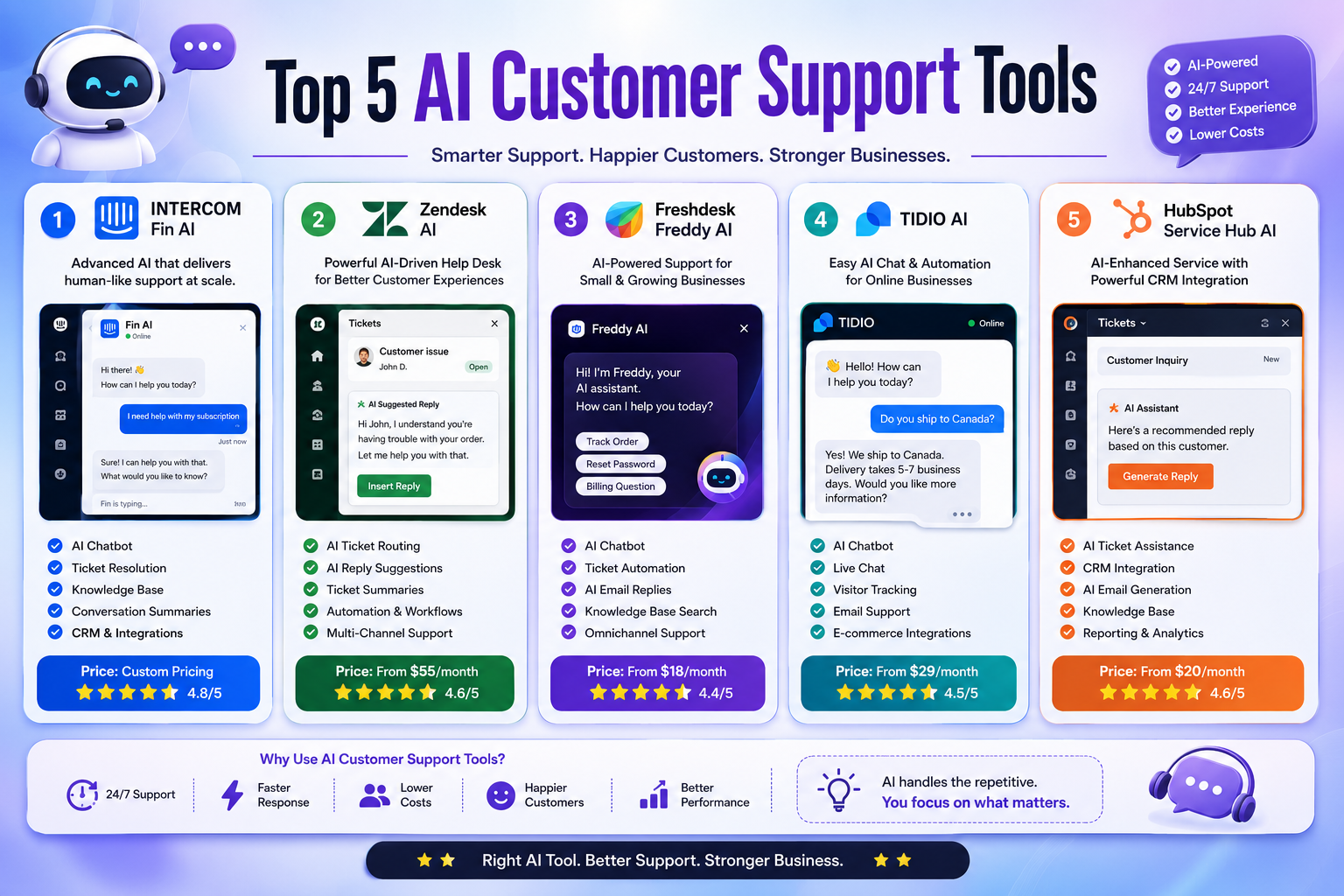
In this guide, we compare five widely used AI customer support platforms in 2026:
- Intercom Fin AI — Best for AI-first customer support
- Zendesk AI — Best for mature help desk operations
- Freshdesk Freddy AI — Best balance of help desk and AI automation
- Tidio Lyro AI — Best for smaller businesses and ecommerce
- HubSpot Service Hub — Best for businesses already using HubSpot
Editorial note: Pricing and AI usage models can change frequently. Prices below reflect publicly available information checked in September 2026 and may vary by billing cycle, region, taxes, usage, or promotional offers.
Quick Comparison Table
| Tool | Best For | AI Approach | Free Option | Current Starting Point |
|---|---|---|---|---|
| Intercom Fin AI | AI-first support teams | AI agent + support platform | Free trial | Fin from $0.99/outcome |
| Zendesk AI | Growing and enterprise support teams | AI agents + help desk | Free trial | Suite Team $55/agent/month annually |
| Freshdesk Freddy AI | SMB and growing teams | AI agent + ticketing | Free trial | $19/agent/month annually |
| Tidio Lyro AI | Small businesses and ecommerce | AI agent + live chat | Free/trial options | Lyro from $32.50/month |
| HubSpot Service Hub | CRM-centered support | Customer Agent + CRM | Free plan | Starter from $7/seat/month annually |
Pricing structures differ significantly, so comparing only the headline monthly price can be misleading.
What Are AI Customer Support Tools?
AI customer support tools are customer service platforms that use artificial intelligence to help businesses answer questions, manage conversations, and automate support workflows.
Depending on the platform, AI can perform tasks such as:
- Answering frequently asked questions
- Searching a company knowledge base
- Generating suggested replies
- Summarizing support conversations
- Classifying customer requests
- Routing tickets to the appropriate team
- Automating repetitive support workflows
- Translating conversations
- Analyzing customer sentiment
- Helping agents find relevant information
- Escalating conversations to human agents
The most advanced platforms are moving beyond simple chatbots toward AI agents that can perform defined actions and resolve certain customer requests.
However, AI works best when it has reliable company information and clear rules about when a conversation should be handed to a person.
AI Chatbots vs AI Customer Support Platforms
These terms are often used interchangeably, but they are not exactly the same.
A basic AI chatbot may primarily answer questions inside a website chat window.
An AI customer support platform usually includes a broader system for:
- Tickets
- Live chat
- Knowledge bases
- Customer profiles
- Agent workspaces
- Automation
- Reporting
- Integrations
- AI-assisted workflows
For a small website that receives a few questions per day, a chatbot may be enough.
For a SaaS company receiving thousands of support requests, a full help desk with AI automation is usually more appropriate.
Why Use AI Customer Support Software?
AI does not automatically create better customer service. Its value depends on how it is implemented.
Used correctly, however, it can help support teams in several important ways.
1. Respond to Routine Questions Faster
AI can handle repetitive questions about topics such as:
- Pricing
- Account settings
- Shipping
- Returns
- Product features
- Password recovery
- Documentation
- Subscription policies
This allows customers to receive an answer without waiting for an agent when the question is straightforward.
2. Reduce Repetitive Agent Work
Support agents often spend significant time answering similar questions.
An AI assistant can handle some of these repetitive interactions while human agents concentrate on situations that require judgment, investigation, or empathy.
The goal should not be to eliminate human support.
The goal is to make human support more productive.
3. Provide Support Outside Business Hours
An AI agent can remain available when your support team is offline.
This can be particularly useful for businesses serving customers across multiple time zones.
However, 24/7 availability is only valuable if the AI provides useful answers and gives customers an appropriate path to human assistance when necessary.
4. Help Agents Work Faster
AI can also work behind the scenes.
Instead of talking directly to customers, it can help agents by:
- Summarizing long conversations
- Drafting replies
- Finding knowledge-base articles
- Translating messages
- Suggesting solutions
- Organizing tickets
- Identifying important information
This makes AI useful even when a company does not want autonomous customer conversations.
5. Scale Support Operations
As customer volume increases, adding more agents is not always the only solution.
AI automation can absorb some routine workload and help teams handle larger volumes without forcing every conversation through a manual process.
The actual savings depend on the percentage of requests AI can successfully handle, the quality of the knowledge base, and how much human escalation is still required.
Top 5 Best AI Customer Support Tools in 2026
1. Intercom Fin AI — Best for AI-First Customer Support
Intercom has positioned Fin as an AI-first customer service agent rather than simply another chatbot.
Fin can use a company’s support content to answer customer questions, handle conversations, perform configured procedures, and hand conversations to human agents when necessary.
Intercom also combines Fin with a broader customer service platform that includes messaging, shared inboxes, ticketing, reporting, and help center functionality.
Why We Recommend Intercom Fin
Intercom is particularly interesting for companies that want AI to become a central part of their customer support workflow rather than an add-on to a traditional ticketing system.
One important advantage is its usage-based pricing model for Fin.
Intercom currently prices Fin from $0.99 per outcome, with an outcome representing a successful resolution or another defined result. Intercom plans also have separate per-seat costs.
Key Features
- Fin AI customer service agent
- AI-powered answers
- Knowledge-based responses
- Shared inbox
- Ticketing
- Help center
- Automated procedures
- Human handoff
- Conversation management
- Reporting
- Multilingual support
- CRM and help desk integrations
Pros
- Strong AI-first approach
- AI agent can work with existing support content
- Supports human escalation
- Combines AI with a full support platform
- Can also be used with an existing help desk
Cons
- Pricing can become complex because seats and AI usage are separate
- Higher-level plans are aimed at more sophisticated support operations
- Usage-based pricing requires careful monitoring
Best For
SaaS companies, growing support teams, ecommerce businesses, and companies that want AI to play a central role in customer service.
Our Take
Intercom Fin is one of the strongest choices if AI automation is your primary reason for upgrading your support stack.
Its biggest strength is not simply generating answers. It is combining AI, support workflows, knowledge, and human escalation in one system.
2. Zendesk AI — Best for Mature Help Desk Operations
Zendesk is one of the most established customer service platforms in this comparison.
Its advantage is the combination of traditional help desk functionality with newer AI capabilities.
Zendesk AI can assist with customer conversations, automate support processes, use knowledge-base information, and help organizations route and resolve requests.
Why We Recommend Zendesk
Zendesk makes the most sense for organizations that need more than a website chatbot.
It provides a mature support environment for teams managing tickets, messaging, voice, knowledge bases, routing, and reporting.
Current Zendesk pricing lists Support Team at $19 per agent/month when paid annually, while Suite Team starts at $55 per agent/month annually and adds AI agents, knowledge base, Action Builder, omnichannel routing, messaging, live chat, and telephony.
Key Features
- AI agents
- Ticket management
- AI knowledge base
- Automated routing
- Messaging
- Live chat
- Voice support
- Automation
- Reporting
- Agent assistance
- Omnichannel support
- Action Builder
- Customer context
Pros
- Mature help desk platform
- Strong omnichannel capabilities
- Good for larger support teams
- Extensive automation
- Strong reporting ecosystem
- AI is integrated into the broader support workflow
Cons
- Can be more complicated than lightweight support tools
- Pricing is based on agent seats and plan level
- Advanced functionality may require higher tiers
Best For
Growing companies, established support departments, SaaS businesses, and enterprise organizations.
Our Take
If your company already has a serious ticketing operation and wants to add AI without abandoning that infrastructure, Zendesk is one of the strongest choices.
3. Freshdesk Freddy AI — Best Balance of Help Desk and AI
Freshdesk combines traditional ticketing with Freshworks’ Freddy AI capabilities.
The platform is particularly interesting for small and medium-sized businesses that need a structured help desk without immediately moving to an enterprise-level platform.
Freshdesk’s current Growth plan starts at $19 per agent/month when billed annually and includes Freddy AI Agent with the first 500 sessions. Pro starts at $55 per agent/month annually, while Enterprise starts at $89. Additional AI Agent sessions are priced separately.
Why We Recommend Freshdesk
Freshdesk provides a useful middle ground.
You get:
- Ticketing
- Shared inbox
- Knowledge base
- Customer portal
- Reporting
- AI automation
- AI-assisted agent workflows
without necessarily needing the complexity of a large enterprise deployment.
Key Features
- Freddy AI Agent
- AI response assistance
- Ticket management
- Shared inbox
- Knowledge base
- Customer portal
- Ticket summaries
- Sentiment analysis
- Live translation
- Intelligent routing
- Analytics
- AI insights
Pros
- Strong balance between help desk and AI
- Clear plan structure
- Good fit for growing teams
- AI features cover both customers and agents
- Useful reporting and automation
Cons
- AI usage has additional limits and costs
- More advanced capabilities require higher plans
- Large organizations may need additional configuration
Best For
Small and medium-sized businesses, startups, SaaS companies, and growing support teams.
Our Take
Freshdesk is a strong option if you want a traditional help desk first and AI automation second.
It is particularly attractive for businesses that need structured ticket management instead of a chatbot-only solution.
4. Tidio Lyro AI — Best for Small Businesses and Ecommerce
Tidio takes a different approach from platforms such as Zendesk and Intercom.
It combines live chat, automation, and AI in a relatively approachable package, making it particularly attractive to smaller companies and ecommerce stores.
Its AI agent is called Lyro.
Tidio currently lists Lyro AI Agent from $32.50 per month, including 50 Lyro AI conversations, with a 7-day free trial.
Why We Recommend Tidio
Tidio is a good choice when you want to get an AI-powered support system running without building a large enterprise support operation.
It can be especially useful for online stores where customers frequently ask questions about products, orders, shipping, and policies.
Key Features
- Lyro AI Agent
- Live chat
- AI customer conversations
- Human handoff
- Knowledge-based answers
- Automation
- Visitor information
- Ecommerce integrations
- Customer service workflows
- Mobile support
Pros
- Easy starting point for smaller businesses
- Combines live chat and AI
- Useful for ecommerce
- Human handoff is built into the workflow
- Less intimidating than some enterprise platforms
Cons
- Less suitable for complex enterprise support operations
- AI usage limits matter when conversation volume increases
- Advanced help desk functionality is not its primary strength
Best For
Ecommerce stores, startups, small businesses, and websites that primarily need live chat plus AI automation.
Our Take
If you’re running a Shopify-style ecommerce business or a smaller online company, Tidio can be a more practical starting point than a large enterprise help desk.
5. HubSpot Service Hub — Best for CRM-Centered Customer Support
HubSpot takes a different approach by connecting customer service directly to its broader CRM platform.
Its current AI customer service system includes Customer Agent, which can use a company’s existing content to respond to customer questions and escalate conversations when necessary.
That makes HubSpot particularly interesting for companies that already use HubSpot for sales, marketing, and customer data.
Why We Recommend HubSpot
The main advantage is context.
Instead of treating customer support as an isolated system, HubSpot can connect service interactions with CRM records and other customer-facing activities.
Current Service Hub pricing includes a free plan, while paid plans vary by edition and billing period. HubSpot currently lists Starter from $7 per seat/month when billed annually, Professional from $90 per seat/month annually, and Enterprise from $150 per seat/month. AI functionality such as Customer Agent can also use HubSpot Credits.
Key Features
- Customer Agent
- Ticket management
- CRM integration
- Knowledge base
- Live chat
- Customer portal
- Automation
- Customer feedback
- Reporting
- AI-assisted support
- Customer data management
Pros
- Excellent CRM integration
- Strong ecosystem
- Useful for sales and support alignment
- AI works with existing company content
- Good reporting and customer context
Cons
- Best value may come when you’re already using HubSpot
- Advanced service functionality requires higher plans
- AI features can involve credit-based usage
Best For
Businesses already using HubSpot CRM, customer success teams, B2B companies, and organizations that want sales, marketing, and service data in one ecosystem.
Our Take
If your company already runs on HubSpot, moving customer service into the same ecosystem can make more sense than adding a completely separate support platform.
AI Customer Support Tools Compared by Use Case
There is no universal winner.
The best platform depends heavily on how your support operation works.
| Use Case | Recommended Tool | Why |
|---|---|---|
| AI-first customer support | Intercom Fin | Strong AI-agent workflow |
| Enterprise help desk | Zendesk AI | Mature ticketing and omnichannel support |
| Growing SMB support team | Freshdesk Freddy AI | Balanced help desk and AI |
| Ecommerce live chat | Tidio Lyro | Simple live chat + AI |
| CRM-centered support | HubSpot Service Hub | Deep CRM integration |
How to Choose the Right AI Customer Support Tool
Choosing software based only on the number of AI features is a mistake.
Instead, start with your actual support workflow.
1. Identify Your Support Channels
Ask where customers currently contact you.
For example:
- Website chat
- Support tickets
- Social messaging
- Phone
- Help center
- In-app support
A platform that supports your most important channels can be more valuable than one with a longer AI feature list.
2. Estimate Your Support Volume
A business receiving 100 support conversations per month has very different requirements from one handling 100,000.
Estimate:
- Monthly conversations
- Number of support agents
- Percentage of repetitive requests
- Number of channels
- Expected growth
This also helps you understand whether usage-based AI pricing could become expensive.
3. Examine How AI Is Charged
This is one of the most important considerations in 2026.
AI customer support platforms increasingly use different pricing models.
You may pay based on:
- Agent seats
- AI conversations
- Successful resolutions
- AI credits
- Usage
- Features
- Messaging volume
For example, Intercom charges Fin by outcome, while HubSpot uses HubSpot Credits for certain AI functionality. Zendesk also uses automated resolutions as a measurement for AI-agent usage.
Don’t compare “$30 per month” against “$50 per month” without understanding what the price actually includes.
4. Check Human Handoff
A good AI support system should make escalation easy.
Look for:
- One-click human handoff
- Conversation history
- Agent assignment
- Internal notes
- Ticket creation
- Escalation rules
- Priority management
Customers should not be trapped in an endless chatbot loop.
5. Evaluate the Knowledge Base
AI quality depends heavily on the information available to it.
Before choosing a platform, ask:
- Can it use your existing help center?
- Can you update its knowledge?
- Can you control which information it uses?
- Can you identify outdated answers?
- Can you review AI responses?
A sophisticated AI model cannot compensate for incorrect company information.
6. Check Your Existing Software
If your company already uses HubSpot, Salesforce, Shopify, Slack, or another major platform, integration should be part of your decision.
A slightly less powerful AI tool that integrates smoothly can sometimes be more useful than a technically stronger platform that requires manual work.
How to Implement AI Customer Support Successfully
Buying the software is only the beginning.
Build a Reliable Knowledge Base
Create clear documentation for:
- Product information
- Pricing
- Shipping
- Returns
- Billing
- Account management
- Troubleshooting
- Policies
- Frequently asked questions
Review outdated information regularly.
Start With Low-Risk Questions
Don’t immediately automate every support conversation.
Begin with predictable questions such as:
- “What are your opening hours?”
- “How do I reset my password?”
- “Where can I find my invoice?”
- “What is your return policy?”
- “How long does shipping take?”
Then expand automation after reviewing the results.
Define Escalation Rules
Decide when AI should transfer a customer to a human.
Examples include:
- Billing disputes
- Complaints
- Account security issues
- Highly unusual technical problems
- Requests requiring manual approval
- High-value customers
- Situations where the AI is uncertain
Review AI Conversations
AI support should not be a “set it and forget it” system.
Regularly review:
- Incorrect answers
- Escalations
- Unresolved questions
- Customer complaints
- Repeated questions
- Low satisfaction conversations
These reviews can reveal gaps in your documentation and support process.
How to Measure AI Customer Support Performance
Don’t judge an AI support system simply by the number of conversations it handles.
Track several metrics.
Resolution Rate
How many conversations are successfully resolved without additional support?
First Response Time
How quickly does the customer receive an initial response?
Escalation Rate
How often does AI need to transfer a conversation to a human?
A high escalation rate is not automatically bad. It can indicate that the system is correctly recognizing situations that require human judgment.
Customer Satisfaction
Monitor customer feedback after support interactions.
Possible measurements include:
- CSAT
- Customer feedback
- Ratings
- Follow-up complaints
Average Resolution Time
Measure how long it takes to resolve customer issues.
AI may improve this metric when it successfully finds information or completes routine workflows.
Cost Per Resolution
If you’re paying for AI usage, calculate the cost of successfully resolved requests.
This gives you a more meaningful picture than simply looking at the subscription price.
Common AI Customer Support Mistakes
1. Automating Everything
Not every customer interaction should be automated.
Some situations require empathy, judgment, negotiation, or human decision-making.
2. Using an Outdated Knowledge Base
If your documentation says one thing and your product does another, AI can reproduce the same problem at scale.
Keep your source information current.
3. Making Human Support Difficult to Reach
AI should reduce friction, not create it.
Customers should have a clear path to a human when automation is not appropriate.
4. Ignoring AI Usage Costs
A low monthly subscription can become expensive if the platform charges separately for AI conversations, outcomes, credits, or additional usage.
Always estimate your expected monthly volume before committing.
5. Measuring Only Automation
A chatbot that resolves many conversations is not necessarily successful if customers are unhappy.
Measure both operational efficiency and customer experience.
Advantages and Disadvantages of AI Customer Support
Advantages
- Faster responses to routine questions
- 24/7 availability
- Reduced repetitive work
- Agent assistance
- Conversation summaries
- Automated ticket workflows
- Better access to knowledge
- Multilingual support
- Scalable support operations
- Consistent answers to common questions
Disadvantages
- AI can provide incorrect answers
- Initial setup takes time
- Knowledge bases require maintenance
- Usage-based pricing can become expensive
- Complex cases still need human agents
- Poor implementation can frustrate customers
- Some advanced features require expensive plans
Can AI Customer Support Replace Human Agents?
For most businesses, no.
AI is very effective at repetitive and predictable tasks, but customer service includes situations where context and human judgment matter.
A better model is usually:
AI handles routine requests → AI identifies more complicated cases → human agent takes over when necessary.
This hybrid approach allows businesses to automate suitable conversations without removing human support completely.
Are AI Customer Support Tools Secure?
Security depends on the provider, plan, configuration, and type of customer information being processed.
Before deploying an AI support platform, review:
- Data handling policies
- Access controls
- Encryption
- Compliance documentation
- Data retention
- User permissions
- Third-party integrations
- AI data usage policies
Businesses handling sensitive customer information should review the provider’s current security and compliance documentation rather than assuming that every AI feature has the same protections.
Are AI Customer Support Tools Free?
Some platforms offer free plans, while others provide trials or limited free functionality.
However, the free version may restrict:
- Number of agents
- Conversations
- AI usage
- Integrations
- Automation
- Reporting
- Knowledge-base functionality
The important question is not simply whether a tool is free.
It’s whether the free allowance is sufficient for your actual support volume.
Frequently Asked Questions
What is the best AI customer support tool in 2026?
There isn’t one universal winner.
Intercom Fin AI is a strong choice for companies prioritizing AI-first support automation. Zendesk AI is better suited to mature help desk operations, while Tidio Lyro can be more practical for smaller businesses and ecommerce teams.
What is the best AI customer support tool for small businesses?
Tidio Lyro is worth considering for smaller businesses that primarily need live chat and AI automation.
Freshdesk is another strong option if you need a more traditional ticketing and help desk environment.
Is Intercom Fin better than Zendesk AI?
It depends on the workflow.
Intercom is particularly compelling if you want an AI-first customer service experience centered around Fin.
Zendesk is a stronger fit if you need a mature help desk with ticketing, omnichannel support, routing, reporting, and AI capabilities.
Is Freshdesk good for AI customer support?
Yes. Freshdesk combines ticket management with Freddy AI features such as AI agents, response assistance, summarization, sentiment analysis, translation, and intelligent routing.
It can be a good middle ground for growing support teams.
Is Tidio good for ecommerce customer support?
Tidio can be a strong option for ecommerce businesses that want live chat, automation, and AI assistance in a relatively approachable platform.
However, larger ecommerce operations with complex ticketing, routing, and enterprise requirements may need a more comprehensive help desk.
Is HubSpot good for customer service?
HubSpot can be an excellent choice when customer support needs to work closely with CRM, sales, and marketing data.
It’s especially attractive for businesses already invested in the HubSpot ecosystem.
Can AI customer support improve customer satisfaction?
It can, but there is no guarantee.
AI may improve the experience when it provides fast, accurate answers and makes human escalation easy.
Poorly configured AI can have the opposite effect.
The quality of the knowledge base, AI configuration, escalation process, and overall support strategy matters just as much as the software itself.
Final Verdict
AI customer support has evolved beyond basic website chatbots.
Today’s platforms can answer questions, search company knowledge, summarize conversations, assist human agents, automate workflows, and in some cases resolve customer requests independently.
But the best platform depends on the type of support operation you’re building.
Our Top Picks
Intercom Fin AI — Best for companies that want an AI-first customer support platform.
Zendesk AI — Best for mature help desk and omnichannel support operations.
Freshdesk Freddy AI — Best balance between traditional ticketing and AI automation.
Tidio Lyro AI — Best for small businesses, websites, and ecommerce stores.
HubSpot Service Hub — Best for companies already using HubSpot CRM.
If you’re just getting started, don’t try to automate everything immediately.
Start with a small group of repetitive customer questions, connect a reliable knowledge base, establish clear human escalation rules, and measure resolution rate, customer satisfaction, response time, and cost per resolution.
That approach will tell you whether AI is actually improving your support operation—not just whether the software has impressive AI features.
Editorial Methodology
We evaluated these platforms based on the factors that matter most when selecting customer support software:
- AI agent capabilities
- Help desk functionality
- Human handoff
- Knowledge-base support
- Automation
- Omnichannel capabilities
- Integrations
- Reporting
- Scalability
- Pricing structure
- Ease of implementation
- Suitability for different business sizes
Pricing and feature availability can change, so readers should verify the provider’s current plan details before purchasing.
For stronger first-hand review content, publishers should also add screenshots, test results, conversation examples, and measured observations from their own use of each platform. This is particularly important when making claims such as “best overall.” Google recommends that high-quality reviews demonstrate expertise, explain meaningful differences between products, discuss benefits and drawbacks based on original research, and provide evidence of first-hand experience where possible.
Sources & Verification
The pricing and product information in this article was checked against the official product and pricing information from:
- Intercom
- Zendesk
- Freshworks / Freshdesk
- Tidio
- HubSpot
- Google Search Central
Prices, AI usage limits, included features, and plan structures may change after publication.